Starting with the release of Strategy ONE (March 2024), dossiers are also known as dashboards.
When the attribute Element filter is used as a Drop-Down Selector and the “Allow multiple selections” option is unchecked, the drop-down list does not display all elements in the dataset if > x number. And users are unable to scroll on the filter to see all available elements.
1) Create a dossier with a "customer" attribute as it has more than 1000 elements
2) Create a selector and use drop-down list.
3) The scrolling works well when allow multiple selections is checked
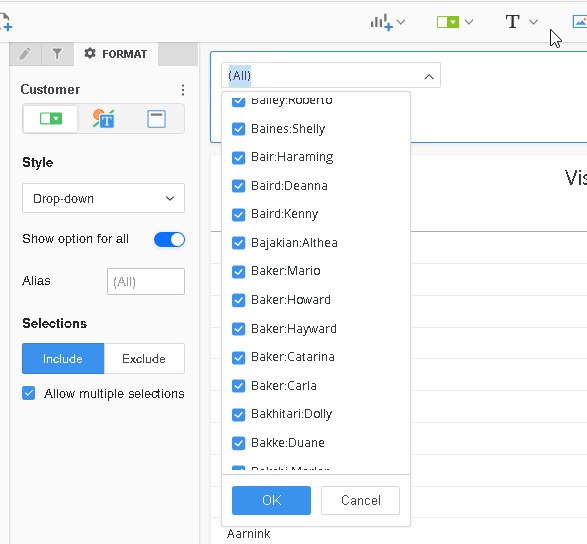
4) If you uncheck allow multiple selection the drop-down list scrolling gets stuck and doesn’t display more element
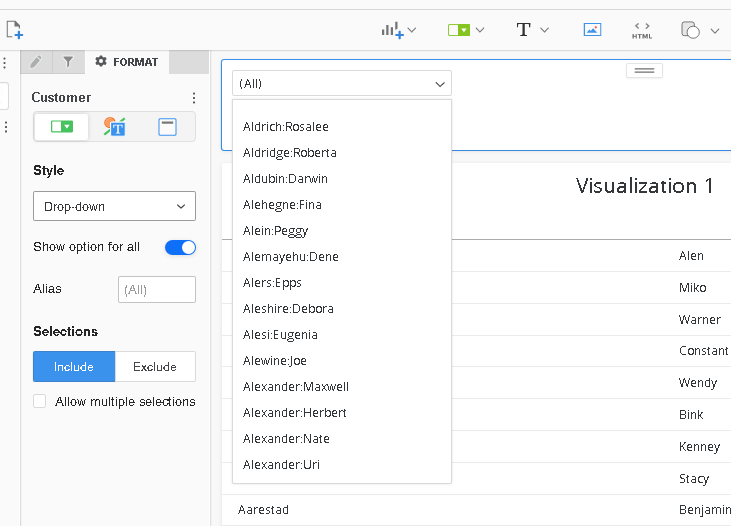
In the above example, you can’t scroll after reaching Alexander Uri.
The issue seems related to Chrome browser and the value of the zoom as the issue can be consistently reproduced with a 125% zoom on a 27/24 Inch monitor at 1920x1080 resolution.
A defect has been logged to investigate the root cause of this issue with Strategy technology department to provide a fix in future updates.
Adjusting the zoom of Chrome browser to 100% should fix the issue for screen larger than 16 inch.
If the issue persists changing the browser to Firefox is also an option.
Please contact Strategy Technical Support for an update on this issue.
