EducationSoftwareStrategy.com
StrategyCommunity

Knowledge Base

Product

Community

Knowledge Base

TopicsBrowse ArticlesDeveloper Zone

Product

Download SoftwareProduct DocumentationSecurity Hub

Education

Tutorial VideosSolution GalleryEducation courses

Community

GuidelinesGrandmastersEvents
x_social-icon_white.svglinkedin_social-icon_white.svg
Strategy logoCommunity

© Strategy Inc. All Rights Reserved.

LegalTerms of UsePrivacy Policy
  1. Home
  2. Topics

KB485673: When "Create Intelligent Cubes by database connection" is enabled, the cube published with the latest data can't be hit.


Lei Dong

Software Architect • MicroStrategy


Starting with the release of Strategy ONE (March 2024), dossiers are also known as dashboards.

Symptom


In the below scenario, a cube published with the latest data can’t be hit.

  1. Disable "Create Intelligent Cubes by database connection".
ka0PW0000001JiwYAE_0EM4W000005n7xX.jpeg


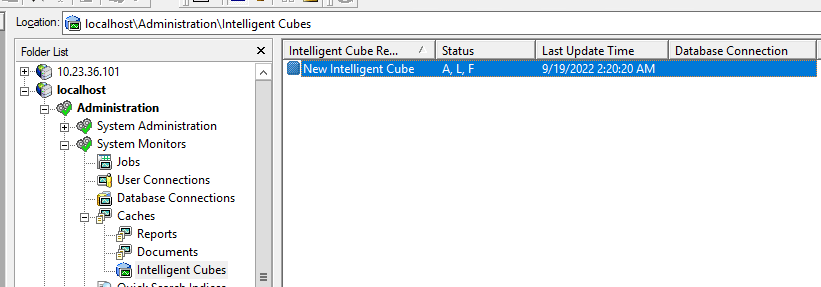
  1. Publish a cube and you can see its Database Connection is empty.
ka0PW0000001JiwYAE_0EM4W000005n7xh.jpeg
  1. Enable "Create Intelligent Cubes by database connection" (need to reload the project to make it work).
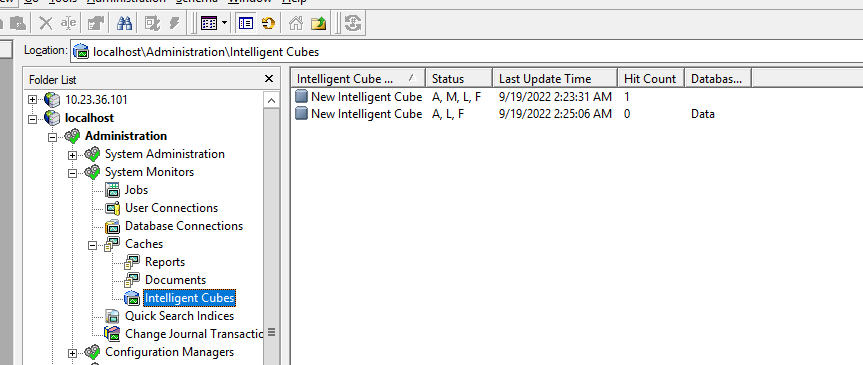
  2. Republish the same cube, and a new cube instance is generated. Check it in the cube monitor and we can see its column Database Connection is not empty.
  3. Run a dossier based on the cube. From the cube monitor, we could see the old cube is it instead of the newly published one.
ka0PW0000001JiwYAE_0EM4W000005n7xr.jpeg


Cause


The database connection is part of the cube information. When “Create Intelligent Cubes by database connection“ is disabled, we ignore it when publishing a cube. So you will see the Database connection column is empty. When the setting is enabled, we will check the database connection used by the cube and save it. So you will see it in the Database connection column. As a result, two cube instances exist, one instance has no database connection, and one instance has “Data” in this example. 
When we execute a dossier based on the cube, we will check the cube’s information to decide which to hit. For the database connection, we check if the user could access the Database connection, if yes, the cube instance could be used. 
In this case, the instance whose database connection is empty is checked first and the user could use it since it has no database connection defined in the cube information. so the cube instance is hit.
 

Action


To avoid users having a chance to access data from different DB Connections, after changing the setting “Create Intelligent Cubes by database connection“, the administrator needs to remove the cube instance published before. 
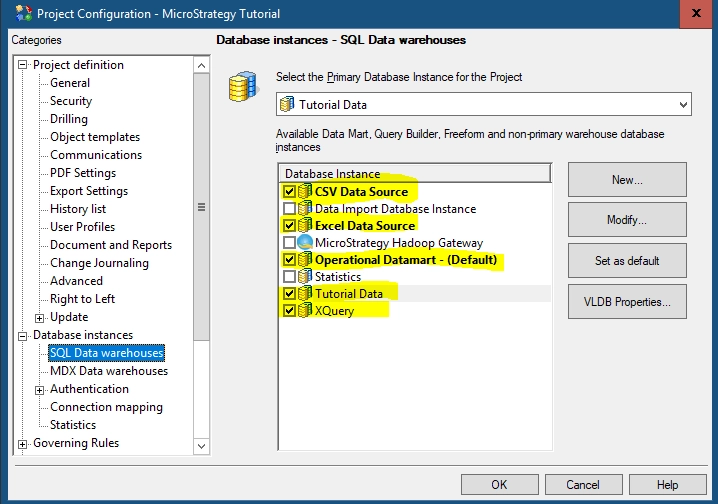
This only affects the cubes based on the database instances which are checked in the project list as below.
ka0PW0000001JiwYAE_0EM4W000005n7y1.jpeg


Comment

0 comments

Details

Knowledge Article

Published:

September 22, 2022

Last Updated:

March 21, 2024