Starting with the release of Strategy ONE (March 2024), dossiers are also known as dashboards.
Although a drill path is created to be able to drill to a defined attribute, when right clicking the attribute in to drill the expected attribute designed to drill to are not found.

STEPS TO REPRODUCE
1. Get on MicroStragegy 10.9 with tutorial installed.
2. Create two data sets with different attributes but that has at least one attribute that is same. (This one attribute that is the same in both datasets will be linked refered to as a cross join)
3. Add both data sets to a Dossier ( You should see a little symbol beside the attributes that are the same implying a cross join of the two datasets has been created)
4. Add attributes from only one dataset to a simple grid on dossier and attempt to drill. Note: The drill options should only show for this dataset (this is expected)
5. Add an attribute from the second dataset and then try drilling on the same attribute as before Note: For the customer he sees attributes from the second data set which is not expected
CAUSE
This is working as designed as drilling outside a dataset is not supported. Drilling is also data source driven and in this example, if you have two datasets the grid changes datasources as there is a crossjoin relating the two datasets.
ACTION
Currently this issue is being reviewed by Strategy for a potential code fix on an upcoming Strategy release.
WORKAROUND
By adding a data set that contains the attribute that is to be drilled to the option to drilling to this attribute will return. It is possible to remove the data set afterwards and the option to drill to the attribute is expected to remain.
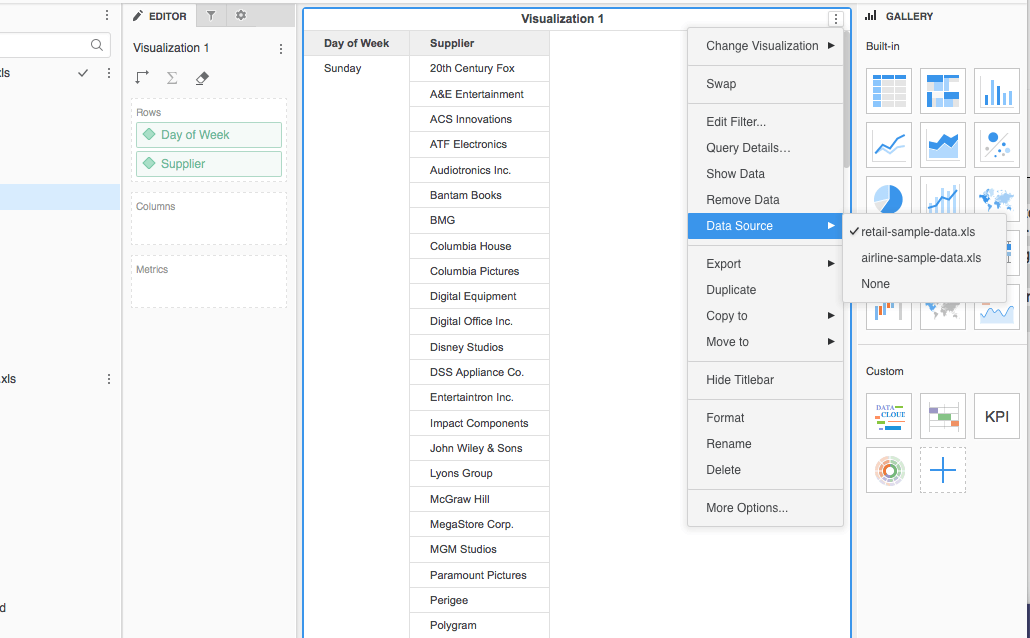
The reason for this drill behavior is because when you add the new attribute from the second dataset to the grid, you already change the data source to the second dataset(There's a check mark behind the dataset name, which indicates the current data source).
KB439924
