EducationSoftwareStrategy.com
StrategyCommunity

Knowledge Base

Product

Community

Knowledge Base

TopicsBrowse ArticlesDeveloper Zone

Product

Download SoftwareProduct DocumentationSecurity Hub

Education

Tutorial VideosSolution GalleryEducation courses

Community

GuidelinesGrandmastersEvents
x_social-icon_white.svglinkedin_social-icon_white.svg
Strategy logoCommunity

© Strategy Inc. All Rights Reserved.

LegalTerms of UsePrivacy Policy
  1. Home
  2. Topics

When adding macros for prompt answers in a text box in Dossier, line breaks get added after each prompt.


Katarzyna Olszewska

Senior Cloud Support Engineer III • MicroStrategy


This article describes how to remove line breaks when adding macros for prompt answers in a text box in Dossier.

Starting with the release of Strategy ONE (March 2024), dossiers are also known as dashboards.

Steps to reproduce

  1. Create a report.
  2. Add 3 object prompts based on attributes.
  3. Use report as Dossiers dataset.
  4. In Dossier add text box, edit it and add {&Prompt1&} {&Prompt2&} {&Prompt3&}.
  5. In text box, there is a line break after the name of each attribute.
ka0PW0000001JmvYAE_0EM4W0000070Teo.jpeg


Action


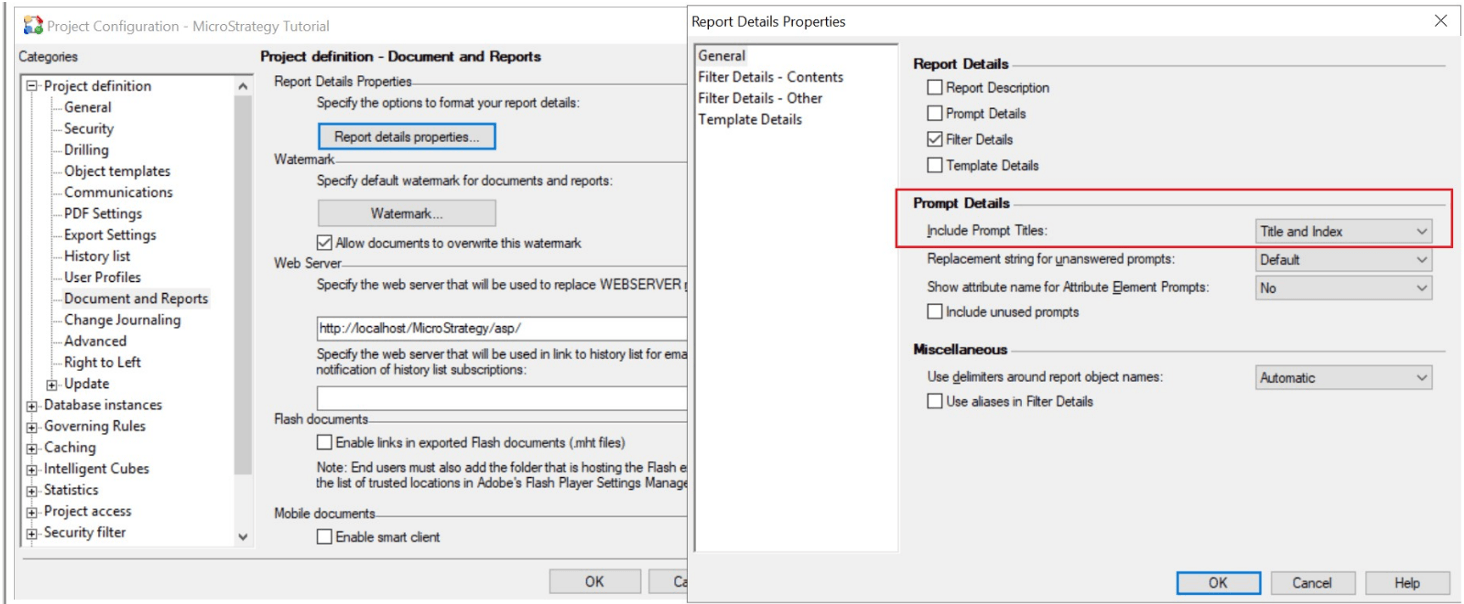
The line breaks are introduced by following setting: Project Configuration > Project definition > Documents and Reports > Report details properties > include Prompt Titles. 
ka0PW0000001JmvYAE_0EM4W0000070Tet.jpeg

In order to remove line breaks, select "No Title or Index" in the dropdown list of "Include Prompt Titles", and clear the existing dossier caches.


Comment

0 comments

Details

Knowledge Article

Published:

March 21, 2023

Last Updated:

March 21, 2024