EducationSoftwareStrategy.com
StrategyCommunity

Knowledge Base

Product

Community

Knowledge Base

TopicsBrowse ArticlesDeveloper Zone

Product

Download SoftwareProduct DocumentationSecurity Hub

Education

Tutorial VideosSolution GalleryEducation courses

Community

GuidelinesGrandmastersEvents
x_social-icon_white.svglinkedin_social-icon_white.svg
Strategy logoCommunity

© Strategy Inc. All Rights Reserved.

LegalTerms of UsePrivacy Policy
  1. Home
  2. Topics

KB440061: When right-clicking on a project table in Warehouse Catalog, the "Table database instances" option is disabled/grayed out in MicroStrategy Developer.


Sepribo Taylor-Harry

Software Engineer in Test • Strategy


This article describe an issue in which the Warehouse Catalog option "Table database instances" for project table is disabled/grayed out

Symptom


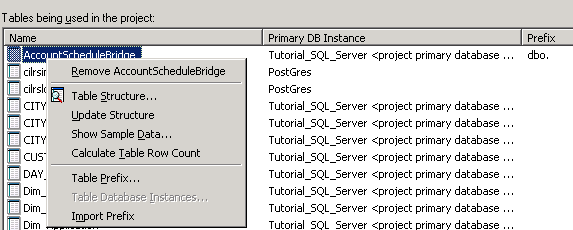
When right-clicking on a project table in Warehouse Catalog, "Table database instances" is disabled/grayed out as shown below:
ka04W000001IvYVQA0_0EM44000000A48S.png


Cause

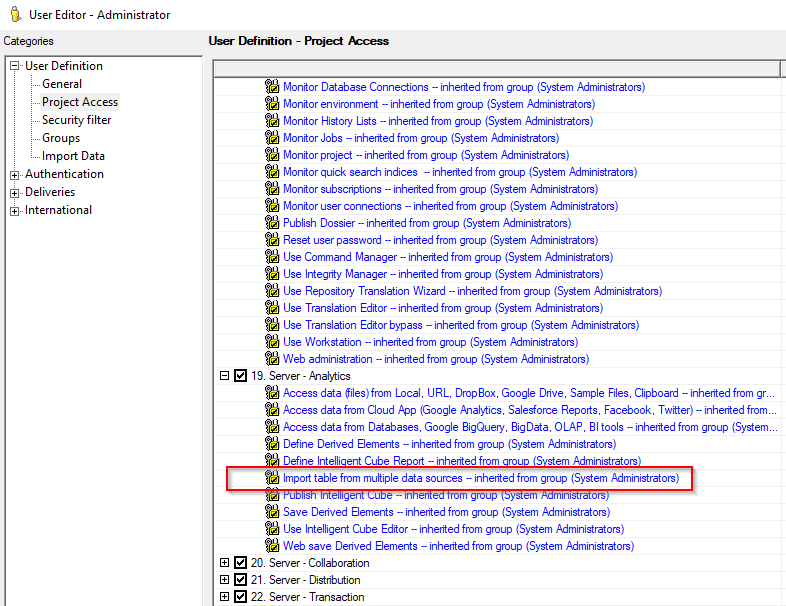
The user does not have the "Import table from multiple sources" privilege enabled under "Multisource Options" privileges list.
ka04W000001IvYVQA0_0EM4W000004a593.jpeg


Action


The user does not have the "Import table from multiple sources" privilege enabled under "Server - Analytics" privileges list. This privilege requires Multisource License. 


Comment

0 comments

Details

Knowledge Article

Published:

March 19, 2018

Last Updated:

December 27, 2018