EducationSoftwareStrategy.com
StrategyCommunity

Knowledge Base

Product

Community

Knowledge Base

TopicsBrowse ArticlesDeveloper Zone

Product

Download SoftwareProduct DocumentationSecurity Hub

Education

Tutorial VideosSolution GalleryEducation courses

Community

GuidelinesGrandmastersEvents
x_social-icon_white.svglinkedin_social-icon_white.svg
Strategy logoCommunity

© Strategy Inc. All Rights Reserved.

LegalTerms of UsePrivacy Policy
  1. Home
  2. Topics

Where do I change the date format for in Dossiers?


Jaime Perez

Vice President, Product Owner • MicroStrategy


Starting with the release of Strategy ONE (March 2024), dossiers are also known as dashboards.

Description

Strategy users are asking the question: "Where do I change the date format for date filters in Dossiers?"
 
Is Strategy dossiers, the date format for visualizations (including date filters) is controlled via the Web Language preferences and can be changed at the user or project level. To access, follow these steps:
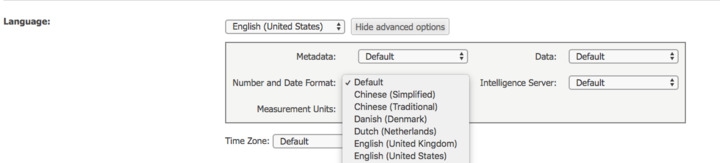
 

  1. Log into Web. Use your Strategy credentials.
  2. Go to Preferences > Language.
  3. Select the corresponding option from the Number and Date Format drop-down.


ka0PW0000001JYwYAM_0EM44000000A6r0.jpeg

 
Note: To change this at the user level, users will need to click on the “Show Advanced Options” button.

Learning Resources

Interested in learning more about Dossier authoring? Visit the Learning Center on Community!


Comment

0 comments

Details

Knowledge Article

Published:

March 30, 2018

Last Updated:

March 21, 2024