EducationSoftwareStrategy.com
StrategyCommunity

Knowledge Base

Product

Community

Knowledge Base

TopicsBrowse ArticlesDeveloper Zone

Product

Download SoftwareProduct DocumentationSecurity Hub

Education

Tutorial VideosSolution GalleryEducation courses

Community

GuidelinesGrandmastersEvents
x_social-icon_white.svglinkedin_social-icon_white.svg
Strategy logoCommunity

© Strategy Inc. All Rights Reserved.

LegalTerms of UsePrivacy Policy
  1. Home
  2. Topics

KB485119: Whitelabel Error Page with status 404 is encountered when accessing CommunityConnectors


Yanqing Liu

Cloud Support Expert I • MicroStrategy


This article explains why the Whitelabel Error Page is returned when accessing CommunityConnectors. This article also provides a solution to avoid this error.

Description


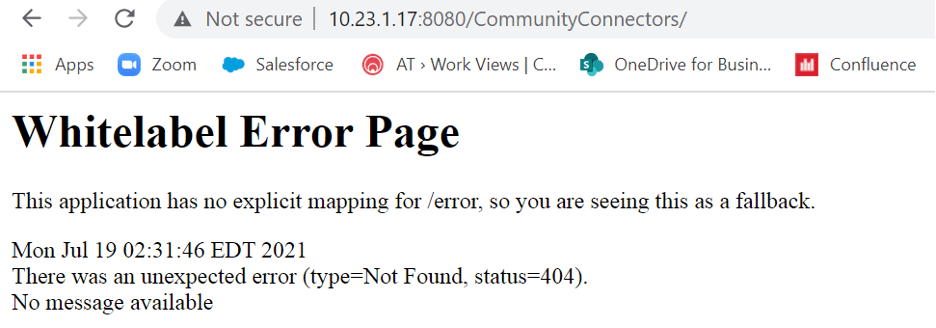
After deploying CommunityConnectors version 2021 or later to the web application server, you may encounter the following Whitelabel Error Page with status 404 when accessing

http(s)://
:
/CommunityConnectors/<domain-name>:<port>/CommunityConnectors/
.
Whitelabel Error Page
The application has no explicit mapping for /error, so you are seeing this as a fallback. 
There was an unexpected error (type=Not Found, status=404)
 

ka04W000001EvNGQA0_0EM4W0000029Geu.jpeg

Why is this happening? 


This is working as expected. From version 2021, the page

http(s)://<domain-name>:<port>/CommunityConnectors
is no longer available to users. 

Solution


If you want to verify whether CommunityConnectors has been deployed successfully, instead of using the link

http(s)://<domain-name>
:<port>
/CommunityConnectors/
, try to access a specific connector to test the deployment. For example, 
http(s)://<domain-name>
/CommunityConnectors/fitbit
.
Once the application has been deployed, you can follow this documentation to set up the connectors through Strategy Web.


Comment

0 comments

Details

Knowledge Article

Published:

July 21, 2021

Last Updated:

July 23, 2021