On M2019, sometimes when a user is trying to edit/delete/duplicate "users" on developer, error message "session is closed" will pops up. This is a known issue which has been fixed in M2019 Critical Update 1.
Workaround:
User could turn on the "Use Strategy Scheduler“ (Strategy Intelligence Server Configuration -> Server Definition -> Advanced), then you would be able to create/duplicate the user without the error message. You could choose to turn it off after the create/duplicate user operation.
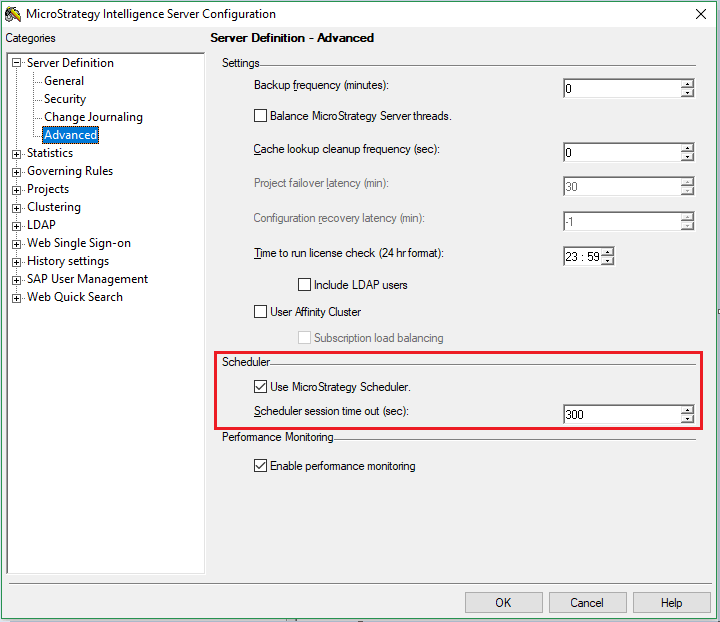
If you need to keep this setting unchecked, as a workaround you could turn off Kafka server to avoid the error. To turn off Kafka server: In Windows, you can either in Windows Services, find service “Apache Kafka” and stop it. Or Under Kafka directory, execute the command: bin\windows\kafka-server-stop.bat. In Linux, you can either use below shell to stop Kafka: /usr/bin/kafka-server-stop.sh. Or kill -s TERM $PIDS.
Under certain circumstance, the administrator will disable this setting to prevent cube cache get updated by other user’s scheduled subscription. In M2019, we highly suggest keeping this setting selected if the Platform Analytics feature is deployed and monitoring your environment. If the setting is unchecked, Narrowcast Server (NCS) will be down and functionalities related to user email will be impacted.
KB483040
