EducationSoftwareStrategy.com
StrategyCommunity

Knowledge Base

Product

Community

Knowledge Base

TopicsBrowse ArticlesDeveloper Zone

Product

Download SoftwareProduct DocumentationSecurity Hub

Education

Tutorial VideosSolution GalleryEducation courses

Community

GuidelinesGrandmastersEvents
x_social-icon_white.svglinkedin_social-icon_white.svg
Strategy logoCommunity

© Strategy Inc. All Rights Reserved.

LegalTerms of UsePrivacy Policy
  1. Home
  2. Topics

Workstation Feature: Topology


Yifan Liu

Product Owner • Strategy


Topology provides a unified and central graphical interface for a MicroStrategy administrator a comprehensive view of all the machines and services within an environment.

Best Practices
Workstation: Topology
  
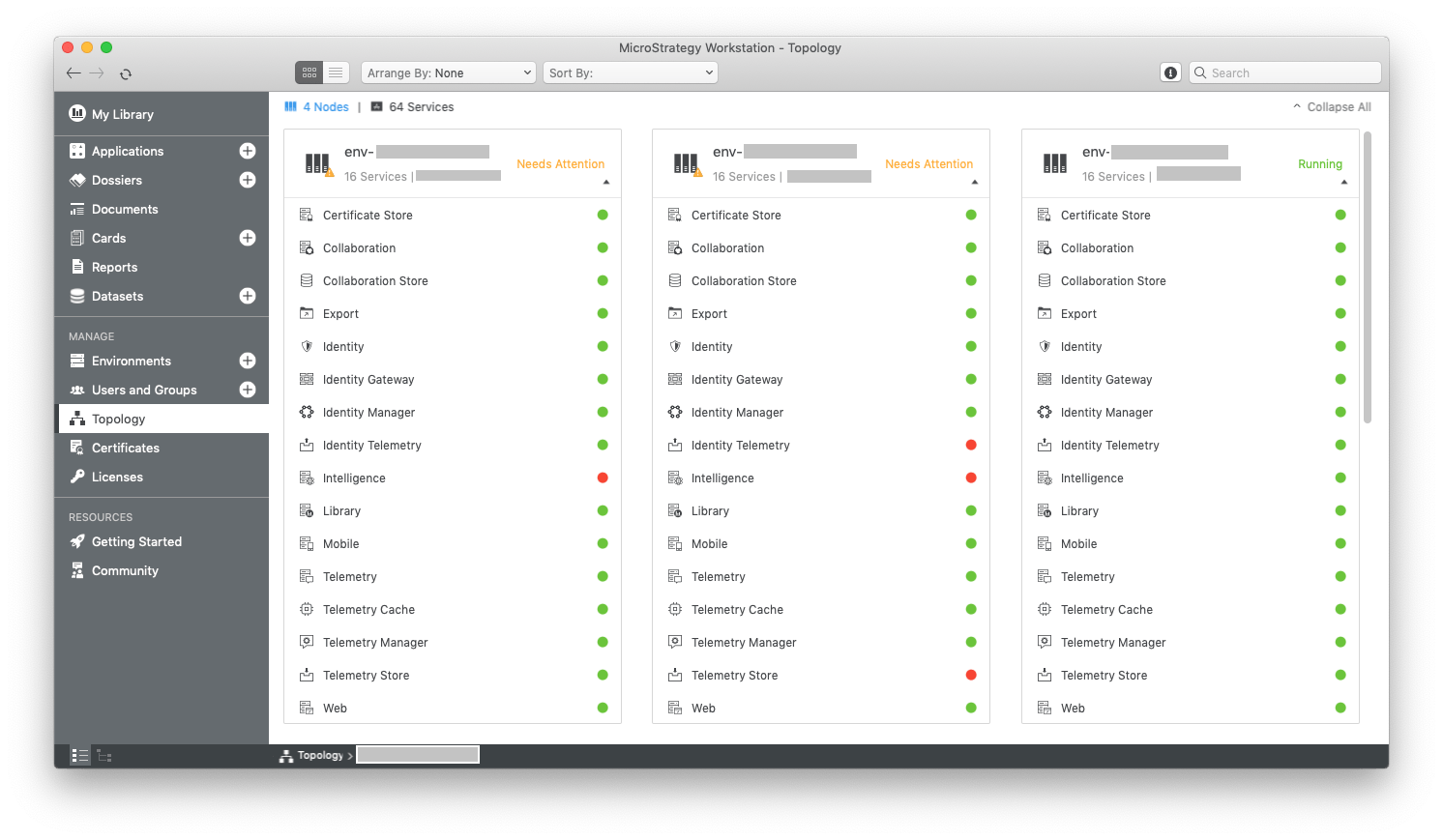
With Strategy increasingly emphasizing a service-oriented architecture and employing more open-source technology, the sophistication of our platform is growing. In the Strategy 2019 release, a unified and central interface called “Topology” was added to Workstation. It is the primary interface to monitor and manage all systems within a Strategy deployment.
ka04W000000OfPQQA0_0EM44000000gZ0y.png

Value
The Topology feature provides Strategy administrators with a comprehensive view of all the machines and services within an environment. In the Topology view of an environment, Strategy administrators can monitor machines in the environment, the list of services installed on each machine, and the status of services. Furthermore, administrators and any users with the appropriate privilege can start or stop services.
Requirements
You will need  “7. Server – Intelligence > Monitor environment”  privilege to view machine and service statuses, unless you've entered maintenance mode.
In addition, to start or stop services on a machine, you'll need “7. Server – Intelligence > Administer environment” privilege, and SSH component should be installed and enabled on the machine.
Architecture
Workstation provides topology graphical interfaces to environment administrators, it obtains environments information and controls services by consuming Strategy Library REST Consul APIs.
Behind REST APIs there is a Consul server, it:
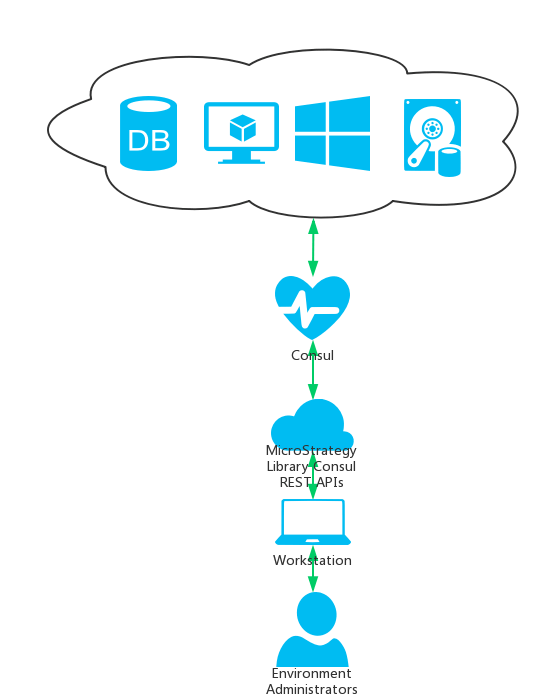
  • Auto-register configuration information to Service Registry when a service starts.
  • Provide service discovery to locate a service and obtain configuration information.
  • Monitor health status, resource usage of services in the platform.
  • Detect and notify services on any abnormal situation.
  • Provide a central repository of all service configurations with automatic propagation capability.
  • Provide a central infrastructure for license tracking and phone home capability.
ka04W000000OfPQQA0_0EM44000000gZ0K.png

Action Steps
 
Monitor machines
Environment Administrators would like to check current status of machines.  
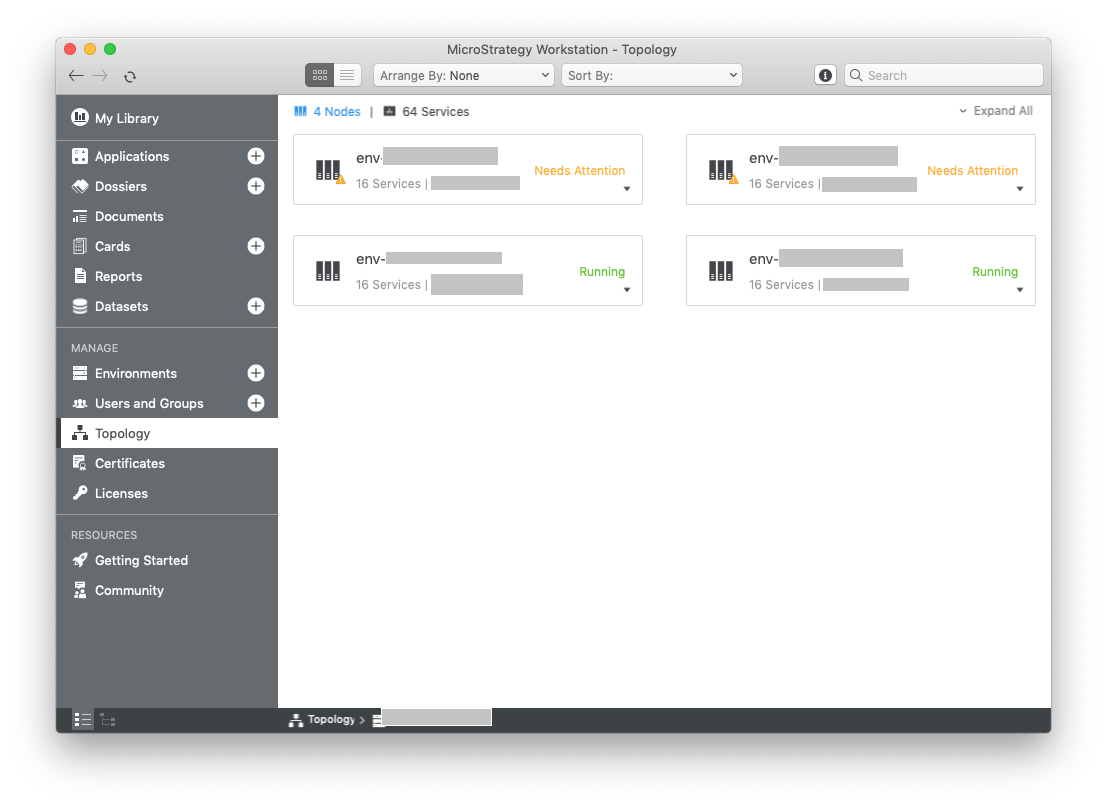
  • Connect to Environment with I-Server user who has either Monitor Environment (ID = 269) or Administer Environment (ID = 264) privilege.
  • In smart mode, click Topology, double click the environment.
  • Check the status of machines.
  • A machine is marked as "Running" when all services are at normal status; a machine is marked as "Needs Attention" when one or all services on it have problems.
ka04W000000OfPQQA0_0EM44000000gZ18.png

Monitor services on machines
Environment administrators would like to check current service status of a particular machine.
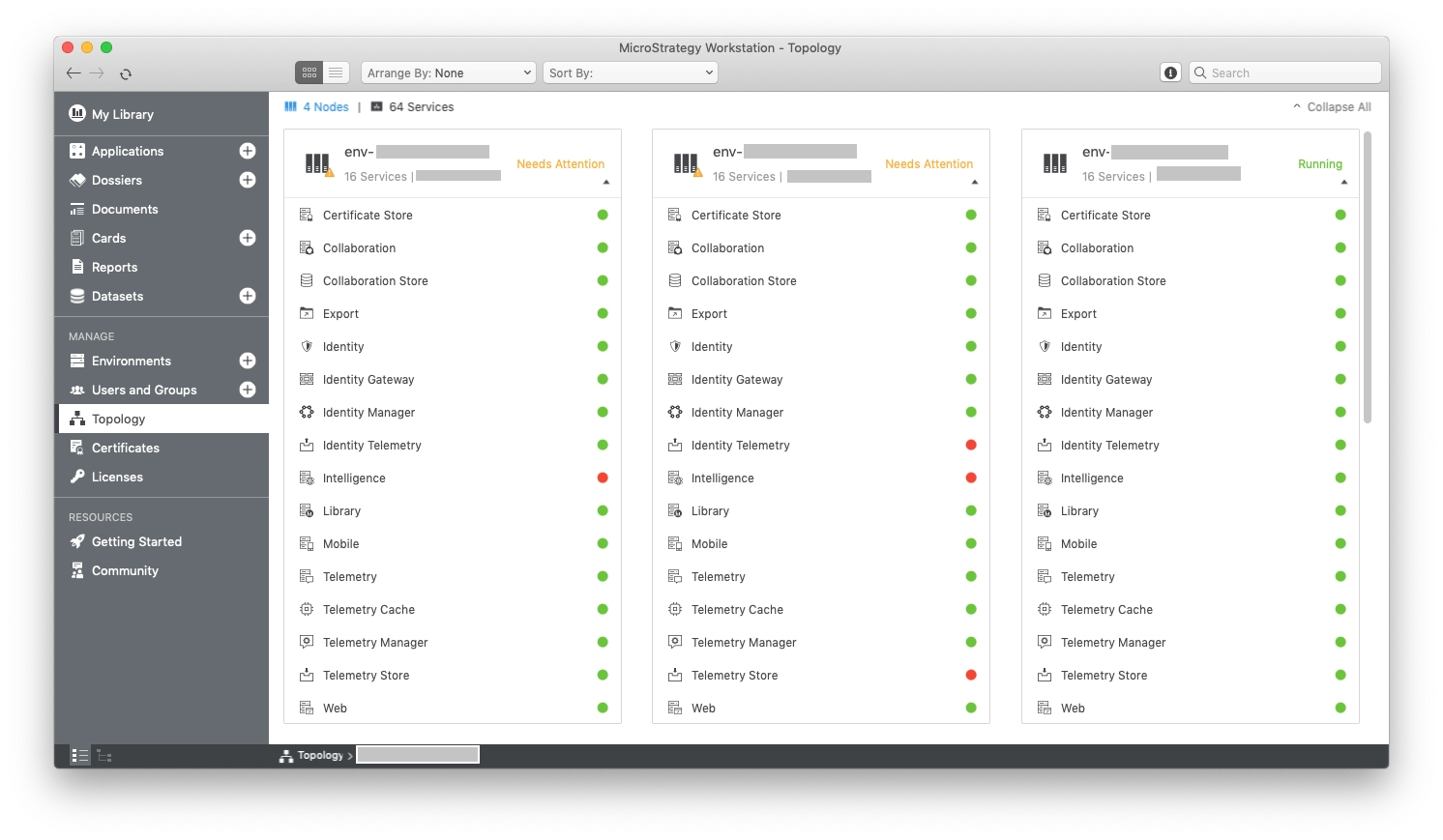
 

  • Connect to the Environment with I-Server user who has either Monitor Environment (ID = 269) or Administer Environment (ID = 264) privilege; or enter maintenance mode.
  • In smart mode, click Topology, double click the environment.
  • Find the machine particular machine by either name or IP address.
  • Click on the machine to expand it, and view all of the services. 
  • A red circle appears next to a stopped service. A green circle appears next to a running service. A yellow circle appears next to a partially stopped service. 
ka04W000000OfPQQA0_0EM44000000gZ1S.png

Check service status
Environment administrators would like to check status of a particular service on a machine.
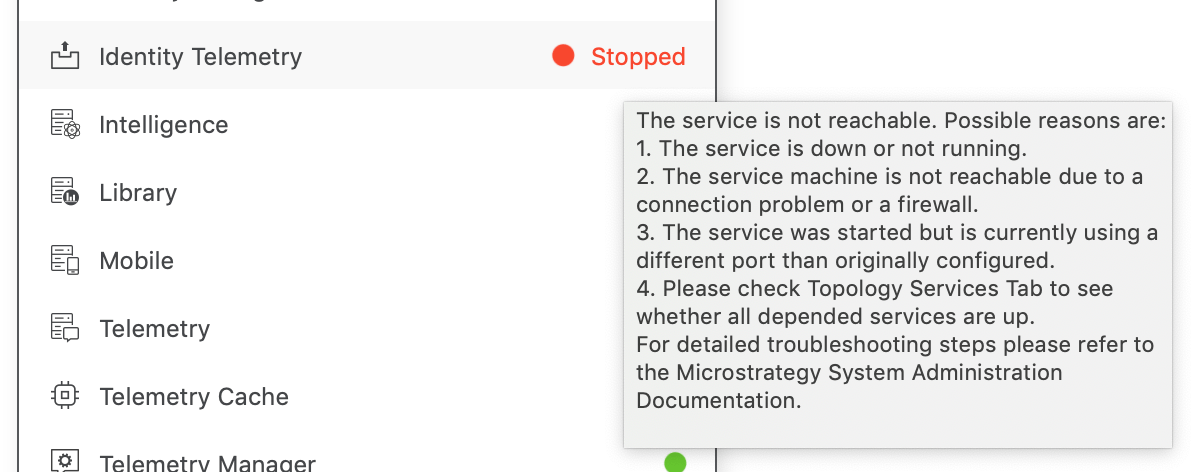
  

  • Connect to the Environment with I-Server user who has either Monitor Environment (ID = 269) or Administer Environment (ID = 264) privilege; or enter maintenance mode.
  • In smart mode, click Topology, double click the environment.
  • Find the machine particular machine by either name or IP address.
  • Click on the machine to expand it, and view all of the services. 
  • Mouseover on the service you want to check, service status title "Running", "Needs Attention" or "Stopped" slides out.
  • Mouseover on the service status title, you'll learn more about the service status when tooltip appears.
ka04W000000OfPQQA0_0EM44000000gZ1X.png

Start or Stop service
Administrator would like to start or stop a service on a machine
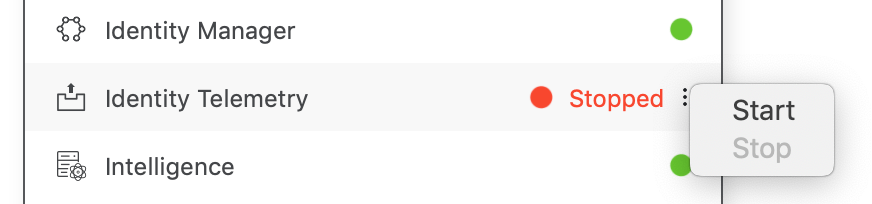
  

  • Connect to the Environment with I-Server user who has Administer Environment (ID = 264) privilege; or enter maintenance mode.
  • In smart mode, click Topology, double click the environment.
  • Find the machine particular machine by either name or IP address.
  • Click on the machine to expand it, and view all of the services. 
  • Mouseover on the service you want to control, a vertical three dots icon 
  •  appears.
  • Click on the 
  •  icon, then choose "Start" or "Stop" from context menu.
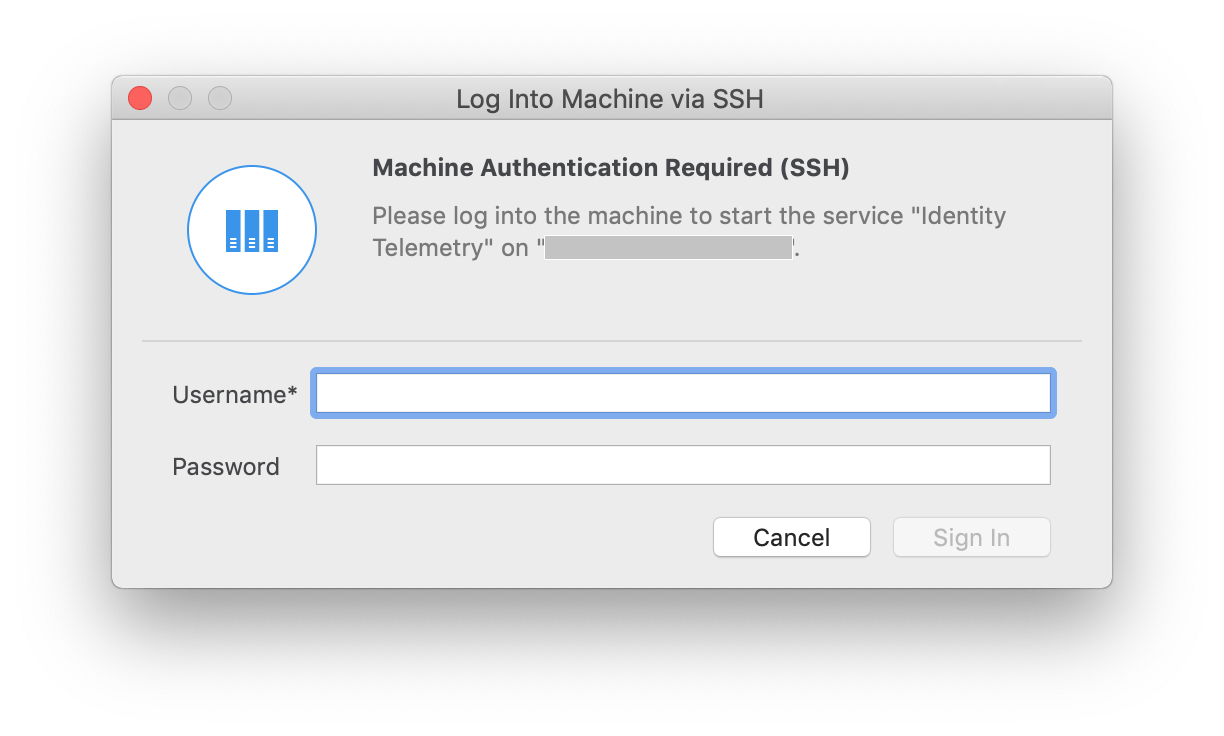
ka04W000000OfPQQA0_0EM44000000gZ1c.png
  • Then you must be authenticated through SSH before you can "Start" or "Stop" the service.
ka04W000000OfPQQA0_0EM44000000gZ1m.png

Check Service dependencies 
Administrators would like to check service dependencies
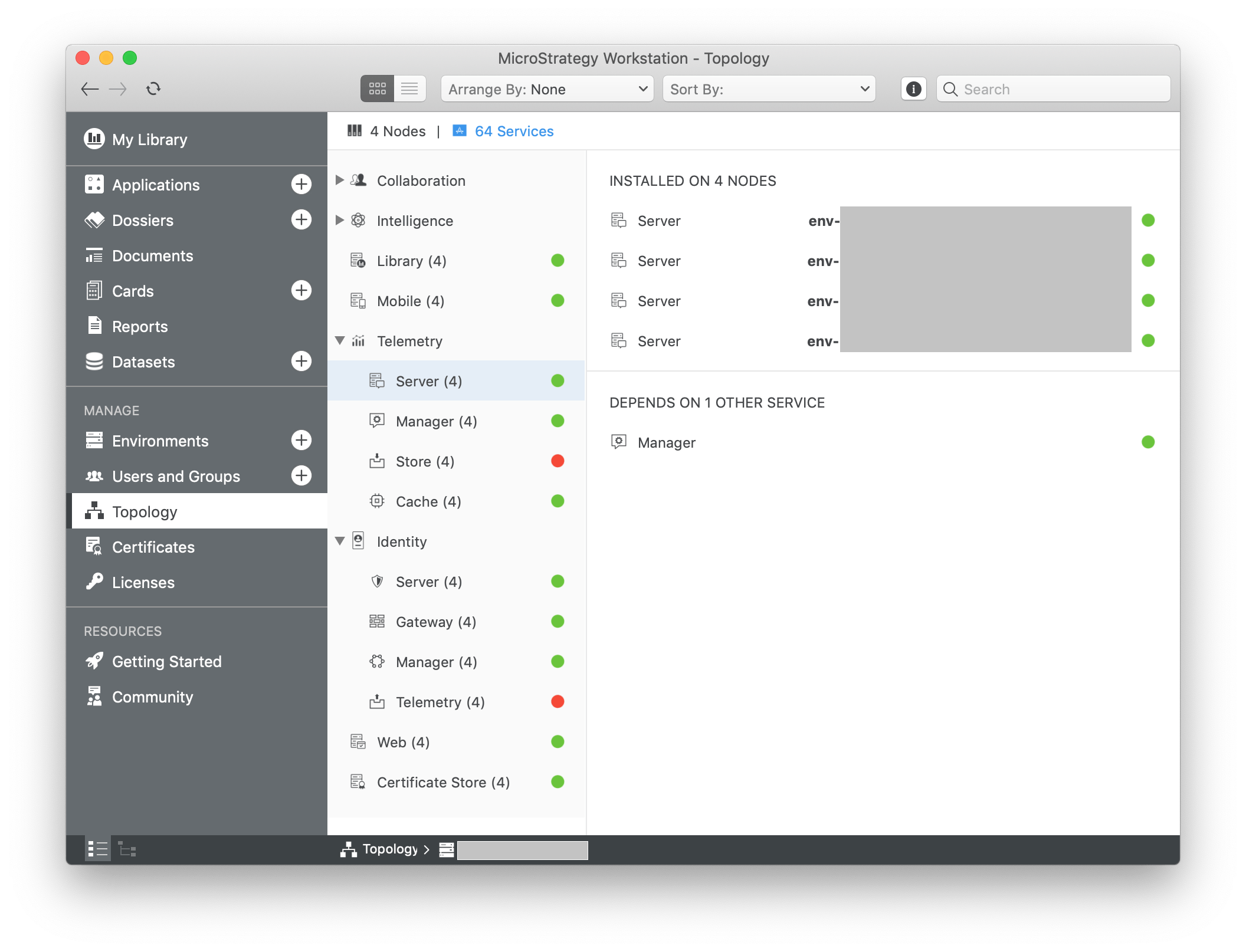
  

  • Connect to the Environment with I-Server user who has either Monitor Environment (ID = 269) or Administer Environment (ID = 264) privilege;
  • In smart mode, click Topology, double click the environment.
  • Click XX Services to display information by service.
  • In the top panel are the instances of the service.
  • In the bottom panel are the service dependencies.
  • Administrators can also view more information about any depended service by double mouse click on the name of depended service.
ka04W000000OfPQQA0_0EM44000000gZ1r.png

Start/Stop services in service view
Administrator would like to start or stop services of same type in service view
  

  1. Connect to the Environment with I-Server user who has either Monitor Environment (ID = 269) or Administer Environment (ID = 264) privilege;
  2. In smart mode, click Topology, double click the environment.
  3. Click XX Services to display information by service.
  4. In the top panel, right mouse on any instance of the service, and choose "Start" or "Stop".


Comment

0 comments

Details

Knowledge Article

Published:

March 12, 2019

Last Updated:

March 12, 2019