In Workstation 2019, the Data Engine Version in an application folder is empty. When you hover over the information icon, the following error appears:
"Failed to load available data engine versions. Please see the log file for additional details."
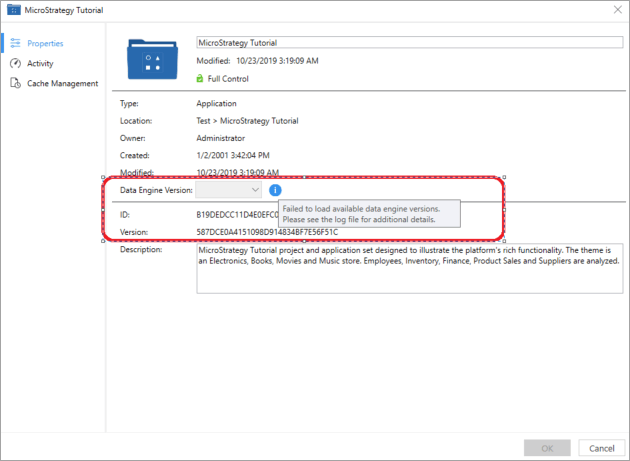
When you navigate to the Workstation log file,
C:\Users\<user_name>\AppData\Local\Strategy_Inc\log\workstation.log, you see the following:
2019-11-04 11:17:09.5054ERROR Failed to retrieve data engine version Workstation.Model.Exceptions.WorkstationWebException: Connection reset at Workstation.Model.Services.Infrastructures.WorkstationHttpClient.<SendWithRetryAsync>d__40.MoveNext()--- End of stack trace from previous location where exception was thrown--at System.Runtime.ExceptionServices.ExceptionDispatchInfo.Throw() at Workstation.Model.Services.Infrastructures.WorkstationHttpClient.<SendWithRetryAsync>d__40.MoveNext()--- End of stack trace from previous location where exception was thrown--at System.Runtime.ExceptionServices.ExceptionDispatchInfo.Throw() at System.Runtime.CompilerServices.TaskAwaiter.HandleNonSuccessAndDebuggerNotification(Task task) at Workstation.ViewModel.Extensions.TaskExtensions.<AddExceptionDetails>d__8`1.MoveNext()--- End of stack trace from previous location where exception was thrown--at System.Runtime.ExceptionServices.ExceptionDispatchInfo.Throw() at System.Runtime.CompilerServices.TaskAwaiter.HandleNonSuccessAndDebuggerNotification(Task task) at Workstation.Model.Services.Rest.RestService.<GetAsyncBase>d__72`1.MoveNext()--- End of stack trace from previous location where exception was thrown--at System.Runtime.ExceptionServices.ExceptionDispatchInfo.Throw() at System.Runtime.CompilerServices.TaskAwaiter.HandleNonSuccessAndDebuggerNotification(Task task) at Workstation.Model.Services.Rest.RestAPIDataServiceActions.<GetPropertySetValues>d__61.MoveNext()--- End of stack trace from previous location where exception was thrown--at System.Runtime.ExceptionServices.ExceptionDispatchInfo.Throw() at System.Runtime.CompilerServices.TaskAwaiter.HandleNonSuccessAndDebuggerNotification(Task task) at Workstation.ViewModel.PropertiesViewModels.ProjectPropertiesViewModel.<LoadDataEngineVersions>d__70.MoveNext() --Workstation.ViewModel.PropertiesViewModels.ProjectPropertiesViewModel
This is an identified issue in Strategy 2019.
This issue is fixed in Strategy 2019 Update 2. Upgrade to Strategy 2019 Update 2 or later to take advantage of the fix.
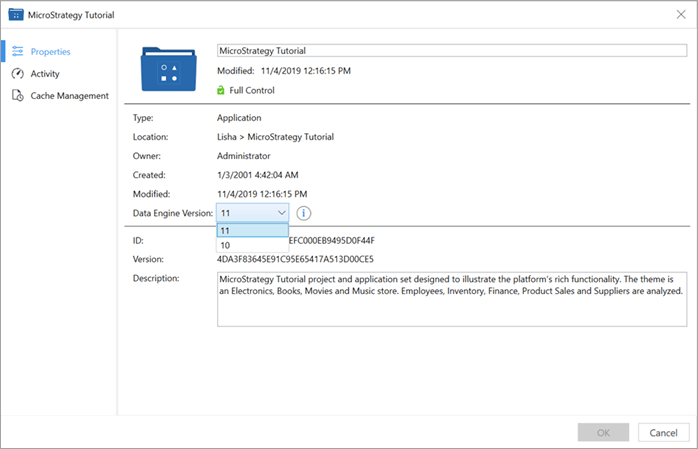
For more information on the Data Engine Version, see Minimizing the Impact of Data Changes for Platform Release Upgrades.
