EducationSoftwareStrategy.com
StrategyCommunity

Knowledge Base

Product

Community

Knowledge Base

TopicsBrowse ArticlesDeveloper Zone

Product

Download SoftwareProduct DocumentationSecurity Hub

Education

Tutorial VideosSolution GalleryEducation courses

Community

GuidelinesGrandmastersEvents
x_social-icon_white.svglinkedin_social-icon_white.svg
Strategy logoCommunity

© Strategy Inc. All Rights Reserved.

LegalTerms of UsePrivacy Policy
  1. Home
  2. Topics
  3. Database Version Not Listed When Creating a New Connection in Mosaic Model

Database Version Not Listed When Creating a New Connection in Mosaic Model

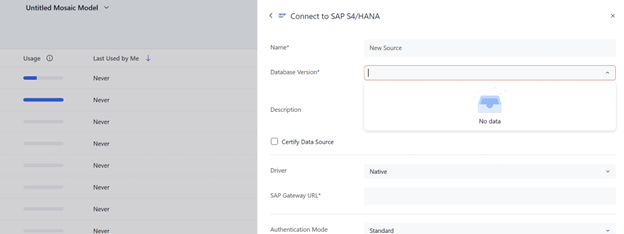
When creating a new connection in a Mosaic model, the required “Database Version” field may appear empty with no options available in the dropdown. This often occurs because the user does not have access to the corresponding DBMS object.

Symptom

When creating a new connection in a Mosaic model, the mandatory “Database Version” field is empty and the dropdown does not display any options to select.

For instance:
prerna.png

Cause

One common cause of this issue is that the user lacks access to the DBMS object.

Solution

Review the security settings on the DBMS object and adjust them as needed for the relevant user or user group.

Workstation > Data Sources > Gateways > Change the security access on the required gateway.


Comment

0 comments

Details

Knowledge Article

Published:

April 2, 2026

Last Updated:

April 2, 2026