EducationSoftwareStrategy.com
StrategyCommunity

Knowledge Base

Product

Community

Knowledge Base

TopicsBrowse ArticlesDeveloper Zone

Product

Download SoftwareProduct DocumentationSecurity Hub

Education

Tutorial VideosSolution GalleryEducation courses

Community

GuidelinesGrandmastersEvents
x_social-icon_white.svglinkedin_social-icon_white.svg
Strategy logoCommunity

© Strategy Inc. All Rights Reserved.

LegalTerms of UsePrivacy Policy
  1. Home
  2. Topics
  3. Import Users During JWT or Trust Login

Import Users During JWT or Trust Login

See the following article that explains how user import works during JWT and Trust authentication for environments where users must be created at login time. The following article focuses on how TenantID controls whether a user is imported.

Overview

In some deployments, users authenticate through JWT or Trust-based login instead of manually creating them in advance. Starting in Strategy (June 2026), for this customer-specific feature scope, the system can import or sync a user at login time, provided the request includes a valid tenant context and the server setting for login-time import is enabled.

The following behavior is intended to support environments where tenant-aware authentication determines where a user should be created. The TenantID must come from the configured JWT claim mapping or from the Trust header, depending on the authentication mode in use.

Important: User import on JWT or Trust login only works when the server-level option, Import user when log on, is enabled.
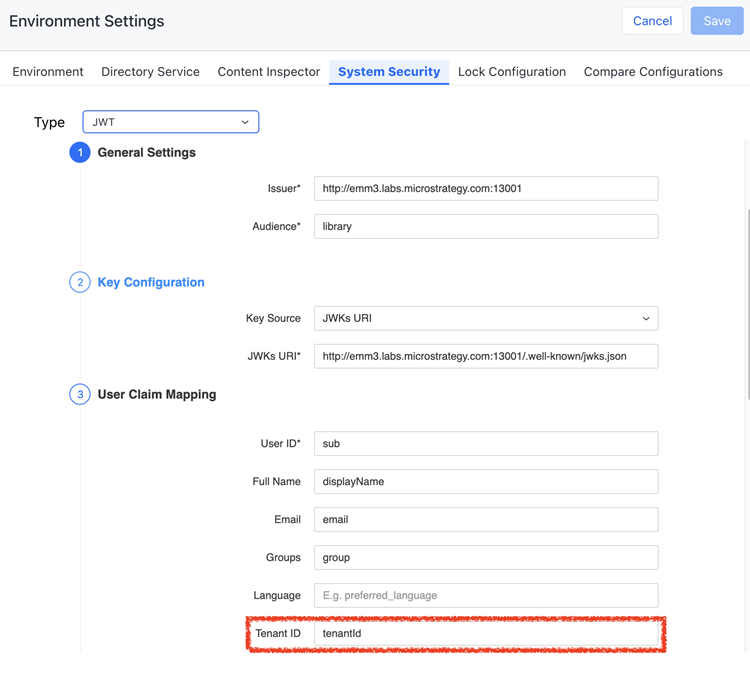
Screenshot 2026-06-08 at 15.12.19-20260608-071238.png

How TenantID Works

Tenant-aware Import Behavior

When a user logs in through JWT or Trust authentication, the system checks the TenantID value provided by the authentication request.

  • JWT mode: TenantID must be configured in the JWT claim mapping.
  • Trust mode: TenantID must be carried in the Trust header.

If the TenantID is present and valid, the user can be imported under the tenant context during login.

Supported Outcomes

TenantID Value

Result

Notes

Configured tenant value

Imported

The user is imported into the tenant identified in the JWT claim or Trust header.

0000000…000 (32-bit zero value as configured by the implementation)

Imports as global

The user is imported into the global tenant

Blank or missing

Not imported

If TenantID is blank in the JWT payload or request, the system does not import the user.

Best practice: Ensure the identity provider always sends a populated TenantID for users who should be created automatically. A blank TenantID prevents import.

Rules and Requirements

  • The feature applies when users log in through JWT or Trust authentication.
  • The system uses the TenantID from the configured JWT claim mapping or the Trust header to decide where the user should be imported.
  • If TenantID is the all-zero global value, the user is imported as a global tenant user.
  • If TenantID is black, the user is not imported.
  • The server-level setting, Import user when log on, must be enabled.
  • The default library link assigned to the global application remains accessible to all users.

What Users and Administrators Should Expect

End Users

  • If authentication is configured correctly and a valid TenantID is provided, the user can be created automatically during login.
  • Users associated with the global tenant can access the default library link assigned to the global application.
  • If the login request does not include a usable TenantID, login-time import does not occur.

Administrators

  • Verify that Import user when log on is enabled at the server level.
  • Confirm the identity provider sends the expected TenantID in the current location.
  • For JWT, validate the claim mapping configuration.
  • For Trust authentication, validate the incoming header values.
  • Plan naming conventions carefully in multi-directory deployments.

Comment

0 comments

Details

Knowledge Article

Published:

June 8, 2026

Last Updated:

June 18, 2026