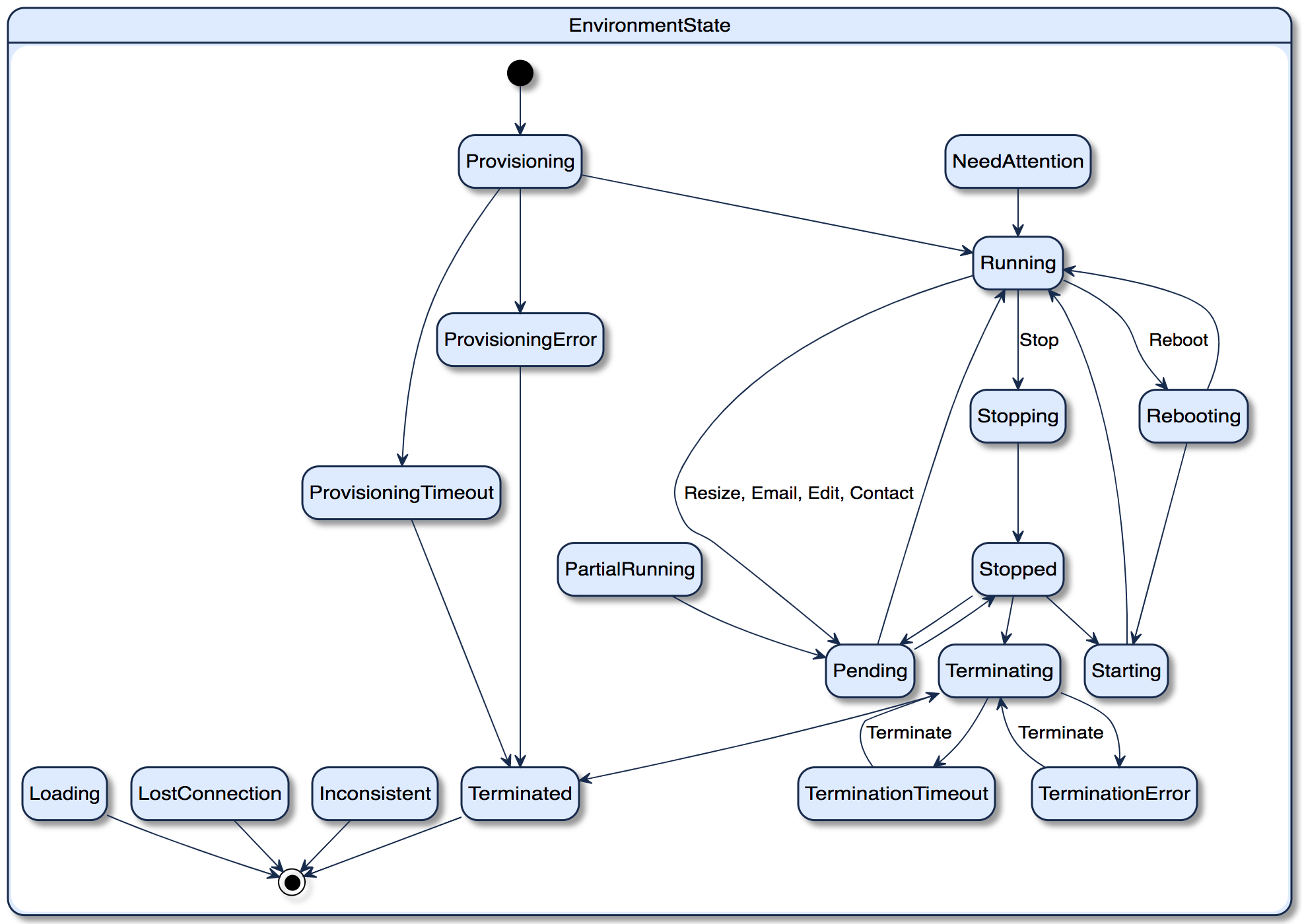
State Name | Description | Stable/Intermediate | Possible Action | Next Possible State |
|---|---|---|---|---|
Provisioning | Environment is provisioning. | Intermediate | No | Running, Provision Error, Provision Timeout |
Provision Error | Environment encounters an error when provisioning, which results in fail. When user hover over the "Provision Error" state, user will obtain error message. Usually, the environment will be terminated automatically. And provision error email will be sent to user. | Stable | No | Terminated. |
Provision Timeout | Environment is provisioned for more than 4 hours but gets no results. Usually, the environment will be terminated automatically. And provision error email will be sent to user. | Stable | No | Terminated |
Running | Environment is running, all the instances as well as services are up and running | Stable | Stop, Reboot, Resize, Resend Email, Edit Contact* | Stopping, Rebooting, Pending |
Stopping | Environment is stopping | Intermediate | No | Stopped |
Stopped | Environment is stopped | Stable | Start, Terminate, Resize | Starting, Terminating, Pending |
Starting | Environment is starting. It will check all machine instances status and Load Balancer status. | Intermediate | No | Running |
Rebooting | Environment is rebooting | Intermediate | No | Running, Starting |
Pending | instances are not in the same state, at least one is in an intermediate state. e.g. 1) Server Instance: Resizing, Developer Instance: Running 2) Server Instance: Starting, Developer Instance: Stopping | Intermediate | No | Running, Stopped |
Partial Running | instances states are stable but not in the same state. e.g. Server Instance: Running, Developer Instance: Stopped | Stable | No** | Pending |
Terminating | Environment is Terminating | Intermediate | No | Terminated, Termination Error, Termination Timeout |
Terminated | Environment is terminated. It is not usable or changed by AWS/Azure any more Hover over the "Terminated" state:
| Stable | No | - |
Termination Error | Environment encounters an error when terminating | Stable | Terminate | Terminating |
Termination Timeout | Environment keeps terminating for more than 1 hour but gets no results | Stable | Terminate | Terminating |
Needs Attention | RDS instance is not available or instance ELB is out of service, e.g. Modifying, Backing-up | Intermediate | No | Running, Stopped |
Lost Connection | The environment has lost connection with the back end. The MicroStrategy Cloud Platform will try to reestablish a connection for 24 hours. If unsuccessful, it will become inactive. e.g. The Cloud Platform role was deleted in the customer's account. | Intermediate | No | - |
Inconsistent | It shows up only when an environment state is none of the above such as any cloud resource was deleted from AWS or Azure directly. Need contact us to troubleshoot. | Intermediate | No | - |
*Resend Email and Edit Contact are only available for Running Environments, and they don't record into any state change.
**Although you cannot operate Environment level actions for Patial Running state, you can still operate actions at instance level such as start, stop and reboot.
State Name | Description | Stable/Intermediate | Possible Action | Next Possible State |
|---|---|---|---|---|
Running | Instance is running, services inside the instance are all usable. | Stable | Stop, Reboot | Stopping, Rebooting |
Available | Instance is up and running. To keep consistency with AWS and Azure, this state only applies to RDS/DB instance. |
|
|
|
Starting | The instance is starting, console will check both instance status and load balancer status | Intermediate | No | Running |
Stopped | The instance is stopped. | Stable | Start | Starting |
Stopping | The instance is stopping. | Intermediate | No | Stopped |
Resizing | The instance is resizing to another type, now it only happens on server instance. After it's finished, instance will go back to previous state. e.g. if instance state is running before resizing, then it will go back to running afterwards. | Intermediate | No | Running, Stopped |
Rebooting | The instance is rebooting. | Intermediate | No | Starting, Running |
