EducationSoftwareStrategy.com
StrategyCommunity

Knowledge Base

Product

Community

Knowledge Base

TopicsBrowse ArticlesDeveloper Zone

Product

Download SoftwareProduct DocumentationSecurity Hub

Education

Tutorial VideosSolution GalleryEducation courses

Community

GuidelinesGrandmastersEvents
x_social-icon_white.svglinkedin_social-icon_white.svg
Strategy logoCommunity

© Strategy Inc. All Rights Reserved.

LegalTerms of UsePrivacy Policy
  1. Home
  2. Topics

KB439502: Unable to delete metric/attribute due to dependent object(s) even though Search for Dependents return no objects.


Community Admin

• Strategy


This issue has been observed as a possible cause for not being able to delete an object. The impact is limited to MicroStrategy Web and Developer whenever a user attempts to delete a metric and searching for dependents does not return any value. Below is written resolution how to find dependent objects.

SYMPTOM:
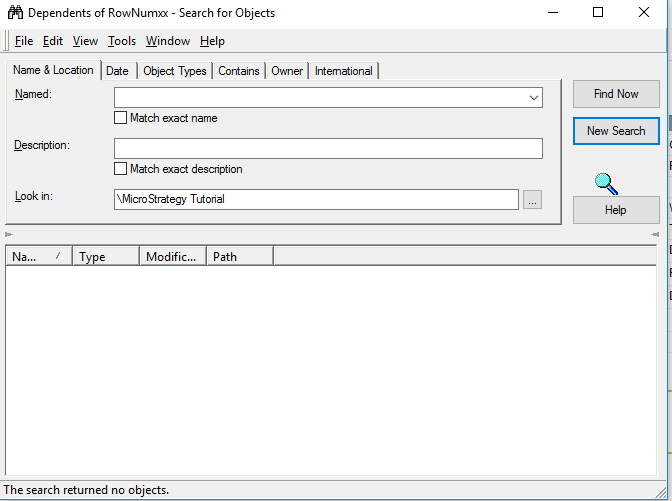
In Strategy 10.x, Attributes/Metrics cannot be deleted due to dependencies on Report Services Document, although Search for dependts both in Web and Developer does not indicate any dependents. Enabling "display Managed Objects" does not show all dependencies also. 
ka04W000000OfFpQAK_0EM44000000QFTv.png

CAUSE:
The root cause of the issue is unknown.
Action:
1. Request object manager package from customer to perform test in-house.
2. Follow steps outlined in KB9665 https://community.Strategy.com/s/article/KB9665-How-to-force-the-deletion-of-an-application-object-s
3. Try to delete corrupted metric.
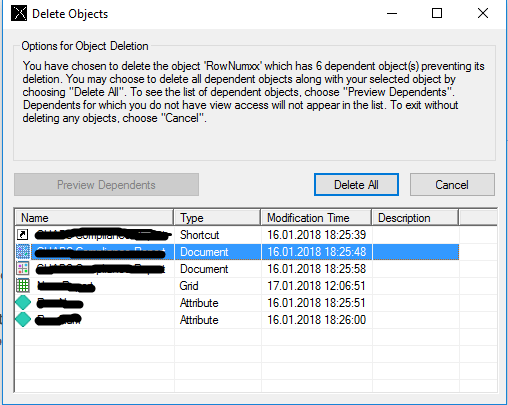
4. Window with warning message will appear.
5. Click on "Preview Dependents".
6. Window with all dependent objects will appear:
ka04W000000OfFpQAK_0EM44000000QFUA.png

  KB439502


Comment

0 comments

Details

Knowledge Article

Published:

February 7, 2018

Last Updated:

December 27, 2018