EducationSoftwareStrategy.com
StrategyCommunity

Knowledge Base

Product

Community

Knowledge Base

TopicsBrowse ArticlesDeveloper Zone

Product

Download SoftwareProduct DocumentationSecurity Hub

Education

Tutorial VideosSolution GalleryEducation courses

Community

GuidelinesGrandmastersEvents
x_social-icon_white.svglinkedin_social-icon_white.svg
Strategy logoCommunity

© Strategy Inc. All Rights Reserved.

LegalTerms of UsePrivacy Policy
  1. Home
  2. Topics

KB484076: Absolute relationship with report filter is not correctly applied when defined in a metric


Alberto Abrisqueta Manzanaro

Product Manager • Strategy


This article explains why an absolute relationship with a report filter cannot be applied when defined in a metric. This article also provides solutions to avoid this issue.

Starting with the release of Strategy ONE (March 2024), dossiers are also known as dashboards.

Description


On a grid, when you define an aggregate from base (AFB) metric that has an absolute relationship with a report filter set, the absolute relationship is not correctly applied.
This behavior persists when the Data Engine Version is set to 11.

Steps to reproduce

  • Set your Data Engine Version to 11. 
  • Open Strategy Deveolper.
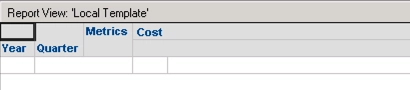
  • In the Strategy Tutorial project, create an Intelligent Cube with the Year and Quarter attributes, and the Cost metric. The Cost metric can be found under Public Objects\Metrics\Sales Metrics.
ka0PW0000001JbhYAE_0EM2R000000nyK5.jpeg
  • Save and publish the Intelligent Cube as Cube 1. 
  • Create another Intelligent Cube with the Gross Revenue metric. The Gross Revenue metric can be found under Public Objects\Metrics\Sales Metrics. 
ka0PW0000001JbhYAE_0EM2R000000nyKF.jpeg
  • Save and publish the Intelligent Cube as Cube 2.
  • Open Strategy Web.
  • Create a new dossier.
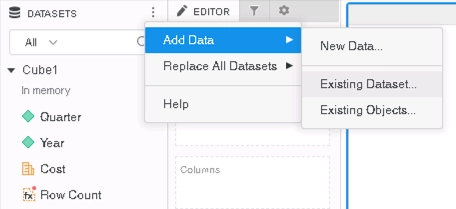
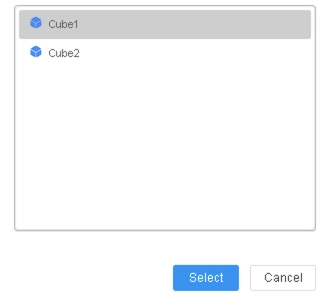
  • In the Datasets panel, click Existing Dataset, and select Cube 1.
ka0PW0000001JbhYAE_0EM2R000000nyMa.jpeg
ka0PW0000001JbhYAE_0EM2R000000nyMf.jpeg
  • In the Datasets panel, click Existing Dataset, and select Cube 2.
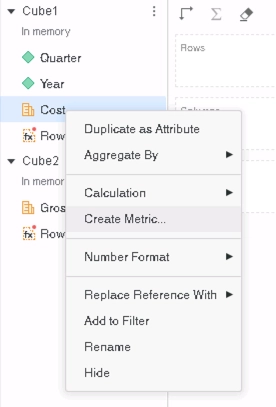
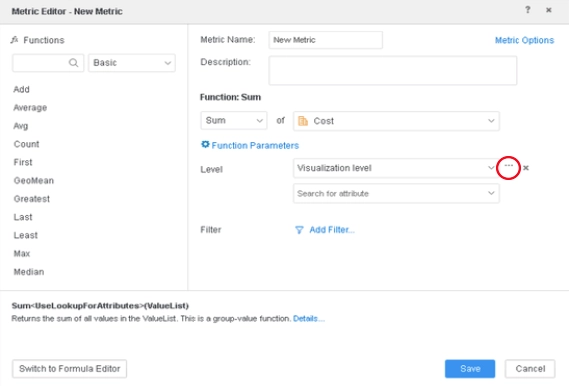
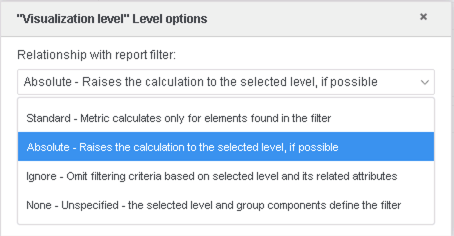
  • Create a derived metrics based on the Cost metric from Cube 1. Set it to have an absolute relationship with the report filter.
ka0PW0000001JbhYAE_0EM2R000000nyMk.jpeg
ka0PW0000001JbhYAE_0EM2R000000nyMp.jpeg
ka0PW0000001JbhYAE_0EM2R000000nyMu.jpeg
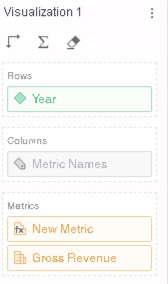
  • Add Year, Gross Revenue, and New Metric to your grid.
ka0PW0000001JbhYAE_0EM2R000000nyMz.jpeg
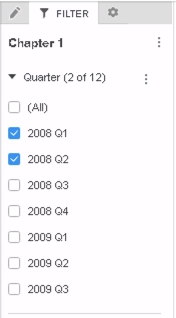
  • Drag Quarter to the Filter panel, and select 2008 Q1 and 2008 Q2.
ka0PW0000001JbhYAE_0EM2R000000nyNE.jpeg
  • In the query details, you can see that the absolute relationship is not applied when calculating the metric:
    
    select	[Year]@[YEAR_ID],
    	sum([[F_MAIN_INDEX].Cost])@{[Year]} as [New Metric]
    from	Cube1
    with Table Join Tree: 	[F_MAIN_INDEX]
    to	Ex14_tempcube1
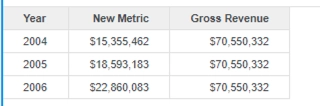


    The grid outputs data without applying the filer.
ka0PW0000001JbhYAE_0EM2R000000nzF1.jpeg

Why is this happening?


This is a known issue in Strategy 10.9, where absolute relationships with a report filter cannot be correctly applied. 
 

Solution


To avoid this behavior, you should do the following:
 

  • Upgrade to Strategy 2020 or above
    The latest version is recommended.  
     
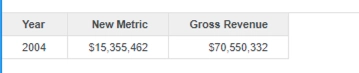
  • Set the Data Engine Version setting to 12 or above
    The project level setting, Data Engine Version, can only enabled via Strategy Workstation. For more details on enabling this setting, see Change Data Engine Version.

    When the Data Engine Version is set to 12, the absolute relationship is applied, as shown in the returned CSI and grid:
    
    select	[Year]@[YEAR_ID],
    sum([[F_MAIN_INDEX].Cost])@{[Year]} as [New Metric]			
    from	Cube1	
    with Table Join Tree: 	[F_MAIN_INDEX]<[Year]@[YEAR_ID] in (Set of [Year]@[YEAR_ID] where [Quarter]@[QUARTER_ID] in (20041, 20042) )>		
    to	Ex0_tempcube1	
    

ka0PW0000001JbhYAE_0EM2R000000nzFf.jpeg
  • Strategy internal reference number for this technical note is KB484076 and DE135161.

Comment

0 comments

Details

Knowledge Article

Published:

February 26, 2020

Last Updated:

March 21, 2024