EducationSoftwareStrategy.com
StrategyCommunity

Knowledge Base

Product

Community

Knowledge Base

TopicsBrowse ArticlesDeveloper Zone

Product

Download SoftwareProduct DocumentationSecurity Hub

Education

Tutorial VideosSolution GalleryEducation courses

Community

GuidelinesGrandmastersEvents
x_social-icon_white.svglinkedin_social-icon_white.svg
Strategy logoCommunity

© Strategy Inc. All Rights Reserved.

LegalTerms of UsePrivacy Policy
  1. Home
  2. Topics

KB483796: An error appears when browsing and selecting a large cube from the MicroStrategy connector


Community Admin

• Strategy


This article provides a solution to the error "Error in Process method of Component: AnalyticalEngineServer, Project xxx, Job xxx, Error Code=xxx" that appears when selecting a large cube from a different MicroStrategy project.

Description


While browsing cubes from another Strategy project, if you select a large cube from the Strategy connector, the following error appears:
"Error in Process method of Component: AnalyticalEngineServer, Project xxx, Job xxx, Error Code=xxx."

ka04W000001IwvgQAC_0EM2R000000mnVI.jpeg

Why is this happening?


This error appears because the cube's size has exceeded the memory limitation of the source Strategy project setting. 

Solution


You must change the source project setting in Strategy Developer.
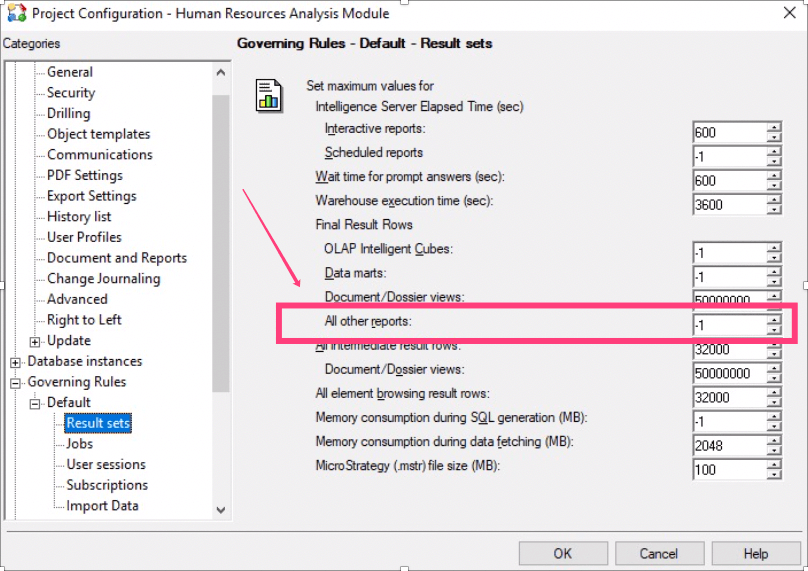
  • Open Strategy Developer and log in as an Administrator. 
  • Right-click your project and select Project Configuration.
  • Select Governing Rules > Default > Result sets.
  • Change the All other reports value to -1.
ka04W000001IwvgQAC_0EM2R000000mnWu.jpeg
  • Click OK.

Comment

0 comments

Details

Knowledge Article

Published:

November 15, 2019

Last Updated:

November 15, 2019