Starting with the release of Strategy ONE (March 2024), dossiers are also known as dashboards.
Description
Starting from Strategy 10.12, with Data Engine Version 2019 or above, there are duplicated rows of data returned in some scenarios for a dossier/report/document which is created based on an intelligence cube and has the join behavior for attributes set to be Outer Join-Preserve Filter. The data issue is resolved with Data Engine Version 2020 in Strategy 2021 Update 2.
Steps to reproduce
To reproduce the data issue: create an OLAP cube to contain multiple attributes in the same dimension; create a document/dossier/report based on the OLAP cube, which has at least one attribute and one metric on template, two attributes in filters, and none of the attributes on template or in filters is the lowest attribute in the dimension; the setting for Outer Join for attributes should be enabled for the document/dossier/report.
A specific example is shown below to demonstrate how the issue happens.
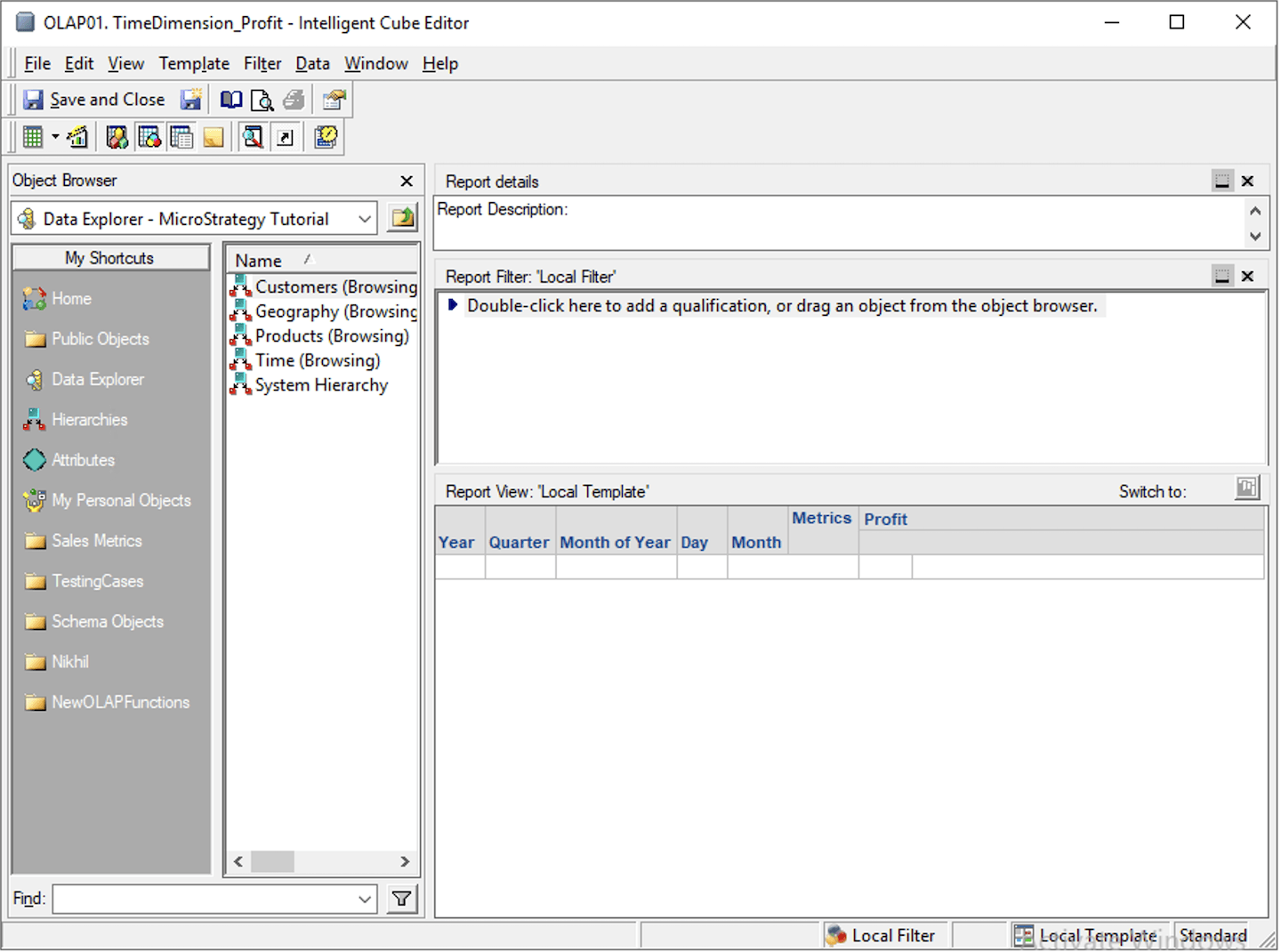
1. Use Strategy Developer to create an OLAP cube named OLAP01 to include one metric (Profit), and multiple attributes in the same dimension (Year, Quarter, Month of Year, Day, Month).
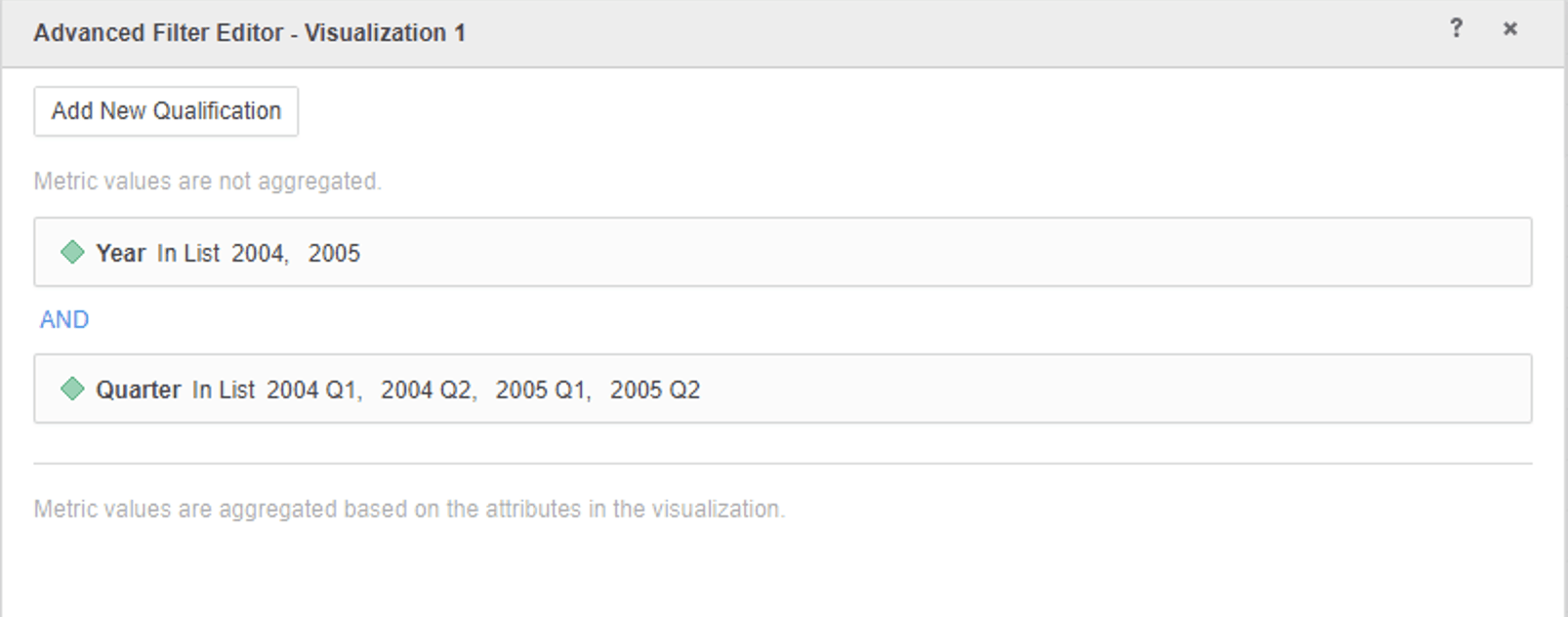
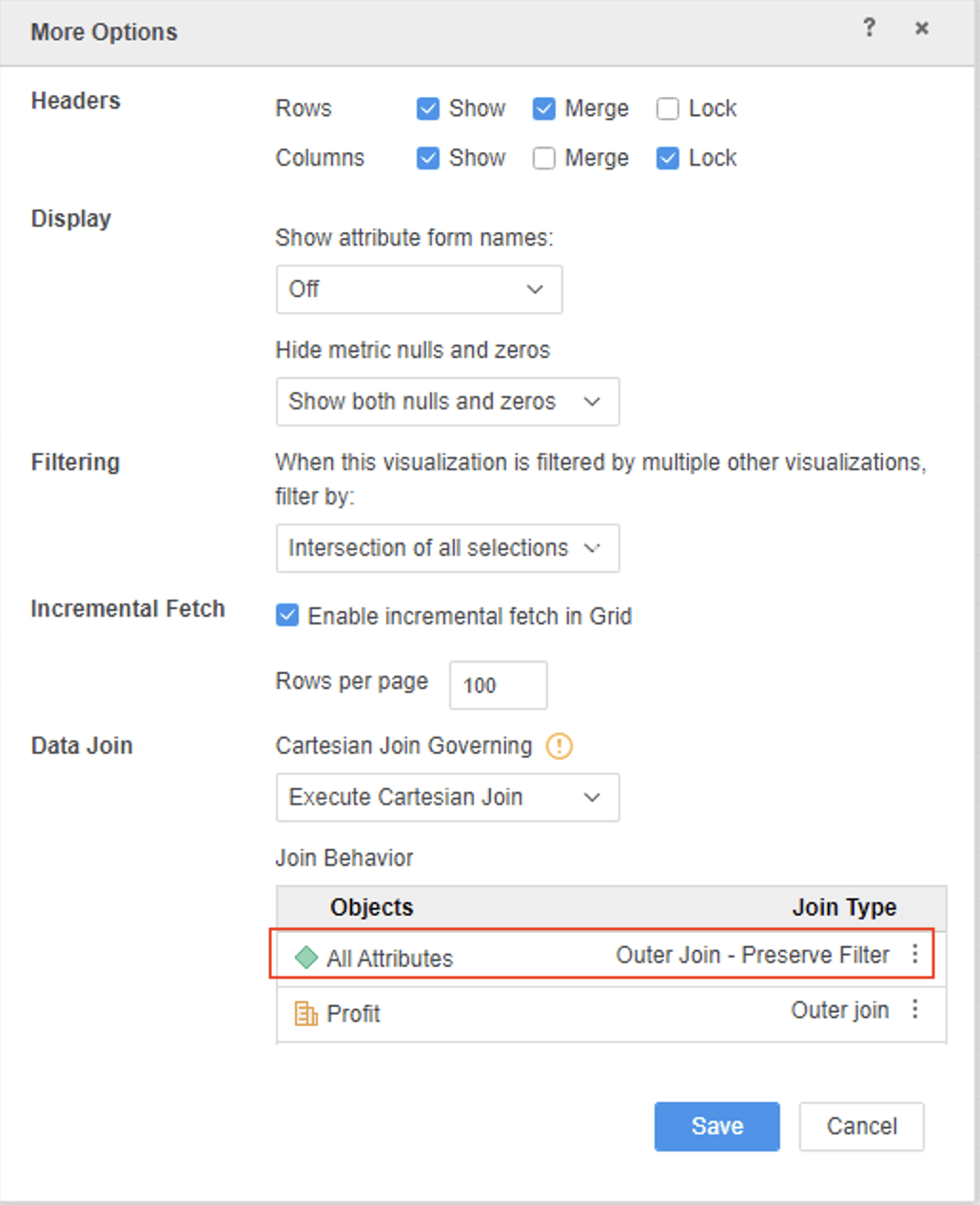
2. Login to Strategy web, create a dossier and use the newly created OLAP01 as a dataset. Add Month and Profit to a grid visualization of the dossier. Add filters for Year and Quarter through the Advanced Filter Editor by clicking on the 3-dot icon on the grid visualization and select Edit Filter. Set Join behavior for all attributes with the option Outer Join – Preserve Filter by clicking on the 3-dot icon and select More Options.
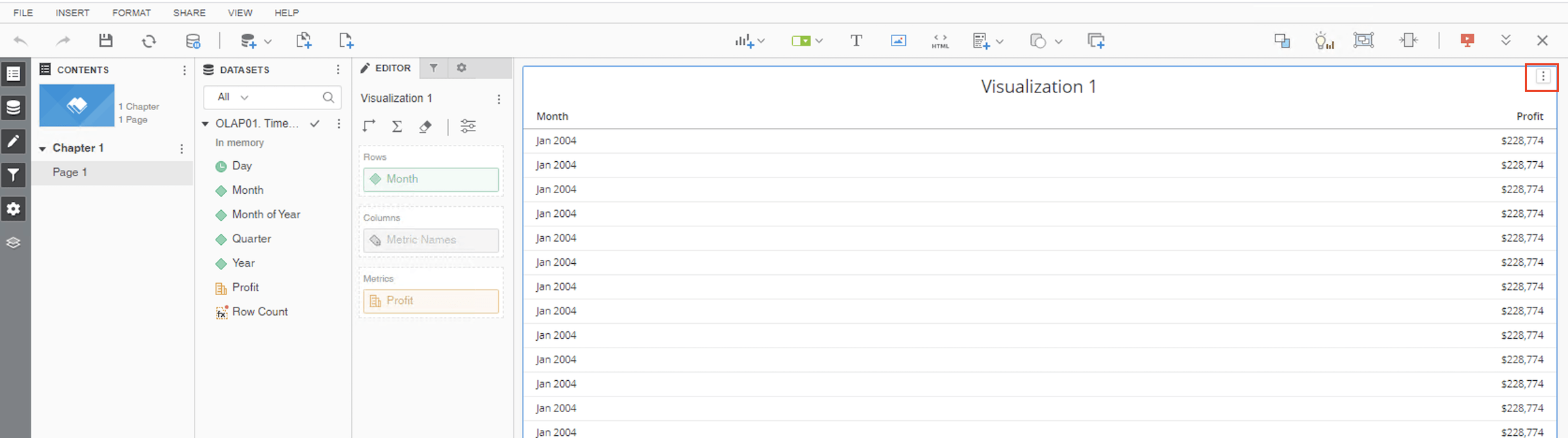
Duplicated rows of data for Month have been returned on the grid visualization as shown above.
3. View Query Details of the visualization. In the table join tree of the second CSI pass shown below, when LeftOuterJoin is performed between set of tuple and TempTable6 according to attributes join behavior setting Outer Join – Preserve Filter, there is distinct missing for Set of Tuple which caused the duplicated rows in the grid data.
************ Individual Step Start ************
Number of Rows Returned: 363
Time Spent: 0.018 sec(s)
Query Execution Start Time: 7/15/2021 4:31:11 PM
Query Execution End Time: 7/15/2021 4:31:11 PM
Tables Accessed:
Table3 [L_MONTH]: Month, LOOKUP_TABLE
Table5 [F_MAIN_INDEX]: Year, Quarter, Month of Year, Month, Day, Profit, FACT_TABLE
select [Month]@[MONTH_ID],
[Month]@[MONTH_DESC],
sum([[F_MAIN_INDEX].Profit])@{[Month]} as [Profit]
from OLAP01. TimeDimension_Profit
with Table Join Tree: [F_MAIN_INDEX]<([Year]@[YEAR_ID] in (2004, 2005)
and [Quarter]@[QUARTER_ID] in (20041, 20042, 20051, 20052))>
Save As TempTable6
select [Month]@[MONTH_ID],
[Month]@[MONTH_DESC],
[TempTable6.Profit] as [Profit]
from OLAP01. TimeDimension_Profit
with Table Join Tree: (Set of Tuple([Month]@[MONTH_ID], [Quarter]@[QUARTER_ID], [Year]@[YEAR_ID]) where Tuple([Month]@[MONTH_ID], [Quarter]@[QUARTER_ID], [Year]@[YEAR_ID]) in [F_MAIN_INDEX]<([Year]@[YEAR_ID] in (2004, 2005)
and [Quarter]@[QUARTER_ID] in (20041, 20042, 20051, 20052))>)
LeftOuterJoin TempTable6 with output level Tuple([Month]@[MONTH_ID])
************ Individual Step End ************
Why is this happening?
This is a known issue starting from Strategy 10.12 with Data Engine Version 2019 or above.
Solution
To fix the data issue, upgrade to Strategy 2021 Update 2 and set the Data Engine Version to be 2020 or above. To set Data Engine Version, refer to How to set Date Engine Version.
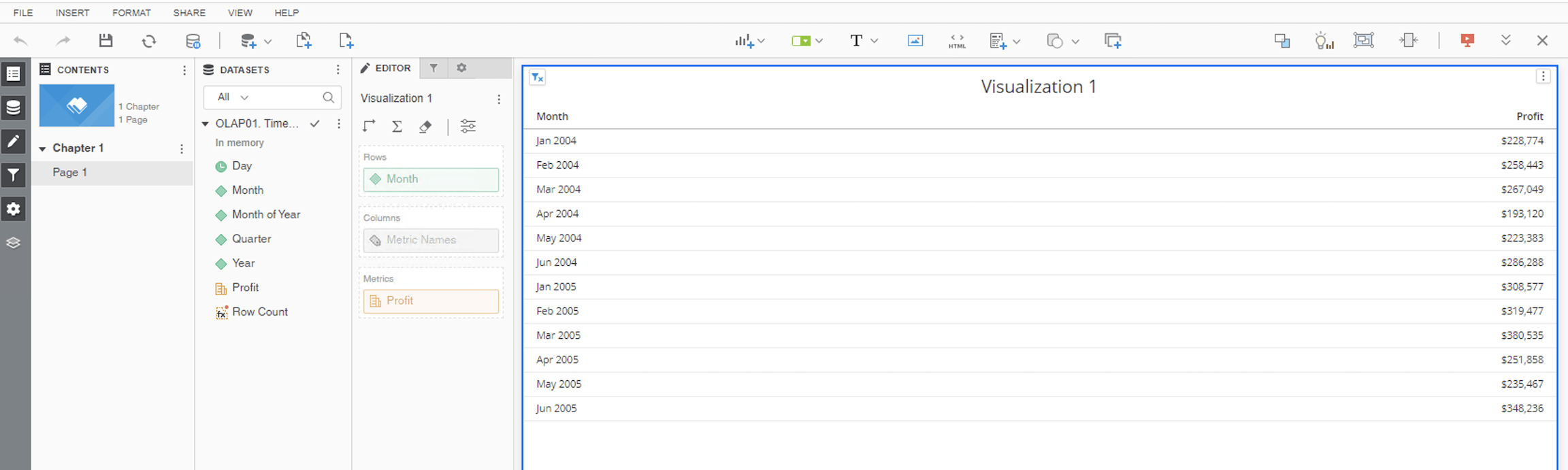
After the fix, there will be no more duplicated rows of data in the grid visualization with correct CSI generated as shown below.
CSI with fix:
************ Individual Step Start ************
Number of Rows Returned: 12
Time Spent: 0.031 sec(s)
Query Execution Start Time: 7/15/2021 4:30:26 PM
Query Execution End Time: 7/15/2021 4:30:26 PM
Tables Accessed:
Table3 [L_MONTH]: Month, LOOKUP_TABLE
Table5 [F_MAIN_INDEX]: Year, Quarter, Month of Year, Month, Day, Profit, FACT_TABLE
select [Month]@[MONTH_ID],
[Month]@[MONTH_DESC],
sum([[F_MAIN_INDEX].Profit])@{[Month]} as [Profit]
from OLAP01. TimeDimension_Profit
with Table Join Tree: [F_MAIN_INDEX]<([Year]@[YEAR_ID] in (2004, 2005)
and [Quarter]@[QUARTER_ID] in (20041, 20042, 20051, 20052))>
Save As TempTable6
select [Month]@[MONTH_ID],
[Month]@[MONTH_DESC],
[TempTable6.Profit] as [Profit]
from OLAP01. TimeDimension_Profit
with Table Join Tree: (Set of distinct Tuple([Month]@[MONTH_ID], [Quarter]@[QUARTER_ID], [Year]@[YEAR_ID]) where Tuple([Month]@[MONTH_ID], [Quarter]@[QUARTER_ID], [Year]@[YEAR_ID]) in [F_MAIN_INDEX]<([Year]@[YEAR_ID] in (2004, 2005)
and [Quarter]@[QUARTER_ID] in (20041, 20042, 20051, 20052))>)
LeftOuterJoin TempTable6 with output level Tuple([Month]@[MONTH_ID])
************ Individual Step End ************
