EducationSoftwareStrategy.com
StrategyCommunity

Knowledge Base

Product

Community

Knowledge Base

TopicsBrowse ArticlesDeveloper Zone

Product

Download SoftwareProduct DocumentationSecurity Hub

Education

Tutorial VideosSolution GalleryEducation courses

Community

GuidelinesGrandmastersEvents
x_social-icon_white.svglinkedin_social-icon_white.svg
Strategy logoCommunity

© Strategy Inc. All Rights Reserved.

LegalTerms of UsePrivacy Policy
  1. Home
  2. Topics

KB11592: How to use Performance Monitor to estimate the number of jobs and user sessions generated by a MicroStrategy Narrowcast Server service


Community Admin

• Strategy


For MicroStrategy Narrowcast Server service enabling the usage of Performance Monitor in order to track counters and manage the system.

Follow the instructions below to determine the number of jobs and user sessions generated by a Strategy Narrowcast Server service:
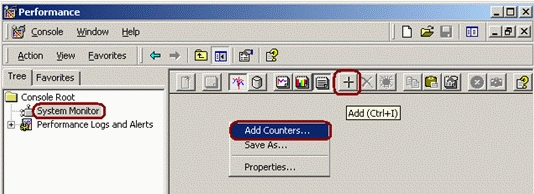
 

  • On the Strategy Intelligence Server machine, launch Performance Monitor from either:
    • Start > Programs > Strategy > Intelligence Server
    • Start > Settings > Control Panel > Administrative Tools
  • Click on System Monitor.
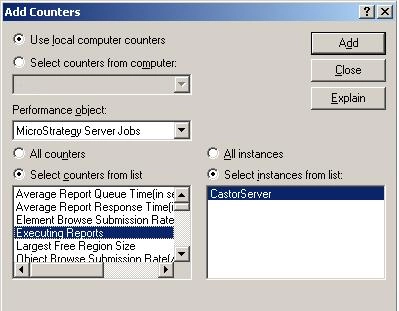
  • Click on the Add Counters icon, or right-click on the right-side panel and select Add Counters:
ka04W000000OhNUQA0_0EM440000002Bkg.gif
  • Select Use local computer counters, or select Select counters from computer followed by the name or IP address of the Intelligence Server machine.
  • In Performance object, select Strategy Server Jobs.
  • Choose Select counters from list, and click on Executing Reports.
  • Click on the Add button to add this counter:
ka04W000000OhNUQA0_0EM440000002Bkk.jpeg
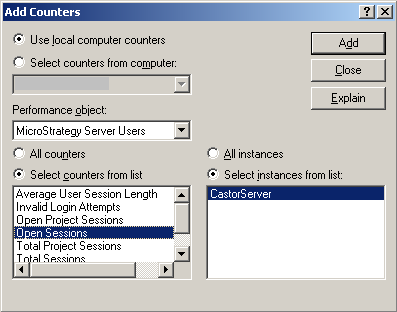
  • In Performance object, select Strategy Server Users.
  • Select Select counters from list, click on Open sessions
  • Click on the Add button to add this counter.
  • Click on Close:
ka04W000000OhNUQA0_0EM440000002Bkb.gif
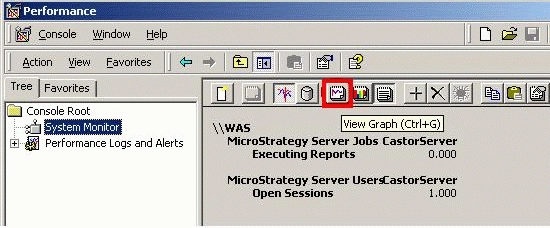
  • Click on the View Graph icon:
ka04W000000OhNUQA0_0EM440000002Bkd.gif
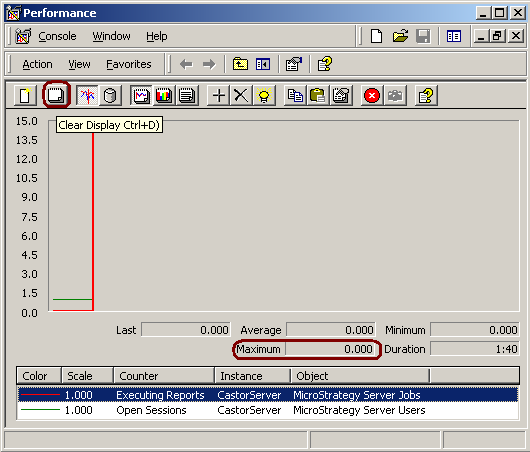
  • Click on the Clear Display icon. For each counter, click on the counter and make a note of its Maximum value:
ka04W000000OhNUQA0_0EM440000002Bka.gif
  • Run the Narrowcast Server service and allow it to complete.
  • For each counter, subtract the maximum value at the start of the service from the maximum value at service completion.

The total number of sessions opened by Strategy Narrowcast Server equals the corresponding value calculated in Step 15.
 
The total number of job requests for Personalized Page Execution jobs equals the corresponding value calculated in Step 15.
 
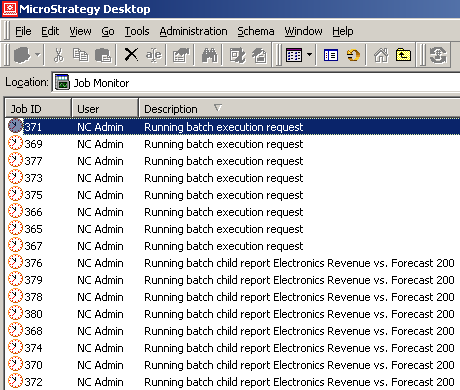
The total number of job requests for Personalized Report Execution (PRE) jobs equals the number in Step 15 times two (x2). This number is multiplied by two because each job request for PRE information objects is accompanied by a batch request, also known as parent job. Performance Monitor does not track batch requests:
 

ka04W000000OhNUQA0_0EM440000002Bke.gif


Comment

0 comments

Details

Knowledge Article

Published:

May 23, 2017

Last Updated:

May 23, 2017