SYMPTOM:
The following error occurs when users try to connect to Essbase from Strategy Desktop 9.x/10:
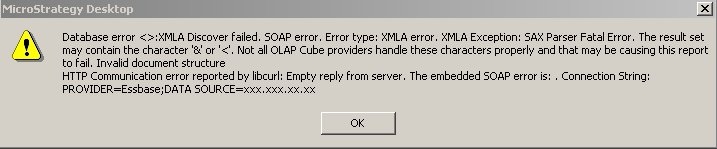
Database error <>:XMLA Discover failed. SOAP error. Error type: XMLA error. XMLA Exception: SAX Parser Fatal Error. The result set may contain the character '&' or '<'. Not all OLAP Cube providers handle these characters properly and that may be causing this report to fail. Invalid document structure HTTP Communication error reported by libcurl: Empty reply from server. The embedded SOAP error is: . Connection String: PROVIDER=Essbase;DATA SOURCE=xxx.xxx.xx.xx
CAUSE:
The response from the XMLA component on the HTTP Server returns an empty XML document. The reason for this is explained in the process flowchart below. Strategy Intelligence Server talks to the XMLA component using HTTP. The XMLA component is responsible for all communications with the database / Analytics server.
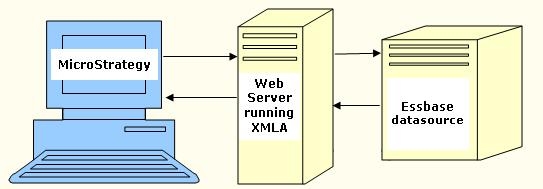
From the Strategy perspective, the Web server should use anonymous authentication. If the HTTP server asks for credentials, the credentials set up in the username and password fields in the database login will be used to authenticate the Strategy user.
On the other side, the XMLA component must also authenticate itself to the database server / Analytic Server from Essbase. This is where the problem lies.
The Essbase Administration Services / Deployment Service out of the box are configured with a default username and password (system / password). The problem is that this user (System) does not exist by default in the actual analytic server. Therefore, when the XMLA component connects to the Analytic Server, it is not able to connect and returns an empty document to Strategy.
ACTION:
Change the login used by the XMLA component to login to the analytic services database.
Edit the Properties file used, essbase.properties, usually found in: C:\Hyperion\eas\server\bin\ and C:\Program Files\Hyperion\eds\7.1.0.0\bin, and change the guest.name and guest.password to be the actual user name and password used to login to the Analytic Server, as shown below:
-----------------------------------------------------------------
webservice.request.redirect.enterpriseServer.host=localhost
webservice.request.redirect.enterpriseServer.orbType=TCPIP
webservice.request.redirect.enterpriseServer.port=5001
webservice.encoding=UTF-8
webservice.guest.name=administrator
webservice.guest.password=hypadmin
webservice.session.timeout=50
japi.netRetryCount=20
japi.netRetryInterval=1000
-----------------------------------------------------------
After this, the following must be checked:
KB13853
