EducationSoftwareStrategy.com
StrategyCommunity

Knowledge Base

Product

Community

Knowledge Base

TopicsBrowse ArticlesDeveloper Zone

Product

Download SoftwareProduct DocumentationSecurity Hub

Education

Tutorial VideosSolution GalleryEducation courses

Community

GuidelinesGrandmastersEvents
x_social-icon_white.svglinkedin_social-icon_white.svg
Strategy logoCommunity

© Strategy Inc. All Rights Reserved.

LegalTerms of UsePrivacy Policy
  1. Home
  2. Topics

KB201258 : Metric formatting is not applied for Metrics which use a case statement that replaces the metric value with text in MicroStrategy 9.x


Stefan Zepeda

Salesforce Solutions Architect • Strategy


Metric formatting is not applied for Metrics which use a case statement that replaces the metric value with text in MicroStrategy 9.x

SYMPTOM
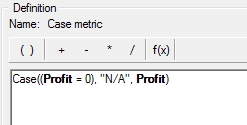
The user has created a metric which uses a case statement that replaces certain metric values with text as seen below:
ka02R000000kbMOQAY_0EM440000002CFI.jpeg

This metric will display the text “N/A” when the Profit is equal to 0. When the user applies metric formatting to this metric at the metric level or the report level, the metric formatting does not apply.
 
STEPS TO REPRODUCE
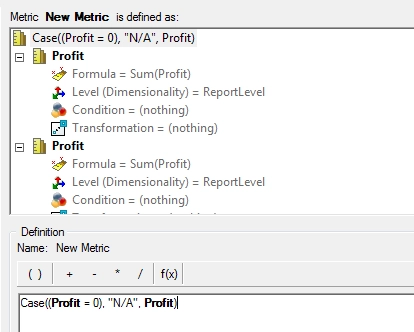
  • In Strategy Desktop, create a metric with definition “Case((Profit = 0), "N/A", Profit)”

ka02R000000kbMOQAY_0EM440000002CFD.jpeg
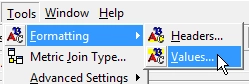
  • In the metric editor, select Tools > Formatting > Values.

ka02R000000kbMOQAY_0EM440000002CFG.jpeg
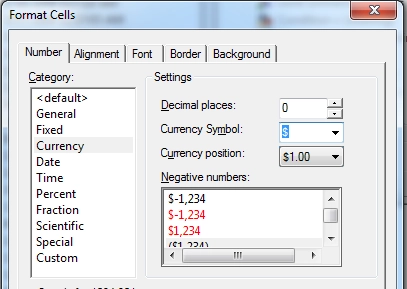
  • On the Number tab, Set the Decimal places to 0 and the Currency symbol to $

ka02R000000kbMOQAY_0EM440000002CFK.jpeg
  • Save the new metric
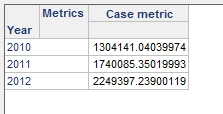
  • Create a report with the year attribute and the new metric. The metric formatting will not apply as expected.
ka02R000000kbMOQAY_0EM440000002CFL.jpeg

CAUSE
This is a known issue with Strategy when using Metrics with case statements that replace the metric values with text. Please contact Strategy Technical Support for an update on this issue
WORKAROUND
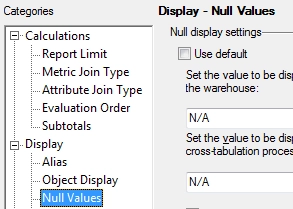
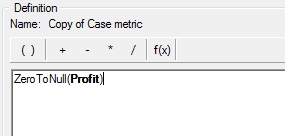
In this case, the user can use the ZerotoNull function to convert the Zero values to Nulls and set the Null display on the Report in Data > Report Data Options > Null Display.
ka02R000000kbMOQAY_0EM440000002CFU.jpeg


ka02R000000kbMOQAY_0EM440000002CFT.jpeg


Strategy Internal Reference Number: 955942 


Comment

0 comments

Details

Knowledge Article

Published:

June 9, 2017

Last Updated:

July 17, 2017