EducationSoftwareStrategy.com
StrategyCommunity

Knowledge Base

Product

Community

Knowledge Base

TopicsBrowse ArticlesDeveloper Zone

Product

Download SoftwareProduct DocumentationSecurity Hub

Education

Tutorial VideosSolution GalleryEducation courses

Community

GuidelinesGrandmastersEvents
x_social-icon_white.svglinkedin_social-icon_white.svg
Strategy logoCommunity

© Strategy Inc. All Rights Reserved.

LegalTerms of UsePrivacy Policy
  1. Home
  2. Topics

KB20128: Attribute elements from an MDX Cube data source are sorted in the wrong order in MicroStrategy Engine


Community Admin

• Strategy


This article notes a scenario where MDX data is not sorted correctly.

SYMPTOM
 
A user runs a report against a multidimensional cube and sorts the rows based on an attribute. The rows then appear in an order different from what was expected.
For example, in this Microsoft SQL Server Analysis Services cube based on Strategy Tutorial data, sorting the Region attribute on ID produces the order on the left, whereas the expected order is on the right. The elements "Germany" and "Web" appear out of order.
 

Strategy Platform (Early Adopter)
Database ObjectType of Permissions RequiredTablesSelect, Insert, Update, Create, Drop, DeleteIndexesCreate, DropTriggersCreate, DropFunctionsCreate, ExecutePackagesCreateProceduresCreate, Execute Standard Verification (default - explicit)Standard Verification (default - implicit)JDBCjdbc:exa:exadb1.example.com:8563; validateservercertificate=1jdbc:exa:exadb1.example.com:8563
 ODBCEXAHOST=exadb1.example.com
SSLCertificate=SSL_VERIFY_SERVER
 EXAHOST=exadb1.example.com
  Connection string examples 1Connection string examples 2JDBCjdbc:exa:exadb1.example.com/<fingerprint>:8563 jdbc:exa:exadb1.example.com:8563; fingerprint=<fingerprint>;ODBCEXAHOST=exadb1.example.com/<fingerprint>:8563 EXAHOST=exadb1.example.com:8563;fingerprint=<fingerprint>; Connection string examples 1JDBCjdbc:exa:exadb1.example.com:8563;validateservercertificate=0 ODBCSSLCertificate=SSL_VERIFY_NONE JDBCjdbc:exa:exadb1.example.com:8563;legacyencryption=1ODBCUseLegacyEncryption=Y Connection string examples 1JDBCjdbc:exa:exadb1.example.com:8563;encryption =0 ODBCencryption=N LanguageDateNumberCurrencyPercentageGermandd.mm.yyyy12.345,00123.456,7812,34%Spanishdd/mm/yyyy12.345,00123.456,7812,34%English (US)mm/dd/yyyy12,345.00123,456.7812.34%English (UK)dd/mm/yyyy12,345.00123,456.7812.34%Frenchdd/mm/yyyy12 345,00123 456,7812,34%Italiandd/mm/yyyy12.345,00123.456,7812,34%Japaneseyyyy/mm/dd12,345.00123,456.7812.34%Koreanyyyy-mm-dd12,345.00123,456.7812.34%Portuguese (Brazil)dd/mm/yyyy12.345,00123.456,7812,34%Swedishyyyy-mm-dd12 345,00123 456,7812,34%COLUMNPURPOSEDATATYPEMR_SUB_IDSubscription Portal generated Subscription IDNumeric/Int (Must be unique)MR_ADDRESS_IDID of the addressText/VarCharMR_USER_IDNarrowcast User IDText/VarCharMR_SUB_SET_IDSubscription Set IDText/VarCharValueEffect1Unicode (UTF-8) support is enabled.0No Unicode support.

Best Practices


Authentication ⟩


Authorization ⟩


Encryption ⟩


Web Security ⟩

[PostgreSQL Unicode(x64)]
Driver=/opt/mstr/MicroStrategy/install/pgsql-11/lib/psqlodbcw.so
Description=ODBC for PostgreSQL
Setup=/opt/mstr/MicroStrategy/install/pgsql-11/lib/psqlodbcw.so
FileUsage=1
DriverUnicodeType=1[TPCH_PG]
Driver=/opt/mstr/MicroStrategy/install/pgsql-11/lib/psqlodbcw.so
Description=PostgreSQL Unicode(x64)
Database=tpch
Servername=xxx.xxx.xxx.xxx
Port=5432
Protocol=9.3
ReadOnly=No
RowVersioning=No
ShowSystemTables=No
ConnSettings=
DriverUnicodeType=1
 Visible sort orderExpected sort order

Strategy Platform (Early Adopter)
Database ObjectType of Permissions RequiredTablesSelect, Insert, Update, Create, Drop, DeleteIndexesCreate, DropTriggersCreate, DropFunctionsCreate, ExecutePackagesCreateProceduresCreate, Execute Standard Verification (default - explicit)Standard Verification (default - implicit)JDBCjdbc:exa:exadb1.example.com:8563; validateservercertificate=1jdbc:exa:exadb1.example.com:8563
 ODBCEXAHOST=exadb1.example.com
SSLCertificate=SSL_VERIFY_SERVER
 EXAHOST=exadb1.example.com
  Connection string examples 1Connection string examples 2JDBCjdbc:exa:exadb1.example.com/<fingerprint>:8563 jdbc:exa:exadb1.example.com:8563; fingerprint=<fingerprint>;ODBCEXAHOST=exadb1.example.com/<fingerprint>:8563 EXAHOST=exadb1.example.com:8563;fingerprint=<fingerprint>; Connection string examples 1JDBCjdbc:exa:exadb1.example.com:8563;validateservercertificate=0 ODBCSSLCertificate=SSL_VERIFY_NONE JDBCjdbc:exa:exadb1.example.com:8563;legacyencryption=1ODBCUseLegacyEncryption=Y Connection string examples 1JDBCjdbc:exa:exadb1.example.com:8563;encryption =0 ODBCencryption=N LanguageDateNumberCurrencyPercentageGermandd.mm.yyyy12.345,00123.456,7812,34%Spanishdd/mm/yyyy12.345,00123.456,7812,34%English (US)mm/dd/yyyy12,345.00123,456.7812.34%English (UK)dd/mm/yyyy12,345.00123,456.7812.34%Frenchdd/mm/yyyy12 345,00123 456,7812,34%Italiandd/mm/yyyy12.345,00123.456,7812,34%Japaneseyyyy/mm/dd12,345.00123,456.7812.34%Koreanyyyy-mm-dd12,345.00123,456.7812.34%Portuguese (Brazil)dd/mm/yyyy12.345,00123.456,7812,34%Swedishyyyy-mm-dd12 345,00123 456,7812,34%COLUMNPURPOSEDATATYPEMR_SUB_IDSubscription Portal generated Subscription IDNumeric/Int (Must be unique)MR_ADDRESS_IDID of the addressText/VarCharMR_USER_IDNarrowcast User IDText/VarCharMR_SUB_SET_IDSubscription Set IDText/VarCharValueEffect1Unicode (UTF-8) support is enabled.0No Unicode support.

Best Practices


Authentication ⟩


Authorization ⟩


Encryption ⟩


Web Security ⟩

[PostgreSQL Unicode(x64)]
Driver=/opt/mstr/MicroStrategy/install/pgsql-11/lib/psqlodbcw.so
Description=ODBC for PostgreSQL
Setup=/opt/mstr/MicroStrategy/install/pgsql-11/lib/psqlodbcw.so
FileUsage=1
DriverUnicodeType=1[TPCH_PG]
Driver=/opt/mstr/MicroStrategy/install/pgsql-11/lib/psqlodbcw.so
Description=PostgreSQL Unicode(x64)
Database=tpch
Servername=xxx.xxx.xxx.xxx
Port=5432
Protocol=9.3
ReadOnly=No
RowVersioning=No
ShowSystemTables=No
ConnSettings=
DriverUnicodeType=1
 Visible sort orderExpected sort order


CAUSE
 
This issue occurs because the native attribute element IDs from multidimensional data sources are strings describing not only the element's key, but also its hierarchical position. As such, Strategy must sort them as strings.
In the above example, the IDs from the Analysis Services cube are as follows:
[Geography].[Geography].[Region].&[1]
[Geography].[Geography].[Region].&[10]
[Geography].[Geography].[Region].&[12]
[Geography].[Geography].[Region].&[2]
[Geography].[Geography].[Region].&[3]
[Geography].[Geography].[Region].&[4]
[Geography].[Geography].[Region].&[5]
[Geography].[Geography].[Region].&[6]
[Geography].[Geography].[Region].&[7]
[Geography].[Geography].[Region].&[8]
[Geography].[Geography].[Region].&[9]
While the IDs have a numeric portion, the IDs are not numeric. Based on ASCII ordering, the sort is correct, though undesired because the numeric portion is not zero-padded.
 
ACTION
 
To sort the elements in numeric order according to key, it is necessary to bring the key values into Strategy as numbers. This is possible in Strategy Engine.
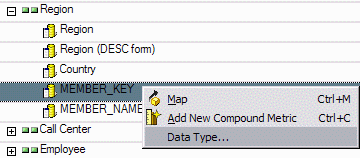
 

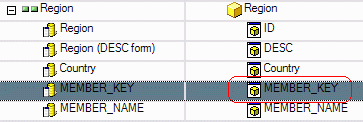
  • Identify the "member property" in the cube containing the numeric key data. (A member property is similar to an attribute form in Strategy. The forms of cube attributes imported into Strategy map onto member properties from the cube.) In SAP cubes, this is usually the Key property; in Analysis Services, MEMBER_KEY.
  • Change the data type for this property to the appropriate numeric data type. To do this, go into the MDX Cube Editor by locating the cube in the data source's Data Explorer, right-clicking on it, and choosing "Edit." Then right-click on the column identifier on the left-hand side and choose "Data type." In the dialog box, uncheck the "Use default from source" option and specify the required data type.
ka04W00000148ZUQAY_0EM440000002Ees.gif
  • Ensure that the Key property on the left is mapped onto an attribute form on the right. That is, the corresponding cell on the right should be anything other than "<Unmapped>."
ka04W00000148ZUQAY_0EM440000002Ef6.gif

 
Note: If desired, the Key property can be mapped onto the attribute's ID form. This is typically done when joining multidimensional cube data to relational data in a Report Services Document, but it may also be done here so that the attribute's ID form behaves intuitively. It is also legitimate to map the Key property onto a different attribute form, and then define sorting based on that form. The remainder of this document will map MEMBER_KEY onto the MEMBER_KEY attribute form, and then use this form for sorting.

  • In reports, make sure sorting is defined on the appropriate attribute form. It is also possible to specify this form as the attribute's default sort.

With the sort defined on the numeric MEMBER_KEY attribute form, the attributes appear in the expected order.
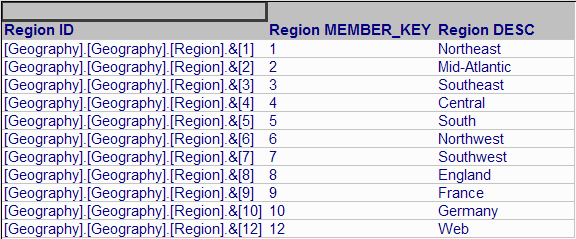
 

ka04W00000148ZUQAY_0EM440000002Eeu.gif

 
Note: When converting data types, a data type conversion error may appear. Consult the following Strategy Knowledgebase document for more information.
 
KB17480: "Cannot convert type for attribute" error appears when running an MDX Cube report in Strategy
Note: When using SAP cubes in Strategy, another option is to mark the dimension to preserve the order of elements from the data source. For more details, consult the Strategy MDXCube Reporting PDF manual, Chapter 3, "Integrating MDX Cubes into Strategy" > Preserving attribute element orders from MDX cube sources.


Comment

0 comments

Details

Knowledge Article

Published:

June 1, 2017

Last Updated:

August 24, 2022