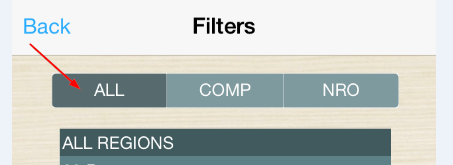
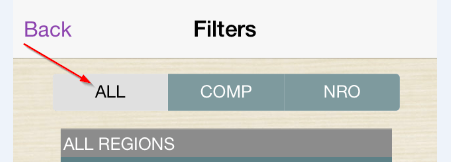
SUMMARY: In iOS mobile app 9.4.1 Update 2, when a user clicks on a button in a button bar selector, the color of the selected button will become a darker version of that button’s fill color. However, this color is always shown as gray regardless of the fill color of the button in mobile app 9.4.1 Update 3.
In Update 2:
In Update 3:
STEPS TO REPRODUCE
CAUSE
This is working by design. Strategy is aware of many issues where users could not distinguish the selected elements from unselected elements when the fill in color is similar to the highlighted color. Thus, the selection color logic for the button bar selector was redesigned in Update 3. In particular, the app will automatically apply the selection color based on the fill in color style. The fill in colors will be divided into two categories, light color and dark color, by the mobile client. If the fill in color is a light color, dark grey will be applied as the selection color. If the fill in color is a dark color, light grey will be applied as the selection color.
WORKAROUND
Select a fill in color for the buttons that is less contrasting to light/dark grey, which is set to be the selection color.
