SUMMARY:
This document describes why there is a discrepancy between Strategy Events and the time needed to successfully complete a time intensive job, such as republication of a large cube. This document provides a workaround so that a user can be notified when the end job is completed.
DESCRIPTION:
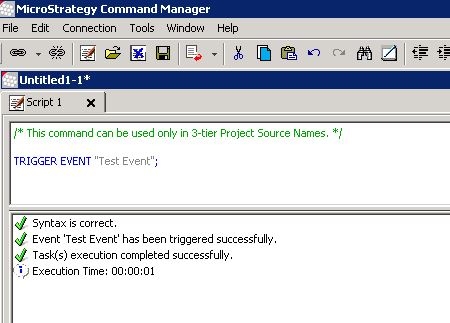
Often times, administrators create events that will trigger the republication of cubes, running reports, etc. However, sometimes instances occur where the task requires a fair amount of time to complete and the administrator needs to know if it completes successfully and at what time it completes. In this case, the event in Strategy Command Manager yields the message “Task execution has been completed successfully” when the cascade of processes has yet to fully complete.
CAUSE:
This is working as intended. The script only contains the first part of the sequence and hence only tracks that piece of information. Strategy Command Manager does not check anything outside of the script to ensure that it successfully completes. In the example above, the script executes and completes successfully because it checks that the event was successfully triggered. This mimics the same behavior seen in Developer.
Workaround:
If a user wants to be informed when the job has been completed, they can make use of email subscriptions that are tied to events after the job. In order to do so, the user will need to create a new event that is not tied to the publication of the cube, but instead tied to an email subscription. Then, they would run the script to publish the cube and then trigger the event that will send e-mail subscription
PUBLISH INTELLIGENT CUBE "Intelligent_Cube_Name" IN FOLDER "\Public Objects" FOR PROJECT "Project_Name";
TRIGGER EVENT "New Email Subscription Event";
