EducationSoftwareStrategy.com
StrategyCommunity

Knowledge Base

Product

Community

Knowledge Base

TopicsBrowse ArticlesDeveloper Zone

Product

Download SoftwareProduct DocumentationSecurity Hub

Education

Tutorial VideosSolution GalleryEducation courses

Community

GuidelinesGrandmastersEvents
x_social-icon_white.svglinkedin_social-icon_white.svg
Strategy logoCommunity

© Strategy Inc. All Rights Reserved.

LegalTerms of UsePrivacy Policy
  1. Home
  2. Topics

KB249645: The default Percent contribution value in the tooltip of a Pie chart in Visual Insight displays a different value than the derived metric Percent to Grand Total in MicroStrategy Web 9.4.1


Community Admin

• Strategy


The default value in a Pie Chart, in Visual Insight, for percent contribution, displays a different value than the derived metric, Percent to Grand Total

SUMMARY:
This Technical Note describes how in Strategy Web 9.4.1, the default value in a Pie Chart, in Visual Insight, for percent contribution, displays a different value than the derived metric, Percent to Grand Total.
 
SYMPTOM:
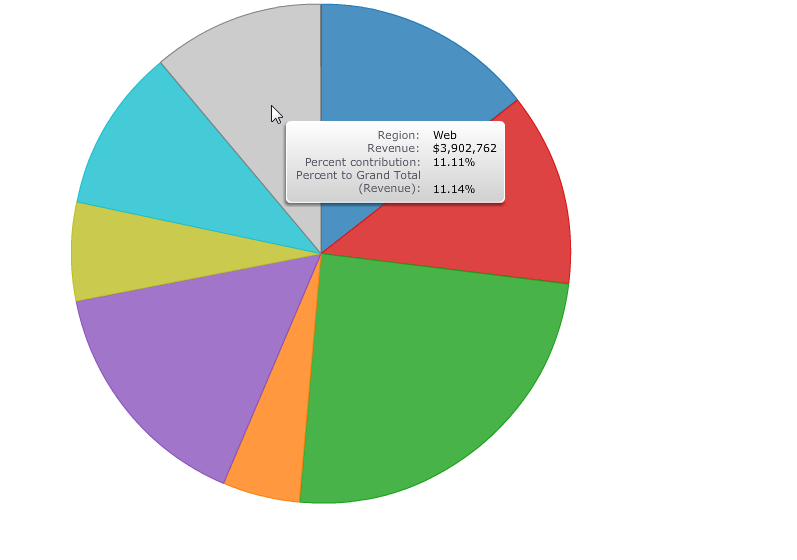
In Strategy Web 9.4 1, users have the ability to insert a percent to total metric on the fly in Visual Insight. When a user chooses a pie graph as visualization, it automatically gives the user a percent to contribution calculation in a tooltip, when hovering over different slices. If a user inserts a Percent to Grand Total metric, it will display differently than the default percent contribution amount, as shown below:
 

ka04W000001MKqqQAG_0EM4400000025ck.jpeg

Note how the Percent contribution displays 11.11% and the Percent to Grand Total displays 11.14%.
STEPS TO REPRODUCE:
  • Navigate to Strategy Tutorial Project > Shared Reports > Strategy Platform Capabilities > Advanced Reporting Guide, and run the 01 Basic Report. 
  • Convert this report into a Visual Insight Dashboard.
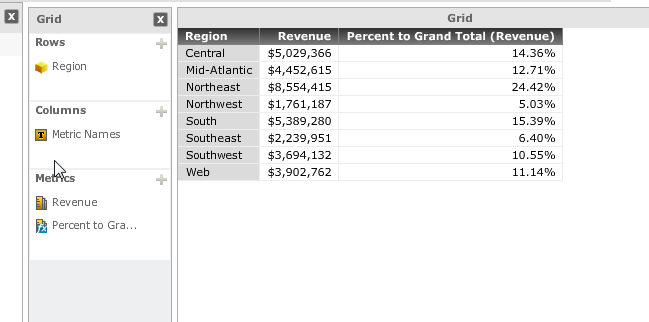
  • Choose Grid as visualization, then add Region and Revenue to the row and column respectively.
  • Add A Percent to Grand Total on the Revenue metric, as shown below.
ka04W000001MKqqQAG_0EM4400000025cb.jpeg
  • Change the visualization to the pie chart.
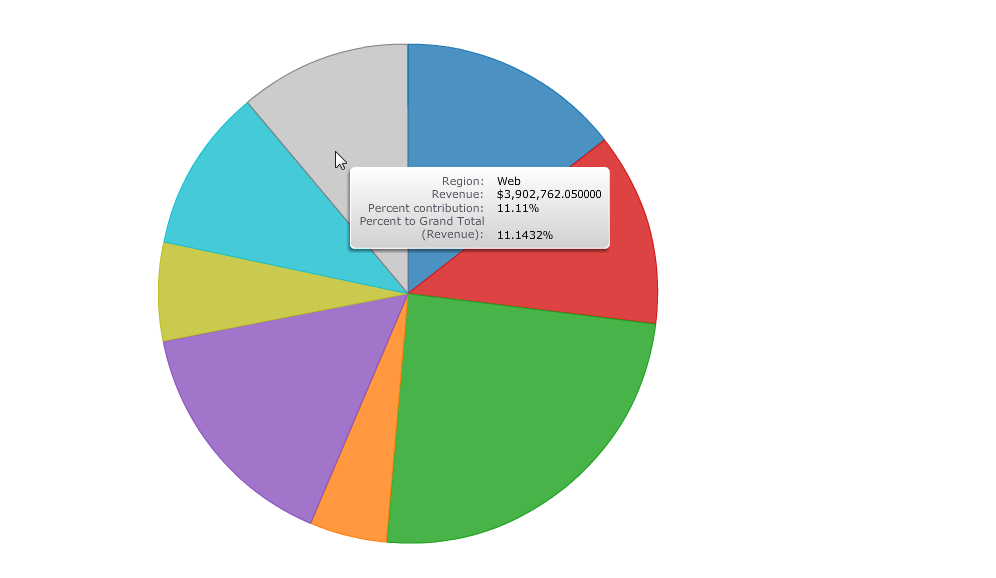
  • Hover the mouse over any slice and observe how, in the tooltip, the Percent to Contribution and Percent to grand total do not match.
  • Now, increase decimal places for the Percent to grand total metric. See the image below how they still do not match:
ka04W000001MKqqQAG_0EM4400000025cU.jpeg

 
CAUSE:
This is an identified defect in Strategy Web 9.4.1.
 
ACTION:
Currently this issue is still being reviewed for feasibility by our Technology team and it is not scoped for any upcoming scheduled Strategy release.


Comment

0 comments

Details

Knowledge Article

Published:

April 5, 2017

Last Updated:

April 5, 2017