EducationSoftwareStrategy.com
StrategyCommunity

Knowledge Base

Product

Community

Knowledge Base

TopicsBrowse ArticlesDeveloper Zone

Product

Download SoftwareProduct DocumentationSecurity Hub

Education

Tutorial VideosSolution GalleryEducation courses

Community

GuidelinesGrandmastersEvents
x_social-icon_white.svglinkedin_social-icon_white.svg
Strategy logoCommunity

© Strategy Inc. All Rights Reserved.

LegalTerms of UsePrivacy Policy
  1. Home
  2. Topics

KB251023: During data import, namespace are not displayed for Impala 2.x in MicroStrategy Secure Analytics Enterprise 10.0


Community Admin

• Strategy


This issue has been classified as a defect by MicroStrategy. The impact is limited to Impala 2.x datasource. A code fix for this issue is available in MicroStrategy 10.0 Hotfix 1. Additional steps are needed to upgrade the database instance to apply the fix.

SYMPTOM:
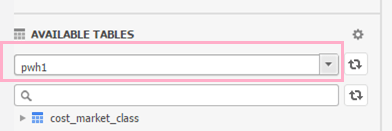
In Strategy 10.0, if users connect to an Impala 1.x database during data import, the namespace are displayed on the GUI. However, when using Impala 2.x, the namespace are not displayed as shown below:
Impala 2.x
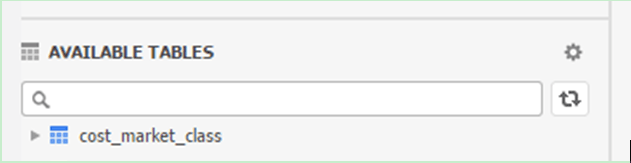
ka04W000000Oeg6QAC_0EM4400000025d0.jpeg

Impala 1.x

ka04W000000Oeg6QAC_0EM4400000025d2.jpeg

 
CAUSE:
This is a known issue in Strategy 10.0 GA
ACTION:
This issue has been fixed In Strategy 10.0 Hotfix 1. Upgrade to this version to take advantage of the fix.
NOTE: Database connection type needs to be upgraded manually to apply the fix.
Follow the steps below to upgrade database instance:
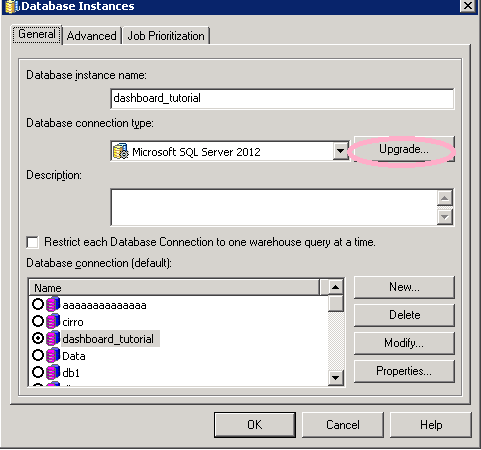
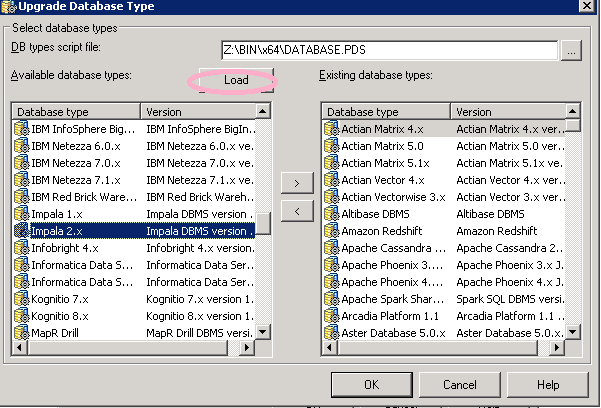
  • On Strategy Developer, navigate to “Administration”-> “Configuration Managers”->”Database Instances”
  • Double click any one of the database instances and click “Upgrade”
ka04W000000Oeg6QAC_0EM4400000025cp.jpeg
  • In “DBtypes script file”, user can see the PDS file ”\\Common Files\ Strategy\Database.PDS”.
     
  • Click “Load” to load all database types
ka04W000000Oeg6QAC_0EM4400000025cy.jpeg
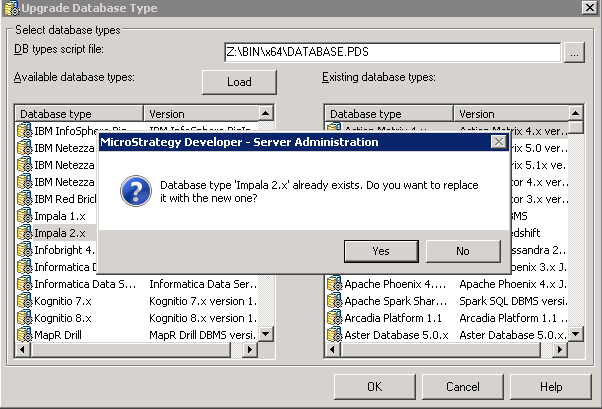
  • Choose “Impala 2.x” and then click “>” to add it to existing database types.
  • Click “Yes” to replace the existing one.
ka04W000000Oeg6QAC_0EM4400000025cr.jpeg
  • Click “OK” to save the changes.

The Strategy internal reference number for this issue is DE14759. 


Comment

0 comments

Details

Knowledge Article

Published:

June 8, 2017

Last Updated:

June 8, 2017