EducationSoftwareStrategy.com
StrategyCommunity

Knowledge Base

Product

Community

Knowledge Base

TopicsBrowse ArticlesDeveloper Zone

Product

Download SoftwareProduct DocumentationSecurity Hub

Education

Tutorial VideosSolution GalleryEducation courses

Community

GuidelinesGrandmastersEvents
x_social-icon_white.svglinkedin_social-icon_white.svg
Strategy logoCommunity

© Strategy Inc. All Rights Reserved.

LegalTerms of UsePrivacy Policy
  1. Home
  2. Topics

KB263490: Selecting "(All search results)" on a Search box filter only shows 50 results in Visual Insight in MicroStrategy Web 10.x.


Community Admin

• Strategy


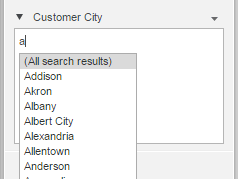
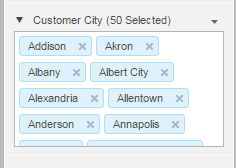
In MicroStrategy Web 10.x, when typing into a search box filter in Visual Insight, the option "(All search results)" appears. However, when this option is selected, only the first 50 results are displayed, even when there should be more than 50 results

SYMPTOM:
In Strategy Web 10.x, when typing into a search box filter in Visual Insight, the option "(All search results)" appears, as shown below.
 

ka04W000000OgiPQAS_0EM4400000025ZC.jpeg

However, when this option is selected, only the first 50 results are displayed, even when there should be more than 50 results, as shown below:
ka04W000000OgiPQAS_0EM4400000025Z6.jpeg

 
STEPS TO REPRODUCE:
Follow these steps in a Strategy Tutorial project.

  1. Create a report containing the attributes Customer Region, Customer City, and the metric Cost.
  2. Add the report to a Visual Insight dashboard.
  3. Add the attributes and metric to a grid.
  4. Insert a search box filter for Customer City.
  5. Type in the letter 'a' in the search box.
  6. Select "(All search results)" from the dropdown.
  7. Only 50 of the search results are displayed.

 
CAUSE:
This is working as designed in Strategy Web 10.x. The "(All search results)" option was designed to select the available elements from the search result. For example, searching for "ale" returns 12 different customer cities. Selecting "(All search results)" selects all 12 of them. When only one letter has been typed in, the search box filter only retrieves the first 50 matches to the search criteria typed in initially. Thus only those first 50 elements are selected, even though there might be more matching results. A request has been logged to address this issue. 
 
ACTION:
Currently this issue is still being reviewed for feasibility by our Technology team and it is not scoped for any upcoming scheduled Strategy release.
 
The Strategy Internal Reference Number for the issue discussed in this technical note is US30737.


Comment

0 comments

Details

Knowledge Article

Published:

June 12, 2017

Last Updated:

June 12, 2017