EducationSoftwareStrategy.com
StrategyCommunity

Knowledge Base

Product

Community

Knowledge Base

TopicsBrowse ArticlesDeveloper Zone

Product

Download SoftwareProduct DocumentationSecurity Hub

Education

Tutorial VideosSolution GalleryEducation courses

Community

GuidelinesGrandmastersEvents
x_social-icon_white.svglinkedin_social-icon_white.svg
Strategy logoCommunity

© Strategy Inc. All Rights Reserved.

LegalTerms of UsePrivacy Policy
  1. Home
  2. Topics

KB309712: In MicroStrategy Web, the Excel export date format appears inconsistent with German regional settings


Community Admin

• Strategy


In Strategy Web, the Excel export date format appears inconsistent when regional settings on the client machine are set to German.
 
STEPS TO REPRODUCE:
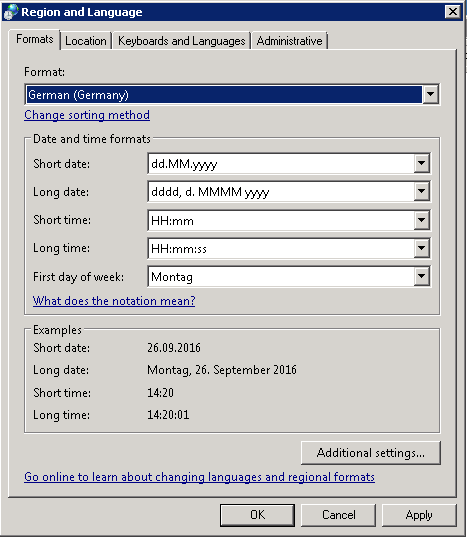
  • Set Regional and Language settings on client machine to German, see screenshot below:
ka04W000000OfrhQAC_0EM4400000025Qx.jpeg
  • Web preferences languages set to English US or to default but browser is English US language
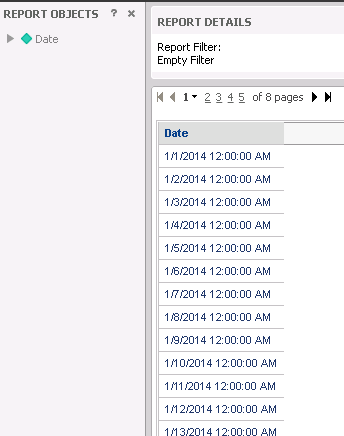
  • Create a report with the Attribute Day, where the formatting is set to default
    Note: When setting formatting to date or custom format the issue as shown in the screenshot below, will be observed as well
ka04W000000OfrhQAC_0EM4400000025RB.jpeg
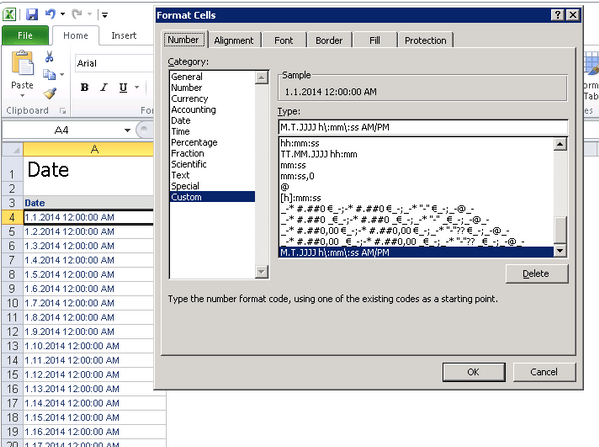
  • As indicated in the screenshot below, when exporting to Excel the format of the cell is set to: Custom M.T.JJJJ h\:mm\:ss AM/PM:
ka04W000000OfrhQAC_0EM4400000025R1.jpeg

 
CAUSE:
This is a limitation of Microsoft Excel. It is confirmed that the output of the Strategy Exporting Engine is with correct format, e.g., 1/1/2001, but Microsoft Excel changes the format when displaying  it.The number format depends on the Regional and Language setting of the machine the user opens the Excel file on. When the region is changed from English(United States) to German(Germany), the default separator is changed from "/" to ".". 
 
ACTION:
As a workaround the separator for Short date in the Region and Language setting could be changed. This can be accomplished with the following steps: 

  1. Open Region and Language panel from the Control Panel.
  2. Click "Additional Settings" and go to "Date" tab.
  3. Type e.g. "dd/MM/yy" in the input box of Short date.


Comment

0 comments

Details

Knowledge Article

Published:

June 13, 2017

Last Updated:

June 13, 2022