SYMPTOM
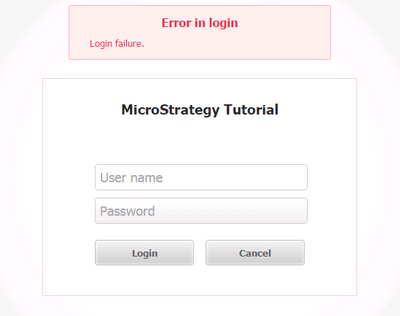
When a disabled users try to log into Strategy Web, in versions 10.2 or later, they receive the error message shown below:
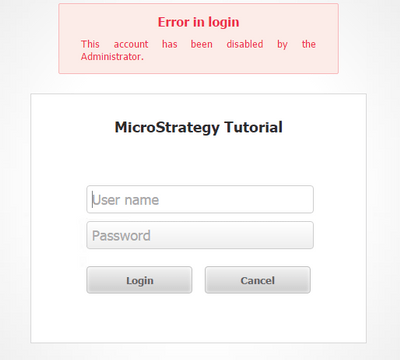
In earlier versions of Strategy, when disabled users try to log into Strategy Web, the error message shown below appears:
CAUSE
This behavior is by default and expected. The error message was changed in Strategy 10.2 due to security reasons. It was determined that the "account has been disabled" error messages exposes the fact that the credentials were valid. An attacker can then try the same credentials on other systems or wait until the account is no longer disabled.
ACTION
Using Strategy SDK, error messages displayed in Strategy Web can be customized. The error code "-2147216965" can be modified to have the message the user desires. Please refer to MicroStrategy SDK documentation on customizing error messages.
ADDITIONAL INFORMATION:
The Strategy SDK allows you to customize the standard Strategy Web interface, and extend and integrate the Strategy business intelligence functionality into other applications. However, before changing the way Strategy Web products look or behave, it is helpful to understand how the application is built. For more information regarding the Strategy Web architecture or the process of customizing Strategy Web, please refer to MicroStrategy Developer Hub.
To access the Strategy Developer Hub, you must have access to the Strategy Knowledge Base, you must have purchased the Strategy SDK, and you must be current on your Strategy maintenance agreement. If you are a US-based business and believe that you satisfy all three of these conditions but you do not have access to the Strategy Developer Hub, please contact Strategy Technical Support at support@microstrategy.com or at (703) 848-8700. If you are an international business, please contact Strategy Technical Support at the appropriate email address or phone number found at http://www.microstrategy.com/Support/ContactUs.asp.
CUSTOMIZATION WARNING:
This customization is provided as a convenience to Strategy users and is only directly applicable to the version stated. While this code may apply to other releases directly, Strategy Technical Support makes no guarantees that the code provided will apply to any future or previous builds. In the event of a code change in future builds, Strategy Technical Support makes no guarantee that an updated version of this particular customization will be provided. In the event of a code change in future builds, Strategy may not be able to provide additional code on this matter even though this customization is provided at this time for this specific build. For enhancements to this customization or to incorporate similar functionality into other versions, contact your Account Executive to inquire about Strategy Consulting assistance.
