EducationSoftwareStrategy.com
StrategyCommunity

Knowledge Base

Product

Community

Knowledge Base

TopicsBrowse ArticlesDeveloper Zone

Product

Download SoftwareProduct DocumentationSecurity Hub

Education

Tutorial VideosSolution GalleryEducation courses

Community

GuidelinesGrandmastersEvents
x_social-icon_white.svglinkedin_social-icon_white.svg
Strategy logoCommunity

© Strategy Inc. All Rights Reserved.

LegalTerms of UsePrivacy Policy
  1. Home
  2. Topics

KB319974: Autostyle for number format does not apply to a metric in MicroStrategy Developer 10.x


Stefan Zepeda

Salesforce Solutions Architect • Strategy


Autostyle does not apply to a metric for number format in MicroStrategy Developer 10.x

SYMPTOM:
Autostyle does not apply to a metric for number format in Strategy Developer 10.x
When users format cells for a metric on the report grid and save it as autostyle, then apply it to a grid on the new report, the format of autostyle does not apply to the metric. 
 
Below is the steps:
1. Format cells for number.
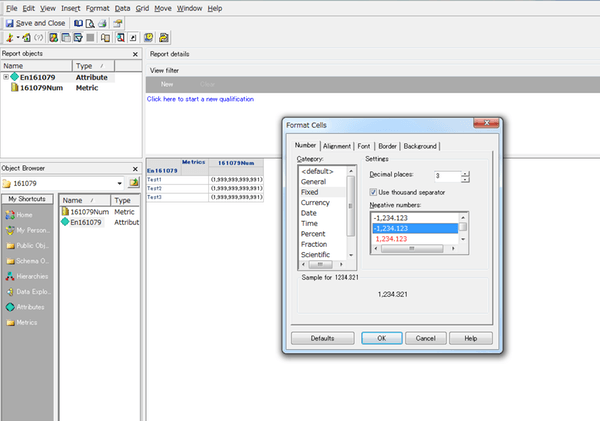
ka02R000000kaXOQAY_0EM440000002Bzo.jpeg

 
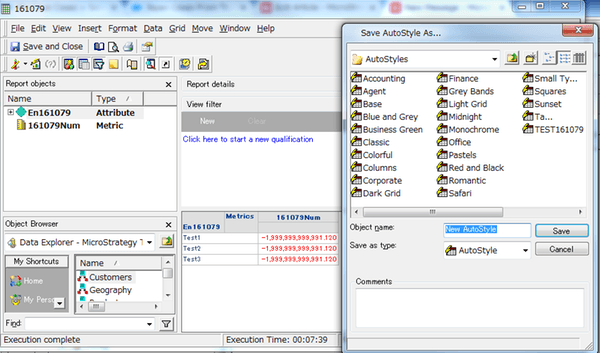
2. Save as new autostyle.

ka02R000000kaXOQAY_0EM440000002Bzp.jpeg

 
3. Create a new blank report.
4. Locate the attribute and the metric. Apply the autostyle created in the above by Menu: Grid > AutoStyle Selected. Users will notice the autostyle does not apply to the metric.
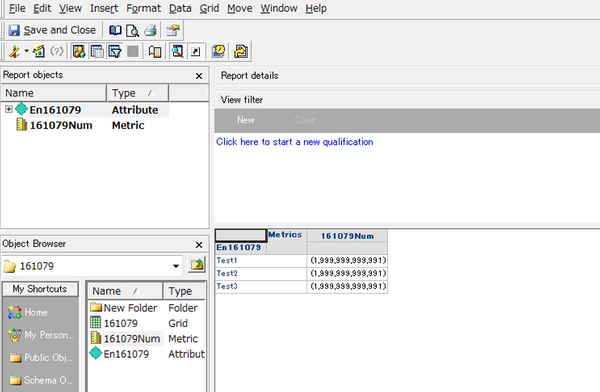
ka02R000000kaXOQAY_0EM440000002Bzr.jpeg

 
CAUSE:
This is working as designed. Autostyles do not include number formatting. Numbers are usually formatted at a different level, such as the metric level. Retaining the report-level format allows your selected number format to remain. For more information, please see product manual Advanced Reporting.


Comment

0 comments

Details

Knowledge Article

Published:

April 14, 2017

Last Updated:

April 14, 2017