EducationSoftwareStrategy.com
StrategyCommunity

Knowledge Base

Product

Community

Knowledge Base

TopicsBrowse ArticlesDeveloper Zone

Product

Download SoftwareProduct DocumentationSecurity Hub

Education

Tutorial VideosSolution GalleryEducation courses

Community

GuidelinesGrandmastersEvents
x_social-icon_white.svglinkedin_social-icon_white.svg
Strategy logoCommunity

© Strategy Inc. All Rights Reserved.

LegalTerms of UsePrivacy Policy
  1. Home
  2. Topics

KB320789: In MicroStrategy 10.4, caches are being hit in a DEV environment when created in PROD in mobile device.


Community Admin

• Strategy


This Technical note addresses an issue when 2 MicroStrategy 10.4 environments that have the same project, report and document GUIDs run the same report from the mobile application, from each connection and returns the same data for both reports. An example of when this situation would occur is when Production and Development have the same project/report/document GUIDs.

SUMMARY:
This Technical note addresses an issue when 2 Strategy 10.4 environments that have the same project, report and document GUIDs run the same report from the mobile application, from each connection and returns the same data for both reports. An example of when this situation would occur is when Production and Development have the same project/report/document GUIDs.
 
SYMPTOM:
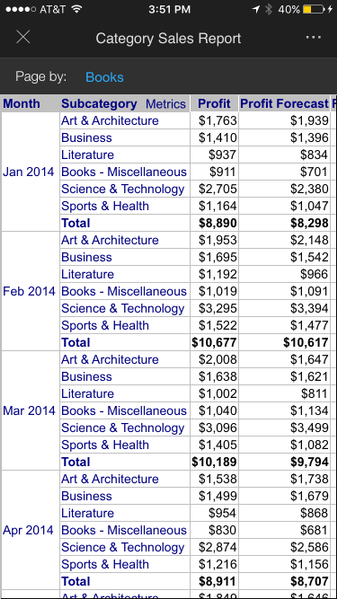
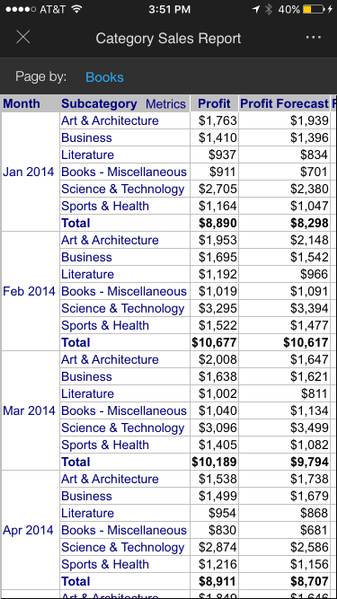
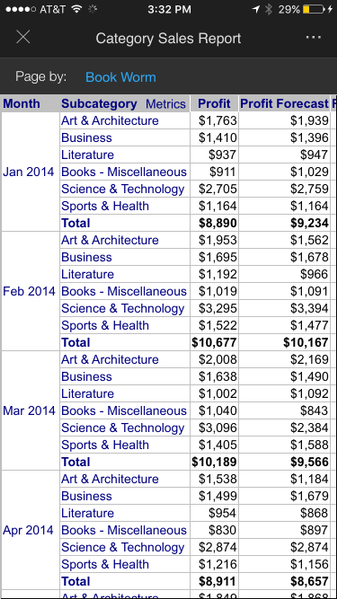
When connected to two environments (PROD and DEV) in the Strategy Mobile application, after running a report in PROD, running the same report with the same GUID from DEV returns the same data as from PROD.
PROD Results:
 

ka04W000000Ohf3QAC_0EM4400000029nG.jpeg

 
DEV Results:
 

ka04W000000Ohf3QAC_0EM4400000029nC.jpeg

STEPS TO REPRODUCE:
 
Requirement: These steps only apply if the projects and the reports/documents have the same GUID between the two environments.
 

  1. In Tutorial Data, make a change to the LU_CATEGORY table by replacing on of the elements with a new category option. Save the changes.
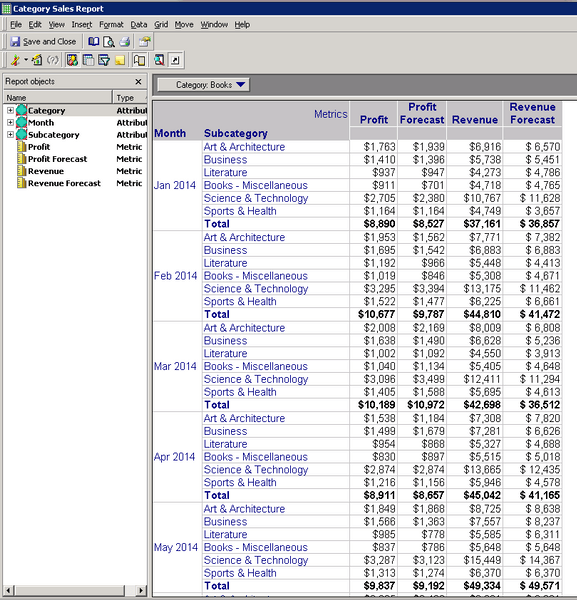
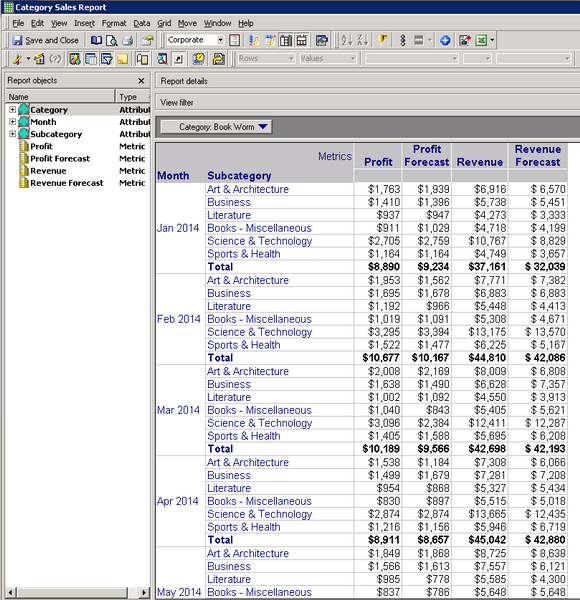
  2. Run the report Shared Reports -> Business Roles -> Category Managers -> Category Sales Report in PROD and DEV in Developer. In PROD, Books is in the page-by. In DEV, “Book Worm” is in the page-by. This is the expected data from each environment.

 
PROD:
 

ka04W000000Ohf3QAC_0EM4400000029nE.jpeg

 
DEV:
 

ka04W000000Ohf3QAC_0EM4400000029n6.jpeg
  1. In the mobile application, connect to PROD and DEV environments.
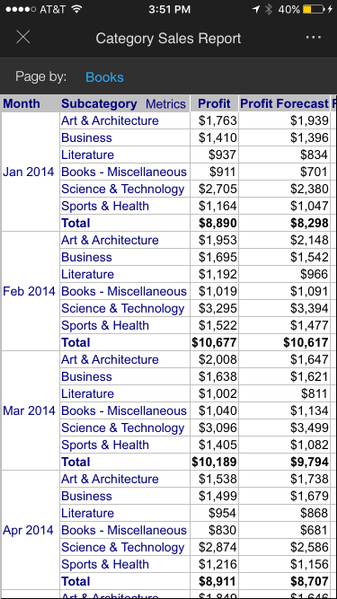
  2. Run Category Sales Report from PROD. Notice “Books” is in the page-by.


ka04W000000Ohf3QAC_0EM4400000029n8.jpeg
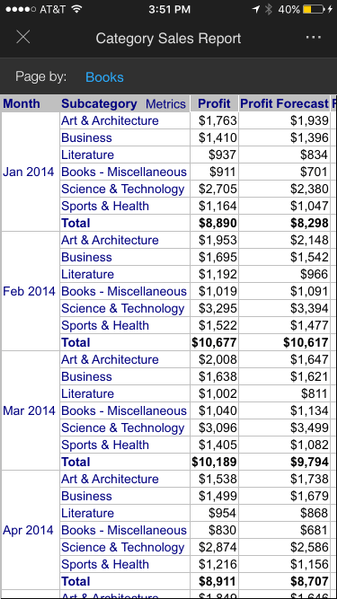
  1. Run Category Sales Report from DEV. Notice “Books” is still in the page-by and not “Book Worm”. The mobile device cache doesn’t take into account what environment you are connected to.


ka04W000000Ohf3QAC_0EM4400000029nK.jpeg

 
CAUSE:
This is an identified defect and has been logged to our Technology team. The device app cache does not take into account the connection information.
 
ACTION:
Strategy will continue to investigate and post updates as soon as they are available.
 
WORKAROUND:
In the mobile application settings, select the option to “Clear Cached Data” before connecting to a new environment. Rerun the report from DEV and the correct data will be displayed.
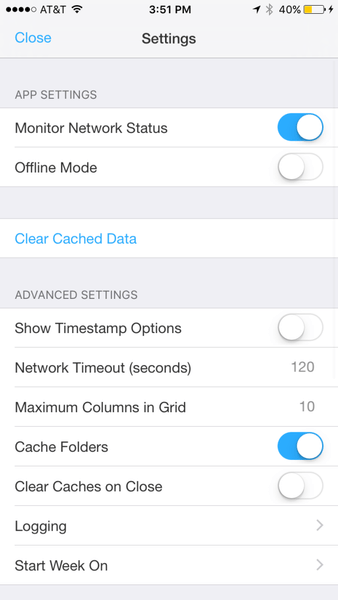
  

ka04W000000Ohf3QAC_0EM4400000029nA.jpeg


ka04W000000Ohf3QAC_0EM4400000029nP.jpeg


Comment

0 comments

Details

Knowledge Article

Published:

April 28, 2017

Last Updated:

April 28, 2017