EducationSoftwareStrategy.com
StrategyCommunity

Knowledge Base

Product

Community

Knowledge Base

TopicsBrowse ArticlesDeveloper Zone

Product

Download SoftwareProduct DocumentationSecurity Hub

Education

Tutorial VideosSolution GalleryEducation courses

Community

GuidelinesGrandmastersEvents
x_social-icon_white.svglinkedin_social-icon_white.svg
Strategy logoCommunity

© Strategy Inc. All Rights Reserved.

LegalTerms of UsePrivacy Policy
  1. Home
  2. Topics

KB33462: Subtotals across level are displayed at the bottom of the of the grid report instead of distributed under each attribute element in MicroStrategy Developer 9.4.x-10.x


Stefan Zepeda

Salesforce Solutions Architect • Strategy


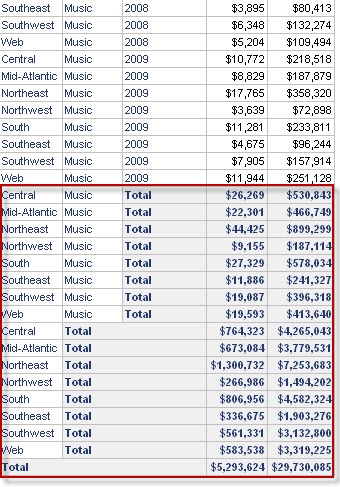
In certain reports, users may notice that subtotals defined across level are not  broken by attribute element in a grid report in MicroStrategy Developer 9.4.x-10.x and are instead displayed at the bottom of the page

SYMPTOM:
In certain reports, users may notice that subtotals defined across level are not  broken by attribute element in a grid report in Strategy Developer 9.4.x-10.x and are instead displayed at the bottom of the page as shown in the image below:
ka02R000000kaR0QAI_0EM440000002E3i.jpeg


CAUSE:
This behavior is observed because of the way in which the Advanced Sorting is defined in the report.  The subtotals are arranged in the observed way to preserve the sorting order.
 
 
ACTION:
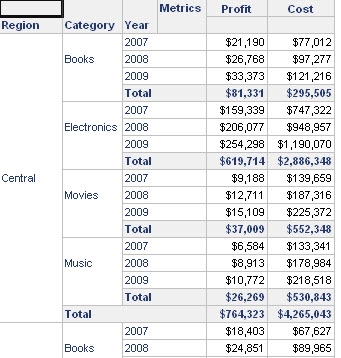
Make sure that the placing of the attributes on the template is consistent with the order defined in the advanced sorting options to display the subtotals in the expected position as shown in the image below.
ka02R000000kaR0QAI_0EM440000002E3l.jpeg

Comment

0 comments

Details

Knowledge Article

Published:

April 24, 2017

Last Updated:

April 24, 2017