EducationSoftwareStrategy.com
StrategyCommunity

Knowledge Base

Product

Community

Knowledge Base

TopicsBrowse ArticlesDeveloper Zone

Product

Download SoftwareProduct DocumentationSecurity Hub

Education

Tutorial VideosSolution GalleryEducation courses

Community

GuidelinesGrandmastersEvents
x_social-icon_white.svglinkedin_social-icon_white.svg
Strategy logoCommunity

© Strategy Inc. All Rights Reserved.

LegalTerms of UsePrivacy Policy
  1. Home
  2. Topics

KB39823: New Feature in 9.3.0 MicroStrategy Web: Export Single Grid/Graph off a Dashboard


Community Admin

• Strategy


starting In 9.3.0 user can now export individual grids or graphs from within your dashboard in a single click. Previously a user would be required to export the entire dashboard to PDF or Microsoft Excel. This feature gives users added control and granularity when sharing or printing data as it only exports the current instance of the user’s grid or graph

In 9.3.0 user can now export individual grids or graphs from within your dashboard in a single click. Previously a user would be required to export the entire dashboard to PDF or Microsoft Excel. This feature gives users added control and granularity when sharing or printing data as it only exports the current instance of the user’s grid or graph.
 
This feature can be accessed from Strategy Web Express View Mode and Flash View Mode for documents.
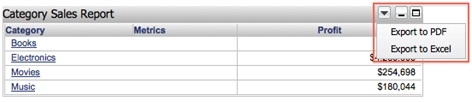
  • In Express View Mode, the grid or graph object must have the Title Bar enabled.
  • The upside-down triangle context menu contains the two options and selecting either will result in an immediate export, with no further prompting or dialog.
ka04W000000OehOQAS_0EM4400000027CD.jpeg


  • In Flash View Mode this feature will be available regardless of the Title Bar being displayed. The option is available on mouse over.
  • Widgets will be exported as a grid or a graph, just the same as if you exported the entire document.

Comment

0 comments

Details

Knowledge Article

Published:

June 7, 2017

Last Updated:

June 7, 2017