EducationSoftwareStrategy.com
StrategyCommunity

Knowledge Base

Product

Community

Knowledge Base

TopicsBrowse ArticlesDeveloper Zone

Product

Download SoftwareProduct DocumentationSecurity Hub

Education

Tutorial VideosSolution GalleryEducation courses

Community

GuidelinesGrandmastersEvents
x_social-icon_white.svglinkedin_social-icon_white.svg
Strategy logoCommunity

© Strategy Inc. All Rights Reserved.

LegalTerms of UsePrivacy Policy
  1. Home
  2. Topics

KB409589: No values are displayed when "Show by default" is used in Transaction Services in MicroStrategy Mobile 9.3.x and 9.4.1 Update 1


Community Admin

• Strategy


No values are displayed when "Show by default" is used in Transaction Services in MicroStrategy Mobile 9.3.x and 9.4.1 Update 1

SYMPTOM:
Users can specify different input styles for different types of controls for a Transaction. The control style of type "list" can be configured as manual input type. Tech note KB39788 describes an issue with this type of control where the labels for each value will not be displayed. It also goes on to describe a workaround where enabling the option "Show by default" and changing the grid's width mode from 'fixed' to 'fit to content' would fix the issue. However, this workaround does not seem to work in Strategy Mobile 9.3.0.
  
STEPS TO REPRODUCE
  • Create a transaction report for the Region attribute.
  • Create a report with the Region attribute and a metric.
  • Insert it into a document and create a grid object based on that dataset.
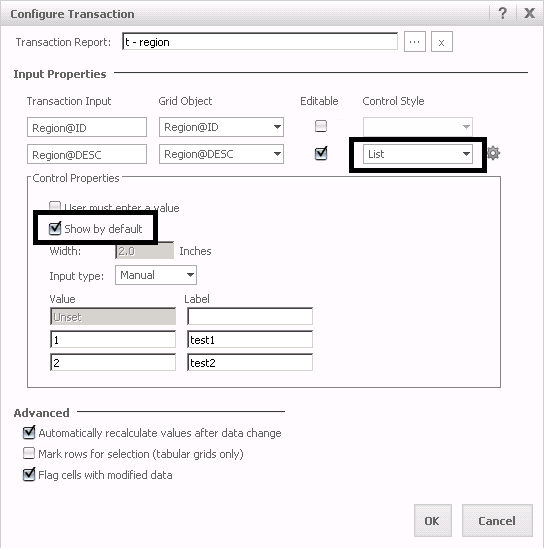
  • Right-click on the grid object and select Configure Transaction.
  • Specify the Transaction Input and click on Control Properties.
  • Configure the transaction as shown below:
ka04W000000OacjQAC_0EM440000002A7m.png
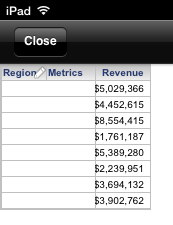
  • Run this Transaction Document on an iPad and notice no values are displayed as seen below:
ka04W000000OacjQAC_0EM440000002A7k.png

CAUSE:
This is a known issue with Transaction Services in Strategy Mobile 9.3.0.
 
ACTION:
This issue has been fixed in Strategy 9.4.1 Update 2. Please upgrade your product in order to take advantage of the fix.
 
 
KB409589


Comment

0 comments

Details

Knowledge Article

Published:

June 13, 2017

Last Updated:

December 31, 2018