EducationSoftwareStrategy.com
StrategyCommunity

Knowledge Base

Product

Community

Knowledge Base

TopicsBrowse ArticlesDeveloper Zone

Product

Download SoftwareProduct DocumentationSecurity Hub

Education

Tutorial VideosSolution GalleryEducation courses

Community

GuidelinesGrandmastersEvents
x_social-icon_white.svglinkedin_social-icon_white.svg
Strategy logoCommunity

© Strategy Inc. All Rights Reserved.

LegalTerms of UsePrivacy Policy
  1. Home
  2. Topics

KB42460: Users cannot choose "Display Mode" and "Shape File" in Image Layout widget properties in Internet Explorer 8 or 9 when compatibility mode is turned on in MicroStrategy Web 9.x


Community Admin

• Strategy


Users cannot choose "Display Mode" and "Shape File" in Image Layout widget properties in Internet Explorer 8 or 9 when compatibility mode is turned on in MicroStrategy Web 9.x

SYMPTOM:
 
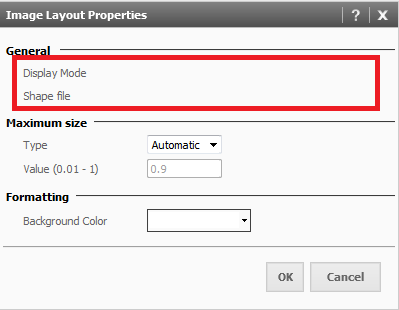
When a user adds an image layout widget to a document in Strategy Web 9.x, the widget properties should enable the user to choose a 'Display Mode' and 'Shape File' for the widget. When using Strategy Web 9.x in Internet Explorer 8 or 9 with compatibility mode turned on, there is no option to choose the 'Display Mode' or 'Shape File' in the Image Layout properties, the dropdowns do not exist like shown below.
 

ka04W000000OdtsQAC_0EM4400000026qj.png


STEPS TO REPRODUCE:
 
Follow these steps in Strategy Tutorial to reproduce:
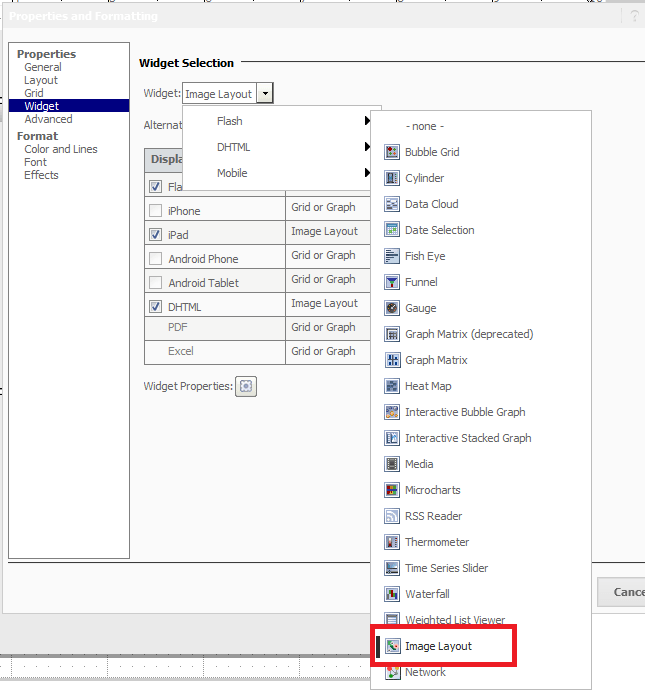
  • Create a report with 'Customer State' in the rows and 'Revenue' in the columns in Internet Explorer 8 or 9 with compatibility mode turned on.
  • Add the report as a grid to a new document.
  • Right click the grid, go to 'Properties and Formatting', click 'Widget', choose 'Flash', and configure the grid to be an Image Layout widget, as shown below:
     
ka04W000000OdtsQAC_0EM4400000026qh.png
  • Still in 'Properties and Formatting, under 'Widget', click on 'Widget Properties'.
  • Notice that under 'General', the words 'Display Mode' and 'Shape File' appear, but the dropdowns to choose which mode and file is desired are missing, as shown below:
     
ka04W000000OdtsQAC_0EM4400000026qj.png

 
CAUSE:
 
This is working as designed. Compatibility mode for Internet Explorer is not supported in Strategy Web 9.3.0.
 
ACTION:
 
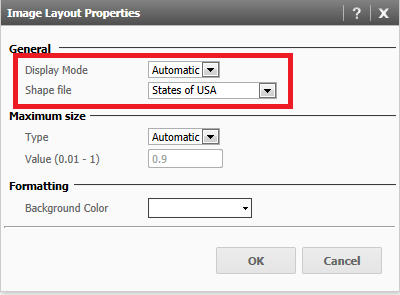
Turn off compatibility mode in Internet Explorer by going to Tools > Compatibility View. Once this is done, the 'Display Mode' and 'Shape File' of the widget will be able to be selected, as shown below:
 

ka04W000000OdtsQAC_0EM4400000026qn.png


Comment

0 comments

Details

Knowledge Article

Published:

June 15, 2017

Last Updated:

June 15, 2017