SYMPTOM:
When upgrading a metadata in Strategy Configuration Wizard in a DB2 UDB database to 10.x, a user receives the following error:
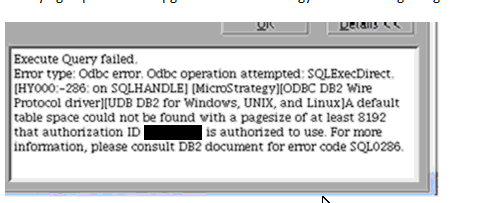
A Default table space count not be found with a pagesize of at least 8192 that authorization ID '' is authorized to use.
This will be seen right after starting the upgrade SQL in Strategy Configuration Wizard.
CAUSE:
This is caused by lack of Temporay Table Space in DB2 UDB.
ACTION:
This can be resolved by creating a user temp table space with a page size of 8kb or larger. Consult Database Administrator to make the change accordingly.
Third Party Software Installation WARNING
The third-party product(s) discussed in this technical note is manufactured by vendors independent of Strategy. Strategy makes no warranty, express, implied or otherwise, regarding this product, including its performance or reliability.
