EducationSoftwareStrategy.com
StrategyCommunity

Knowledge Base

Product

Community

Knowledge Base

TopicsBrowse ArticlesDeveloper Zone

Product

Download SoftwareProduct DocumentationSecurity Hub

Education

Tutorial VideosSolution GalleryEducation courses

Community

GuidelinesGrandmastersEvents
x_social-icon_white.svglinkedin_social-icon_white.svg
Strategy logoCommunity

© Strategy Inc. All Rights Reserved.

LegalTerms of UsePrivacy Policy
  1. Home
  2. Topics

KB438698: After revoking the Web use view filter editor privilege, the Edit View Filter option still appears in a document in presentation mode in Web 10.x


Community Admin

• Strategy


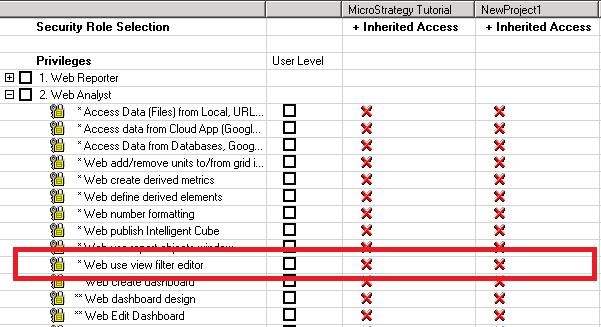
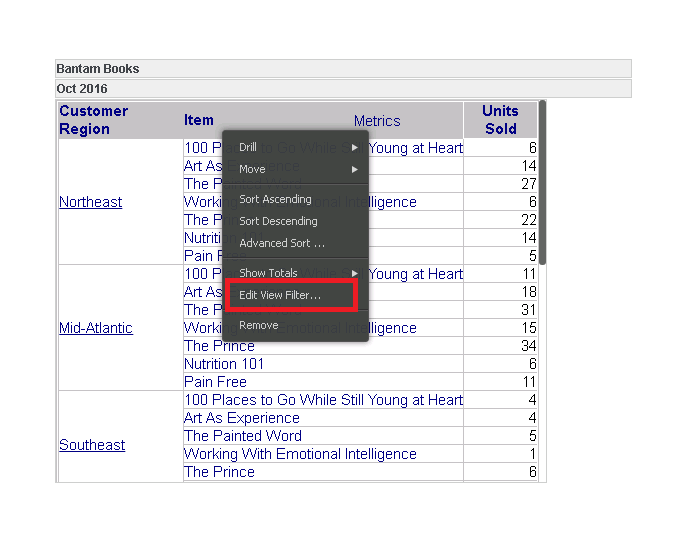
This article describes an issue where The Edit View Filter option still appears when right clicking a grid in a document in presentation mode in MicroStrategy Web 10.x, even though the Web use view filter editor privilege has been revoked

SUMMARY
This article describes an issue where The Edit View Filter option still appears when right clicking a grid in a document in presentation mode in Strategy Web 10.x, even though the Web use view filter editor privilege has been revoked
SYMPTOM
ka04W000000ObQuQAK_0EM44000000Q0Ov.png
ka04W000000ObQuQAK_0EM44000000Q0P0.png

STEPS TO REPRODUCE

  1. Create a user with privileges to run a document.
  2. Revoke the Web use view filter editor privilege under Web Analyst
  3. Go into Strategy Web and run a document the user has permissions to.
  4. Right click the grid and you will find that the Edit View filter option is gone from Design mode and editable mode
  5. Go to presentation mode
  6. Right click the grid and Edit view filter still appears even though the privilege has been revoked.

CAUSE
This is a known issue with Strategy Web 10.x
ACTION
This issue has been address in Strategy 10.8. Upgrade to Strategy 10.8 to take advantage of the fix.
  KB438698


Comment

0 comments

Details

Knowledge Article

Published:

September 29, 2017

Last Updated:

December 6, 2018