SYMPTOM:
In Strategy 10.x, transformations are not applied to metrics if the transformation attribute is not directly available in the report. When the transformation attribute is not present, the SQL engine ignores the transformation when aggregating or filtering.
STEPS TO REPRODUCE:
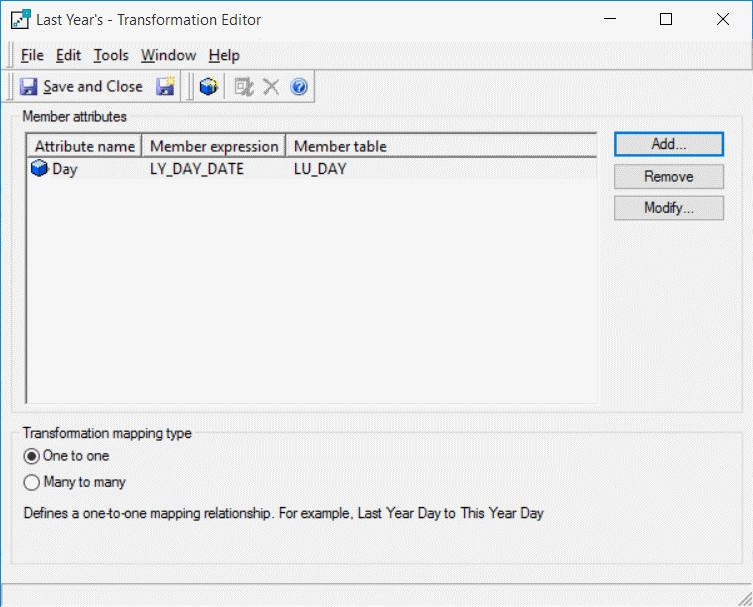
1) Create a Last Year transformation on the Day attribute
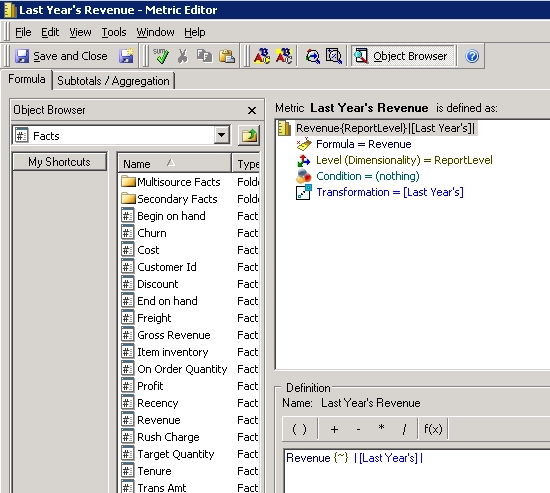
2) Create a "Last Year Revenue" metric containing the Last Year transformation
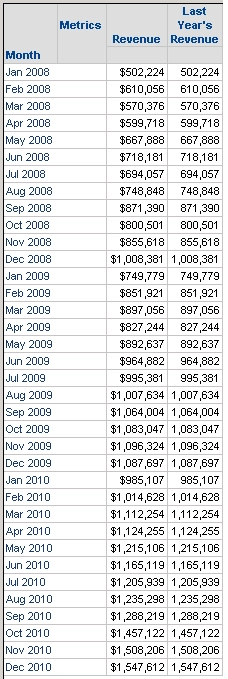
3) Create a report with Month, Revenue and Last Year's Revenue
4) Run the Report and notice that both the metrics return the same value because the transformation is not applied to Last Year's Revenue metric.
SQL:
create table TPNTHS4DWMD000 nologging as
select a11.MONTH_ID MONTH_ID_INT,
sum(a11.TOT_DOLLAR_SALES) Revenue,
sum(a11.TOT_DOLLAR_SALES) LASTYEARREVENUE
from MNTH_CATEGORY_SLS a11
group by a11.MONTH_ID
select pa12.MONTH_ID_INT MONTH_ID_INT,
a13.MONTH_DESC MONTH_DESC,
pa12.Revenue Revenue,
pa12.DE76904LASTYEARREVENUE DE76904LASTYEARREVENUE
from TPNTHS4DWMD000 pa12
join LU_MONTH a13
on (pa12.MONTH_ID_INT = a13.MONTH_ID)
drop table TPNTHS4DWMD000 purge
CAUSE:
This is a known defect in Strategy 10.x. The transformation could not be applied because the level in the transformation is not in the report; However, Strategy should join down from Month to Day to apply the transformation.
ACTION:
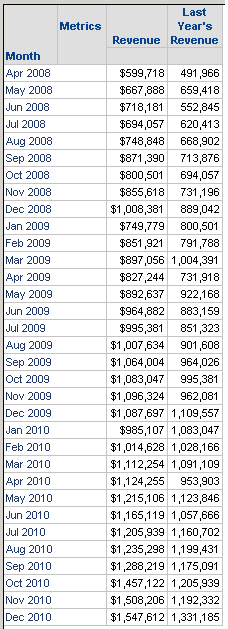
This issue has been fixed in Strategy 10.11. Now, the transformation is applied to Last Year's Revenue even if Day is not used in the report.
SQL:
create table T6GWXRINIMD000 nologging as
select a11.MONTH_ID MONTH_ID_INT,
sum(a11.TOT_DOLLAR_SALES) Revenue
from MNTH_CATEGORY_SLS a11
group by a11.MONTH_ID
create table TW6GVRETAMD001 nologging as
select a12.MONTH_ID MONTH_ID_INT,
sum(a11.TOT_DOLLAR_SALES) DE76904LASTYEARREVENUE
from DAY_CTR_SLS a11
join LU_DAY a12
on (a11.DAY_DATE = a12.LQ_DAY_DATE)
group by a12.MONTH_ID
select pa11.MONTH_ID_INT MONTH_ID_INT,
a13.MONTH_DESC MONTH_DESC,
pa11.Revenue Revenue,
pa12.DE76904LASTYEARREVENUE DE76904LASTYEARREVENUE
from T6GWXRINIMD000 pa11
join TW6GVRETAMD001 pa12
on (pa11.MONTH_ID_INT = pa12.MONTH_ID_INT)
join LU_MONTH a13
on (pa11.MONTH_ID_INT = a13.MONTH_ID)
drop table T6GWXRINIMD000 purge
drop table TW6GVRETAMD001 purge
If you are upgrading to Strategy 11.0 or above, to pick up the fix, enable project level setting "Data Engine Version" to 11. This property can only be enabled through Workstation. For more details on enabling the setting, refer to Change Data Engine Version.
If you are upgrading to Strategy 10.9 / 10.10 / 10.11: To pick up the fix, enable the Feature Flag "Defect fixes that may impact Data, SQL, MDX, CSI" within the Web Preferences -> Project Defaults. For more details on enabling Feature Flags refer to What are the Feature Flag options and what do they accomplish in MicroStrategy Web 10.8 and up. Starting Strategy 11.0, this Feature Flag is removed and replaced with project level setting called "Data Engine Version".
WORKAROUND:
1) Add Day into the report objects for the report that needs the transformation applied
OR
2) Add the additional attribute from the hierarchy into the transformation object (Month, Quarter, Year). With this, the transformation could be applied directly to Month which exists in the original report.
Strategy reference numbers for this technical note are KB439674 and DE76904.
