SYMPTOM:
In various versions of Strategy 10.x (including Strategy 11.0), users may encounter an issue where report/document execution fails due to a misinterpreted SQL statement in the Report Pre Statement VLDB properties. For example, adding the below statement to a report's Report Pre Statement 5 VLDB properties will cause the report to fail.
/*call dbe_macro_fed.sp_upd_sortiment_leistung('!u');*/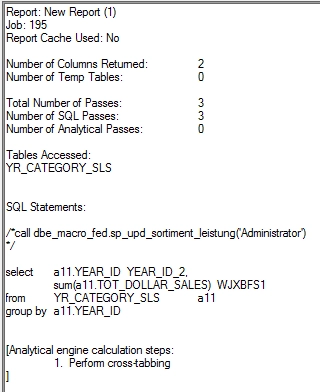
STEP TO REPRODUCE:
1. In Strategy tutorial, create a simple report with the Year attribute and Revenue metric
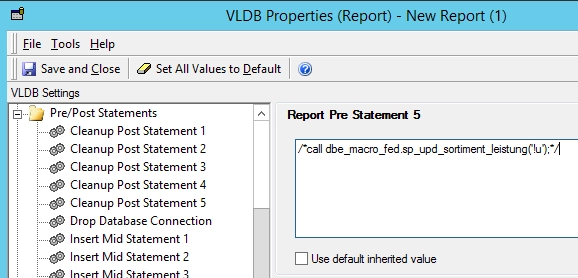
2. Navigate to Data > VLDB Properties > Pre/Post Statements > Report Pre Statement 5 > Uncheck the 'use default inherited value'.
3. Add the following SQL statement" '/*call dbe_macro_fed.sp_upd_sortiment_leistung('!u');*/'
4. Save and close the changes.
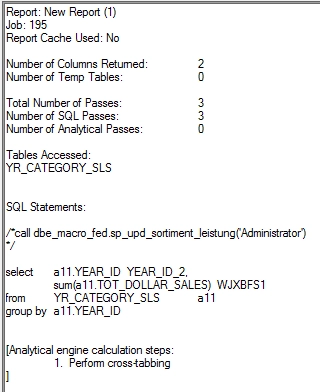
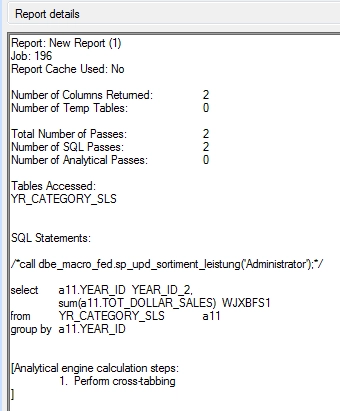
5. View report SQL, notice the line break before the semi-colon in the Report Pre Statement.
CAUSE:
This is an expected behavior. Statement 5 in the Report Pre Statement VLDB properties is special statement which can be used to specify multiple SQL statements separated by a semi-colon (;). Therefore, a single semicolon is considered as a statement separator in Report Pre Statement 5.
ACTION:
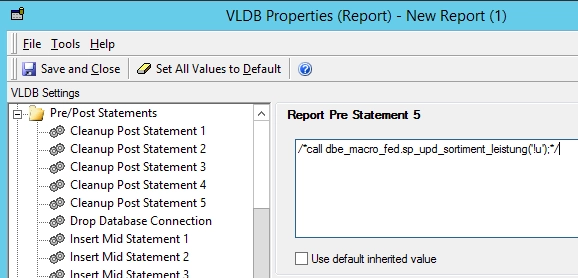
In order to use a semicolon in the Report Pre Statement 5 VLDB properties, user will need to use double semi-colons instead ';;' (without the quotes) as a single semicolon is considered as a statement separator.
Strategy reference numbers for this technical note are KB441521 and DE98043.
