Starting with the release of Strategy ONE (March 2024), dossiers are also known as dashboards.
SYMPTOM
The visualization data changes when the Data Access mode of an Intelligent Cube is changed from In-Memory to Live mode.
STEPS TO REPRODUCE
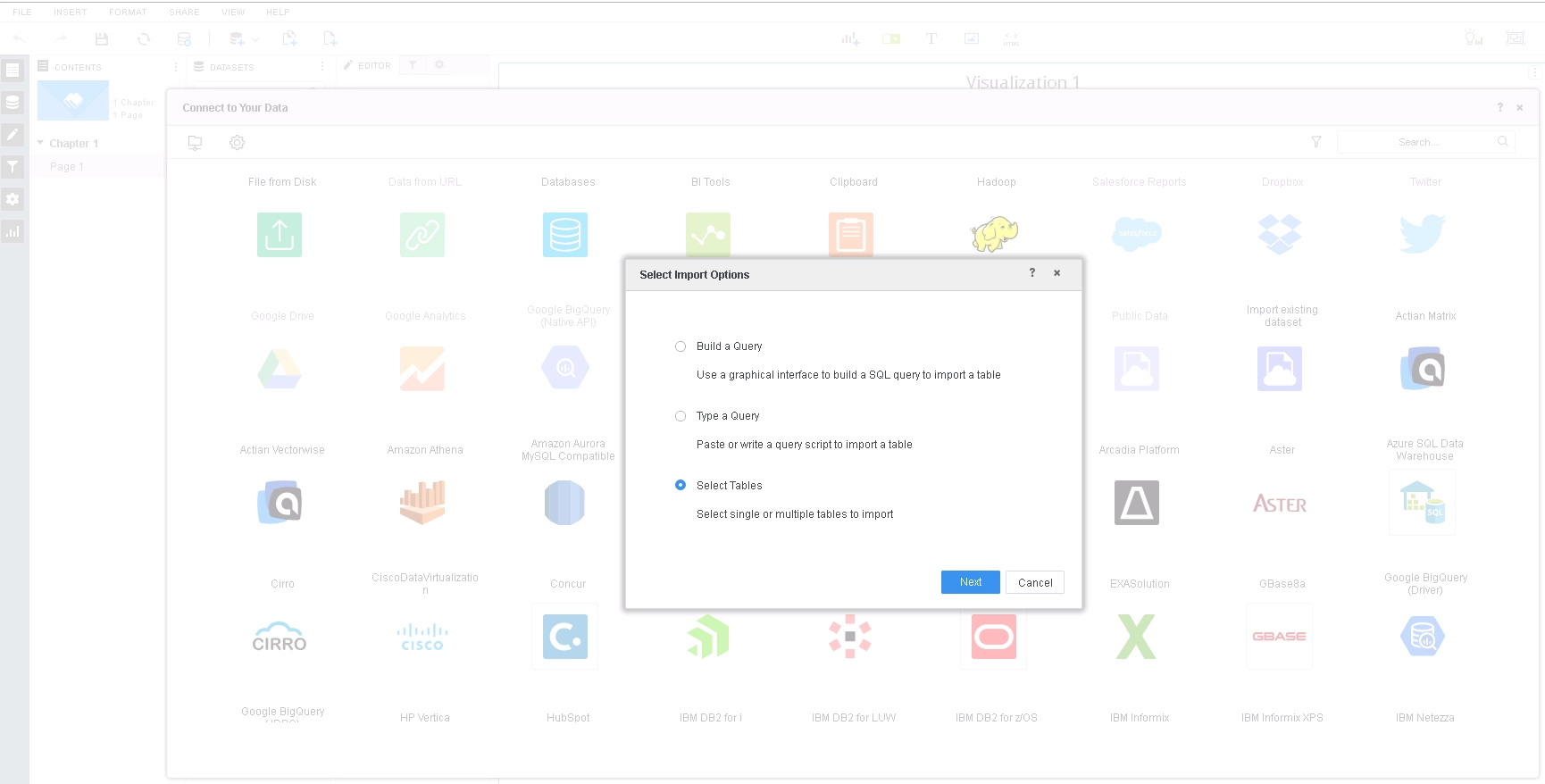
1. In Strategy Web, create a new Dossier > New Data > Databases > Select Tables.
2. Add ORDER_DETAIL (this tables comes with Strategy Tutorial WH) and click Prepare Data.
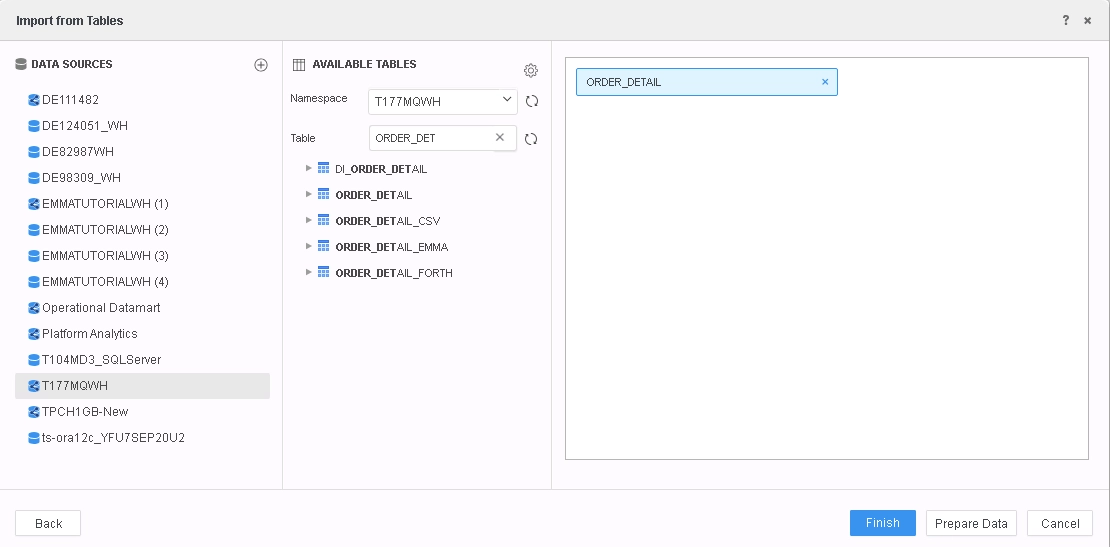
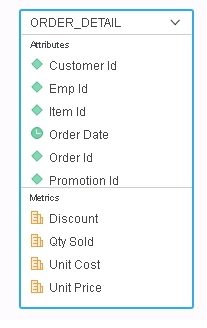
3. There are no relationships created between the attributes by default. Click Finish.
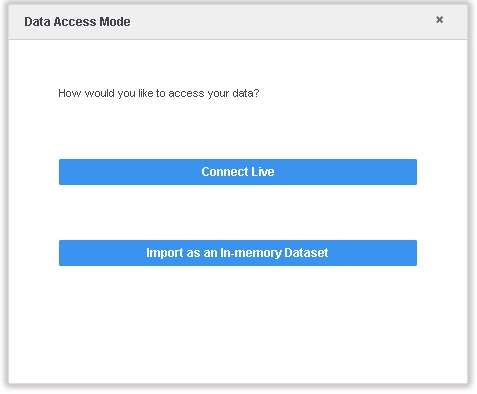
4. Select "Import as an In-memory Dataset".
5. Add "Customer Id" to filter and select an element of this attribute and then add "Emp Id" to visualization. Note that the "Customer Id" filter is applied to "Emp Id" even if they are not related attributes. However, it is intuitive to apply the filter using ORDER_DETAILS table because they exist in the same user uploaded table.
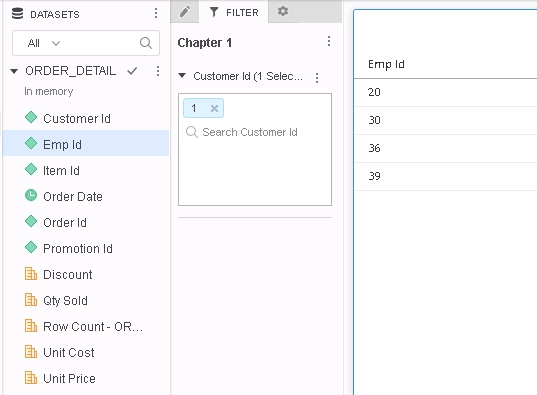
Query Details also explains that the filter is indeed applied, in blue below.
*********   Visualization Summary Start  **********
Time Spent: 0.061 sec(s)
Query Execution Start Time: 2/25/2019 4:26:27 PM
Query Execution End Time: 2/25/2019 4:26:27 PM

Note: The total 'Time Spent' above may be greater than the summation of the individual step execution times below.
There are preparation tasks for each step that are not individually measured.
*********   Visualization Summary End    **********


************   Individual Step Start   ************
Number of Rows Returned: 4
Time Spent: 0.061 sec(s)
Query Execution Start Time: 2/25/2019 4:26:27 PM
Query Execution End Time: 2/25/2019 4:26:27 PM

Tables Accessed:
Table6	[F_ORDER_DETAILF9F6C7C3169268BE7CD1713337888743]:	Promotion Id, Emp Id, Item Id, Order Date, Customer Id, Order Id, 	Row Count - ORDER_DETAIL, Qty Sold, Unit Price, Unit Cost, Discount, 	FACT_TABLE

select	[Emp Id]@[EMP_ID]
from	ORDER_DETAIL
with Table Join Tree: 	[F_ORDER_DETAILF9F6C7C3169268BE7CD1713337888743]<[Customer Id]@[CUSTOMER_ID] in (1)>
************   Individual Step End     ************
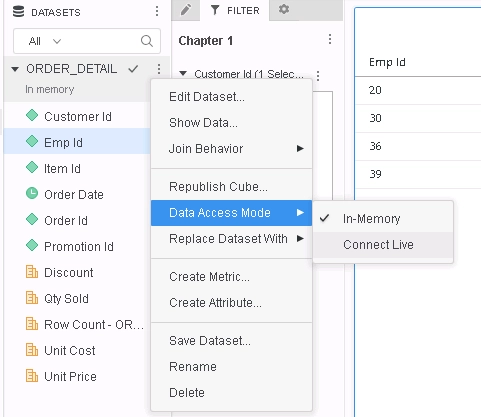
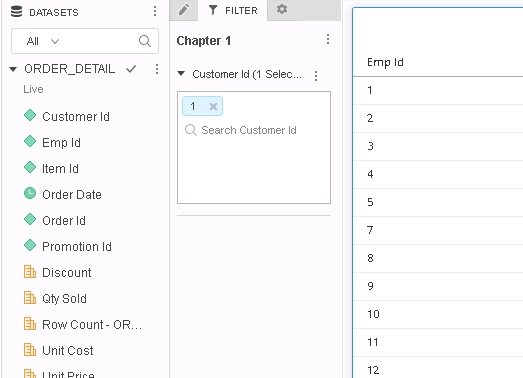
Query Details also explains that the filter is not indeed applied, in red below.
*********   Visualization Summary Start  **********
Time Spent: 0.002 sec(s)
Query Execution Start Time: 2/25/2019 4:31:17 PM
Query Execution End Time: 2/25/2019 4:31:17 PM

Note: The total 'Time Spent' above may be greater than the summation of the individual step execution times below.
There are preparation tasks for each step that are not individually measured.
*********   Visualization Summary End    **********


************   Individual Step Start   ************
Query Engine Execution Start Time:		2/25/2019 4:31:17 PM
Query Engine Execution Finish Time:		2/25/2019 4:31:17 PM

Query Generation Time:		0:00:00.00
Total Elapsed Time In Query Engine:		0:00:00.18
	Sum of Query Execution Time:		0:00:00.00
	Total Data Fetching and Processing Time:		0:00:00.14
		Total Data Transfer from Datasource(s) Time:		0:00:00.14
	Total Analytical Processing Time:		0:00:00.00
	Total Other Processing Time:		0:00:00.02

???		0:00:00.00
???		0:00:00.00
Total Cube Publish Time		0:00:00.00

Number of Rows Returned:		34
Number of Columns Returned:		1
Number of Temp Tables:		0

Total Number of Passes:		2
Number of Datasource Query Passes:		2
Number of Analytical Query Passes:		0

DB User:		T177MQWH
DB Instance:		T177MQWH

Tables Accessed:
ORDER_DETAIL

SQL Statements:

Pass0 - 	Query Pass Start Time:		2/25/2019 4:31:16 PM
	Query Pass End Time:		2/25/2019 4:31:16 PM
	Query Execution:	0:00:00.00
	Data Fetching and Processing:	0:00:00.14
	  Data Transfer from Datasource(s):	0:00:00.14
	Other Processing:	0:00:00.02
	Rows selected: 34
select	distinct a11.EMP_ID  EMP_ID
from	T177MQWH.ORDER_DETAIL	a11

Pass1 - 	Query Pass Start Time:		2/25/2019 4:31:16 PM
	Query Pass End Time:		2/25/2019 4:31:16 PM
	Query Execution:	0:00:00.00
	Data Fetching and Processing:	0:00:00.00
	  Data Transfer from Datasource(s):	0:00:00.00
	Other Processing:	0:00:00.01
[Populate Report Data]

[Analytical engine calculation steps:
	1.  Perform cross-tabbing
]

to  ORDER_DETAIL_0
************   Individual Step End     ************


************   Individual Step Start   ************
Number of Rows Returned: 34
Time Spent: 0.000 sec(s)
Query Execution Start Time: 2/25/2019 4:31:17 PM
Query Execution End Time: 2/25/2019 4:31:17 PM

select	[Emp Id]@[EMP_ID]
from	ORDER_DETAIL_0
************   Individual Step End     ************
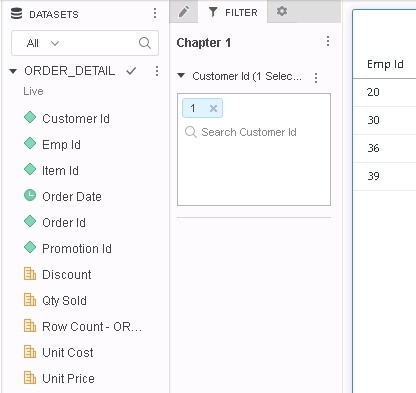
Query Details also explains that the filter is applied, in blue below.
*********   Visualization Summary Start  **********
Time Spent: 0.004 sec(s)
Query Execution Start Time: 2/25/2019 4:38:56 PM
Query Execution End Time: 2/25/2019 4:38:56 PM

Note: The total 'Time Spent' above may be greater than the summation of the individual step execution times below.
There are preparation tasks for each step that are not individually measured.
*********   Visualization Summary End    **********


************   Individual Step Start   ************
Query Engine Execution Start Time:		2/25/2019 4:38:54 PM
Query Engine Execution Finish Time:		2/25/2019 4:38:56 PM

Query Generation Time:		0:00:00.00
Total Elapsed Time In Query Engine:		0:00:02.05
	Sum of Query Execution Time:		0:00:00.01
	Total Data Fetching and Processing Time:		0:00:00.12
		Total Data Transfer from Datasource(s) Time:		0:00:00.12
	Total Analytical Processing Time:		0:00:00.00
	Total Other Processing Time:		0:00:01.89

???		0:00:00.00
???		0:00:00.00
Total Cube Publish Time		0:00:00.00

Number of Rows Returned:		4
Number of Columns Returned:		1
Number of Temp Tables:		0

Total Number of Passes:		2
Number of Datasource Query Passes:		2
Number of Analytical Query Passes:		0

DB User:		T177MQWH
DB Instance:		T177MQWH

Tables Accessed:
ORDER_DETAIL

SQL Statements:

Pass0 - 	Query Pass Start Time:		2/25/2019 4:38:56 PM
	Query Pass End Time:		2/25/2019 4:38:56 PM
	Query Execution:	0:00:00.01
	Data Fetching and Processing:	0:00:00.12
	  Data Transfer from Datasource(s):	0:00:00.12
	Other Processing:	0:00:00.02
	Rows selected: 4
select	distinct a11.EMP_ID  EMP_ID
from	T177MQWH.ORDER_DETAIL	a11
where	a11.CUSTOMER_ID in (1)

Pass1 - 	Query Pass Start Time:		2/25/2019 4:38:56 PM
	Query Pass End Time:		2/25/2019 4:38:56 PM
	Query Execution:	0:00:00.00
	Data Fetching and Processing:	0:00:00.00
	  Data Transfer from Datasource(s):	0:00:00.00
	Other Processing:	0:00:00.00
[Populate Report Data]

[Analytical engine calculation steps:
	1.  Perform cross-tabbing
]

to  ORDER_DETAIL_0
************   Individual Step End     ************


************   Individual Step Start   ************
Number of Rows Returned: 4
Time Spent: 0.001 sec(s)
Query Execution Start Time: 2/25/2019 4:38:56 PM
Query Execution End Time: 2/25/2019 4:38:56 PM

select	[Emp Id]@[EMP_ID]
from	ORDER_DETAIL_0
************   Individual Step End     ************
