Symptom:
This issue is specific to the date/timestamp column when the value from the Warehouse is empty or Null. When the Data Engine Version is set to Version '10' and VLDB Property is on, the empty date/time stamp column will be treated as 0. However, if the Data Engine Version VLDB Property is set to '11' and AE Null Checking VLDB Property is on, the empty date/time stamp column will be treated as 12/31/1899, which is the standard used by Excel.
Steps to Reproduce:
1. Create a Table in your Warehouse with two Date columns.
2. Insert Data into only one of those columns
3. Import the table into Strategy with each column as its own attribute.
4. Create two Derived Metrics from each attribute using the Max function while also changing the formatting to Date named M01 and M02
5. Create a third derived metric that with M01-M02 named M03.
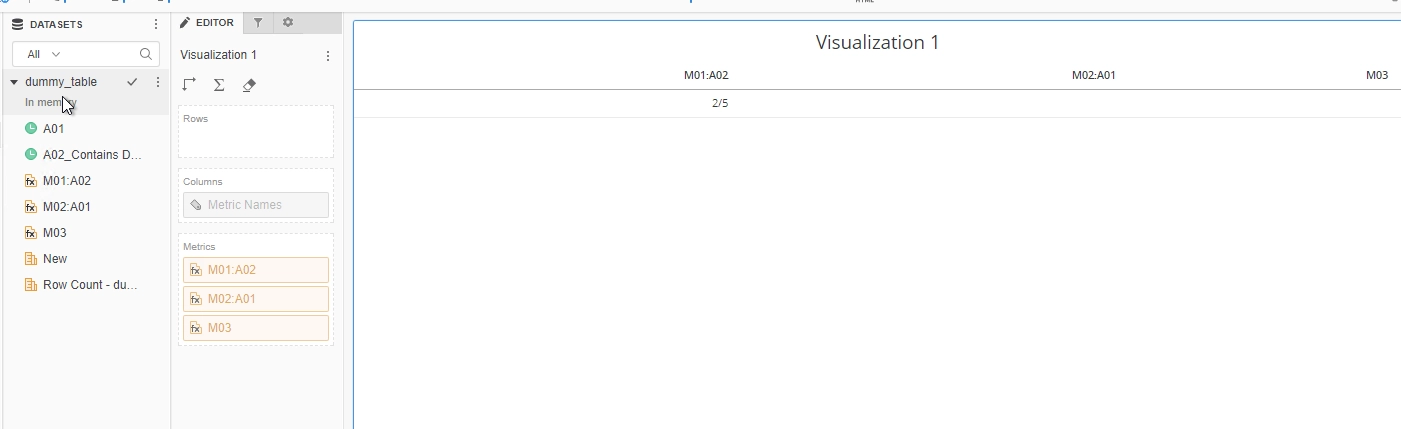
With Data Engine Version set to 10, the value of M03 will be null.
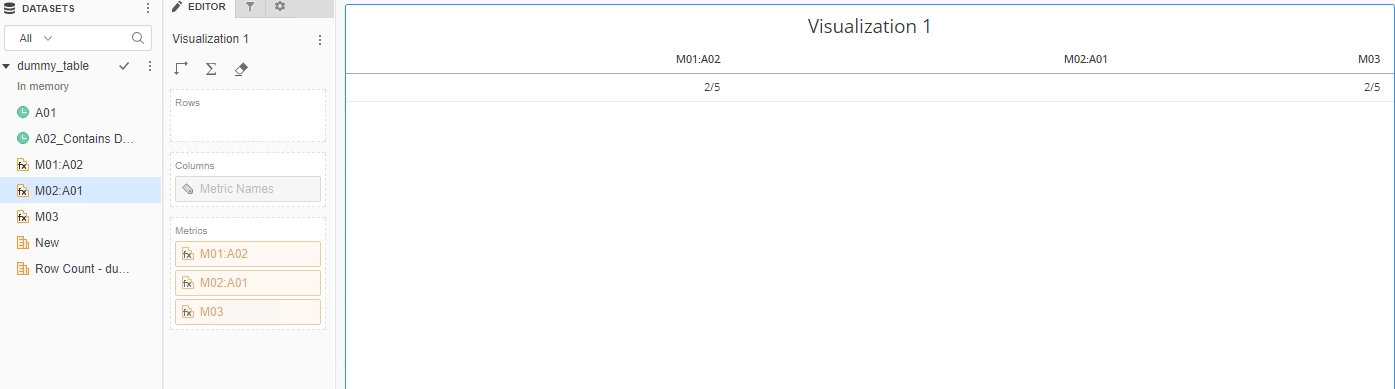
With Data Engine Version set to 11, the M03 will return an actual value because the column with no Warehouse value will be treated as 0 for calculation.
Cause:
This is an enhancement implemented starting in Strategy 2019.
ACTION:
This issue has been fixed in Strategy 2019 or newer version. To pick up the fix, enable project level setting "Data Engine Version" to 11. This property can only be enabled through Workstation. For more details on enabling the setting, refer to Change Data Engine Version.
KB442372
