EducationSoftwareStrategy.com
StrategyCommunity

Knowledge Base

Product

Community

Knowledge Base

TopicsBrowse ArticlesDeveloper Zone

Product

Download SoftwareProduct DocumentationSecurity Hub

Education

Tutorial VideosSolution GalleryEducation courses

Community

GuidelinesGrandmastersEvents
x_social-icon_white.svglinkedin_social-icon_white.svg
Strategy logoCommunity

© Strategy Inc. All Rights Reserved.

LegalTerms of UsePrivacy Policy
  1. Home
  2. Topics

KB44627: "[There is no project to transfer, this could be because all the projects are unloaded, idle or deleted]" error message appears when performing an Enterprise Manager data load in MicroStrategy 9.x


Community Admin

• Strategy


"[There is no project to transfer, this could be because all the projects are unloaded, idle or deleted]" error message appears when performing an Enterprise Manager data load in MicroStrategy 9.x

SYMPTOM:
When performing a data load in Enterprise Manager, the data load fails with the following error in the MSTRMigration.log.
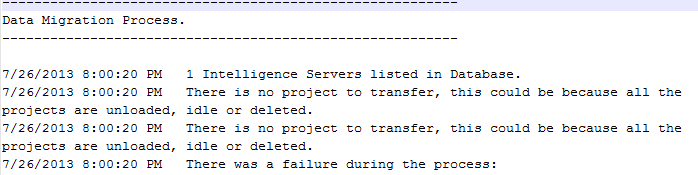
 

ka04W000000Oh3lQAC_0EM4400000029XF.png

 
Sample Code/Error
There is no project to transfer, this could be because all the projects are unloaded, idle or deleted.
 
CAUSE:
 
One possible cause for this error message is that the password for the Administrator user has changed and this change has not been received by the Enterprise Manager console.
 
ACTION:
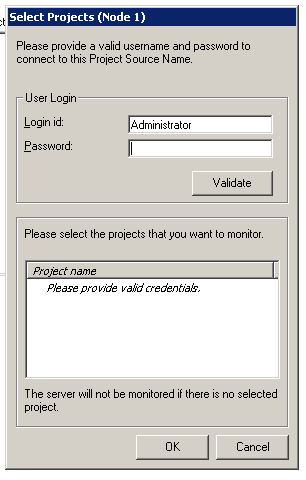
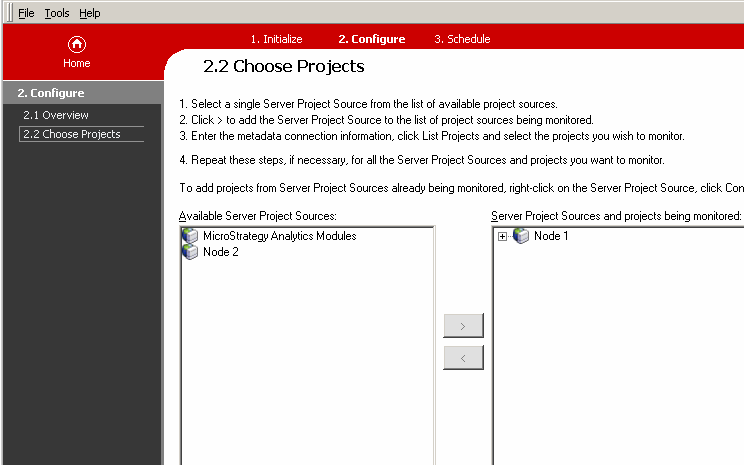
In the Enterprise Manager console, on step "2.2 Choose Projects", move the project source that is being monitored to the left and move it back to the right again. After doing so, correct the password as shown below.
 

ka04W000000Oh3lQAC_0EM4400000029XD.png


ka04W000000Oh3lQAC_0EM4400000029XE.png


Comment

0 comments

Details

Knowledge Article

Published:

June 5, 2017

Last Updated:

June 5, 2017