Some users would like to sort within a threshold. To better illustrate this follow the example below:
1. Create a report with subcategory and revenue on the template.
2. Create a threshold for Revenue to highlight values of 1,000,000 and larger.
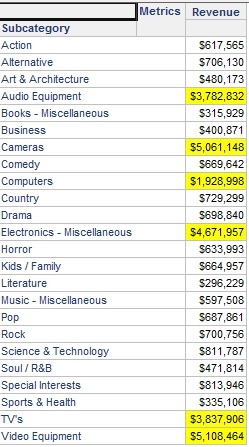
The user wants to sort the elements within that threshold.
1. Create a derived metric with the following definition - Case((Revenue > 1000000), 1, 2). This will display a 1 next to values greater than 1,000,000, and a 2 to all others.
2. Insert the new metric on the grid.
3. In the advanced sorting, set the new metric and then subcategory in ascending order.
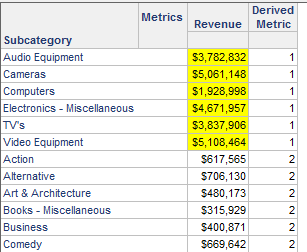
The attribute elements within the threshold are sorted as desired. If the derived metric is not needed on the grid, set its column width to zero.
