EducationSoftwareStrategy.com
StrategyCommunity

Knowledge Base

Product

Community

Knowledge Base

TopicsBrowse ArticlesDeveloper Zone

Product

Download SoftwareProduct DocumentationSecurity Hub

Education

Tutorial VideosSolution GalleryEducation courses

Community

GuidelinesGrandmastersEvents
x_social-icon_white.svglinkedin_social-icon_white.svg
Strategy logoCommunity

© Strategy Inc. All Rights Reserved.

LegalTerms of UsePrivacy Policy
  1. Home
  2. Topics

KB46867: "Unable to establish a connection to the repository" error appears when executing process in MicroStrategy System Manager 9.4.1 against Narrowcast repository


Community Admin

• Strategy


"Unable to establish a connection to the repository" error appears when executing process in MicroStrategy System Manager 9.4.1 against Narrowcast repository

SYMPTOM:
 
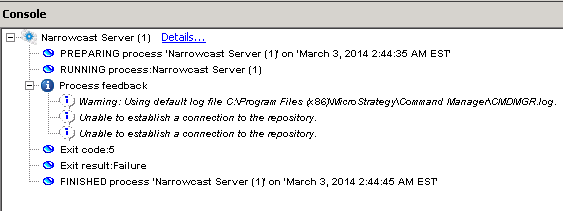
"Unable to establish a connection to the repository" error appears when executing process in Strategy System Manager 9.4.1 against Strategy Narrowcast Server repository as shown below:
 

ka04W000000OhH4QAK_0EM4400000029PI.png


Process feedback
Unable to establish a connection to the repository
Exit code: 5
Exit result: Failure
 
The following steps demonstrate how to reproduce the issue:
1. Create Strategy Narrowcast Server 9.4.1 repository in Oracle database
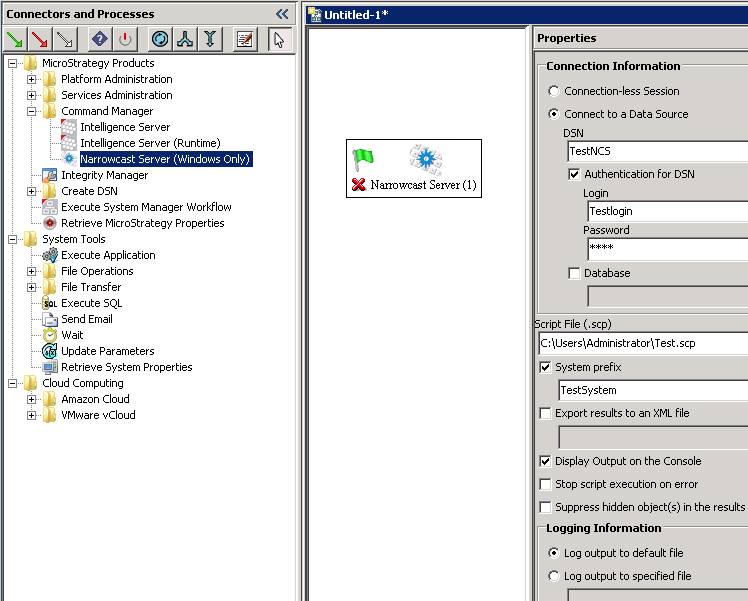
2. In Strategy System Manager 9.4.1, create sample workflow and add process Strategy Products>Command Manager>Narrowcast Server (Windows Only). Enter Data Source Name, database login and password as shown below:
 

ka04W000000OhH4QAK_0EM4400000029PM.png

 
3. Execute the process and error appears. But users can successfully connect to the repository with same login and password in Strategy Command Manager 9.4.1.
 
CAUSE:
 
This is a known issue in Strategy System Manager 9.4.1.
 
ACTION:
Strategy will continue to investigate and post updates as soon as they are available.
 
 
WORKAROUND:
 
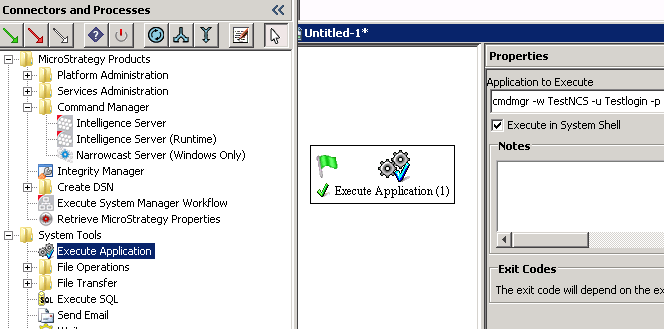
Use the 'Execute Application' process in Strategy System Manager 9.4.1 instead, check “Execute in System Shell” option and enter script as shown below:
 

ka04W000000OhH4QAK_0EM4400000029PK.png


cmdmgr -w TestNCS -u Testlogin -p testpassword -d Databasename -s TestSystem -f "C:\Users\tjiang\Test.scp" –SHOWOUTPUT

 
Note:
 

-w: DSN pointing to narrowcast repository.
-u: Database login
-p: Database password
-d: Database name
-s: System prefix
-f:  Script file path


Comment

0 comments

Details

Knowledge Article

Published:

May 27, 2017

Last Updated:

May 27, 2017