Starting with the release of Strategy ONE (March 2024), dossiers are also known as dashboards.
This issue happens when a dossier uses multiple datasets. Some dossier that used to show data in Data Engine version 10.4, now shows no data after the version is changed to 2019.
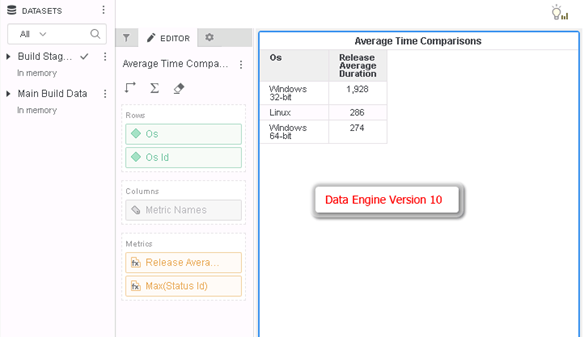
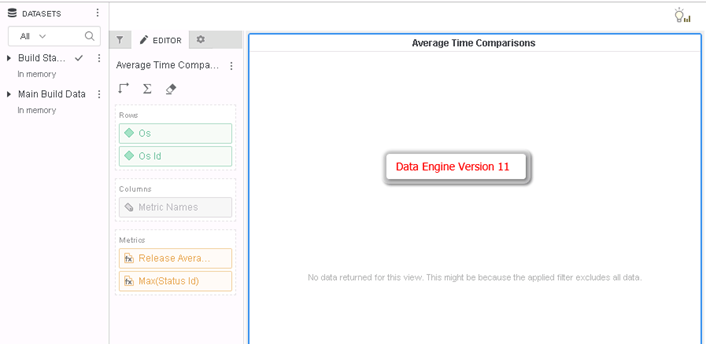
When comparing the query detail between Data Engine version 10 and Data Engine version 11, the symptoms of this change usually include selecting more columns (in blue below) from dataset into the CSI Table Join Tree, for example
Version 10 (correct):
select    [St Desc]@[ST_DESC],

    [B Id]@[B_ID],

    [B Type]@[B_TYPE],

    [Sg Id]@[SG_ID],

    [St Id]@[ST_ID],

    [Sg Desc]@[SG_DESC],

    [T Id]@[T_ID]

from   Build Stage Data

with Table Join Tree:     [F_Custom Query012345678912345]<(<B Id> in (Ex7_tempcube4) and <B Id> in (Ex7_tempcube5))>

     Join ...
select    [St Desc]@[ST_DESC],

    [B Id]@[B_ID],

    [B Type]@[B_TYPE],

    [Sg Id]@[SG_ID],

    [St Id]@[ST_ID],

    [Sg Desc]@[SG_DESC],

    [T Id]@[T_ID],

    [[F_Custom Query012345678912345].A] as [A]

from   Build Stage Data

with Table Join Tree:     [F_Custom Query012345678912345]<(<B Id> in (Ex7_tempcube4) and <B Id> in (Ex7_tempcube5))>

     Join …
This is a known defect in Strategy 2019. In the Data Engine version 11, when using multiple datasets and join tables in CSI, the engine used to not select some attributes.
This issue has been addressed in Strategy 2020.
If you are upgrading to Strategy 11.0 or above, to pick up the fix, enable project level setting "Data Engine Version" to 2019. This property can only be enabled through Workstation. For more details on enabling the setting, refer to Change Data Engine Version.
The fix is further enhanced in Strategy 2021 under Data Engine Version 2020 (Internal ID DE165486). Please upgrade to this release to take advantage of the fix.
After the fix, the data is correct and consistent with Data Engine version 10.
Additionally, user may notice some changes in Table Join Tree.
Before the fix:
with Table Join Tree:     [REL_IS_ACTIVE_MILESTONE_ID]

     Join [F_Custom Query12345678901234567890] with output level Tuple([Is Active]@[IS_ACTIVE], [O Id]@[O_ID], [B Id]@[B_ID])
with Table Join Tree:     [REL_IS_ACTIVE_MILESTONE_ID]

     Join (Set of distinct Tuple([Milestone Id]@[MILESTONE_ID], [O Id]@[O_ID], [B Id]@[B_ID]) where Tuple([Milestone Id]@[MILESTONE_ID], [O Id]@[O_ID], [B Id]@[B_ID]) in [F_Custom Query12345678901234567890]) with output level Tuple([Is Active]@[IS_ACTIVE], [O Id]@[O_ID], [B Id]@[B_ID])
