Starting with the release of Strategy ONE (March 2024), dossiers are also known as dashboards.
1. This example is built upon Strategy Tutorial project.
2. In the Strategy Web, create a new Dossier, click on New Data, Databases and pick the following 2 tables:
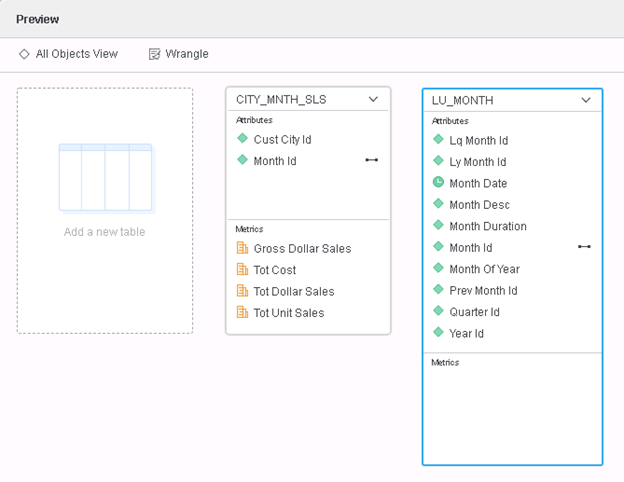
3. Define the following relationship in table LU_MONTH
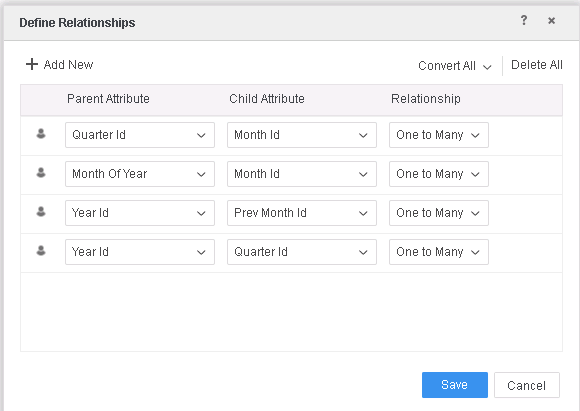
4. Save the data set and choose Access mode to be "Import as an In-memory Dataset"
5. Create a Derived Metric: M01= Sum(Cost){~+, Prev Month Id%}
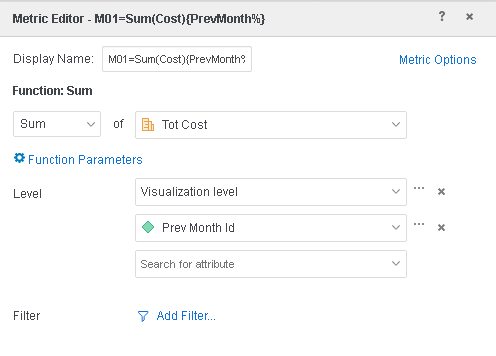
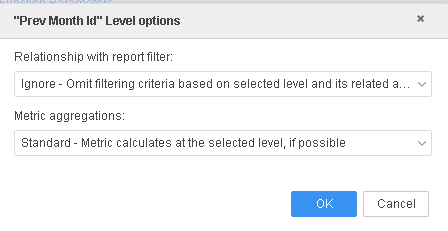
6. Create a grid Visualization and add Quarter Id, Tot Cost, M01 into template
7. Create an Advanced filter Prev Month Id in {200809} on the visualization
8. In the end of the Query Detail, notice many tables are joined and a "display having" clause is used:
...
...
select [Quarter Id]@[QUARTER_ID],
[TempTable17.Tot Cost] as [Tot Cost],
[TempTable18.M01=Sum(Cost){PrevMonth%}] as [M01=Sum(Cost){PrevMonth%}]
from MTDI01=CITY_MNTH_SLS LU_MONTH (2 tables)
with Table Join Tree: TempTable17
OuterJoin TempTable18 with output level Tuple([Quarter Id]@[QUARTER_ID])
Join [REL_YEAR_ID_QUARTER_ID] with output level Tuple([Quarter Id]@[QUARTER_ID], [Year Id]@[YEAR_ID])
Join [REL_YEAR_ID_PREV_MONTH_ID] with output level Tuple([Quarter Id]@[QUARTER_ID], [Prev Month Id]@[PREV_MONTH_ID])
display having [Prev Month Id]@[PREV_MONTH_ID] in (200809)
This is a known issue in Strategy 2019.
With a large dataset that uses Many to Many relationship, when advanced filter is applied, the Engine generated CSI with a display having clause and joined multiple relationship tables, and caused the intermediate table to have too many rows, thus lead to error or performance degrading.
This issue has been addressed in Strategy 2019 Hotfix1, Hotfix2 and Strategy 2020.
If you are upgrading Strategy 2019 Hotfix1, Hotfix2 or Strategy 2020 or above, to pick up the fix, enable project level setting "Data Engine Version" to 11. This property can only be enabled through Workstation. For more details on enabling the setting, refer to Change Data Engine Version.
After the fix, Query Detail shows simpler Table Join Tree and no "display having" clause.
...
...
select [Quarter Id]@[QUARTER_ID],
[TempTable17.Tot Cost] as [Tot Cost],
[TempTable18.M01=Sum(Cost){PrevMonth%}] as [M01=Sum(Cost){PrevMonth%}]
from MTDI01=CITY_MNTH_SLS LU_MONTH (2 tables)
with Table Join Tree: TempTable17
OuterJoin TempTable18 with output level Tuple([Quarter Id]@[QUARTER_ID])
Strategy Internal Reference number for this technical note is KB482994 and DE126752.
