EducationSoftwareStrategy.com
StrategyCommunity

Knowledge Base

Product

Community

Knowledge Base

TopicsBrowse ArticlesDeveloper Zone

Product

Download SoftwareProduct DocumentationSecurity Hub

Education

Tutorial VideosSolution GalleryEducation courses

Community

GuidelinesGrandmastersEvents
x_social-icon_white.svglinkedin_social-icon_white.svg
Strategy logoCommunity

© Strategy Inc. All Rights Reserved.

LegalTerms of UsePrivacy Policy
  1. Home
  2. Topics

KB483216: Incorrect data is displayed when using a derived metric for "Last" in a live connected dossier using a database that does not support the function "Last."


Community Admin

• Strategy


Incorrect data is displayed when using a derived Aggregate From Base metric made with the Last() function in a live connected dossier.

Starting with the release of Strategy ONE (March 2024), dossiers are also known as dashboards.
Symptoms

  • Dossier is created from a cube in Connect Live mode
  • Using a Aggregate From Base metric made with the Last function
    • Data comes from a database that does not support the SQL Last() function
  • Value shown is the next-to-last value instead of the last

Glossary

  • Connect Live - mode of data access that retrieves results directly from the data source
  • Last function  - returns the last value in a sorted set of values
  • Aggregate From Base (AFB) metric - uses the attributes on the dataset (the base) when dynamic aggregation is triggered
  • Dynamic aggregation - roll-up of metric values that occurs when an attribute is removed from a visualization or document

Steps to Reproduce

  • Open Strategy Web.
  • Create a new cube. We use Strategy Tutorial objects.
    1. Add External Data > Databases > Select Tables.
    2. Select "MNTH_CATEGORY_SLS".
    3. Save the cube in "Connect Live" mode.
  • Create a dossier.
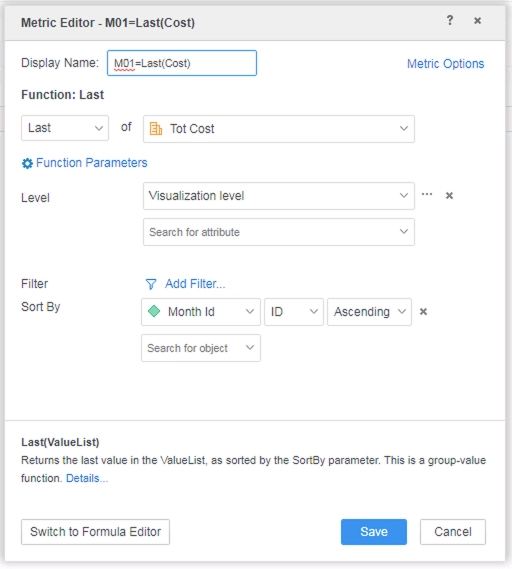
    • Create a derived metric M01=Last(Cost) with the following definition: 
ka0PW0000001JXjYAM_0EM2R000000lOlB.jpeg
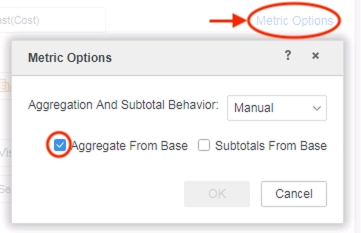
      • Open "Metric Options", change the "Aggregation and Subtotal Behavior" to Manual, and check "Aggregate From Base".
ka0PW0000001JXjYAM_0EM2R000000lO9C.jpeg
    • Add Category Id and M01=Last(Cost) to a Grid visualization.
    • To narrow down the amount of data, add Category Id to the filter panel, and set it to 1.
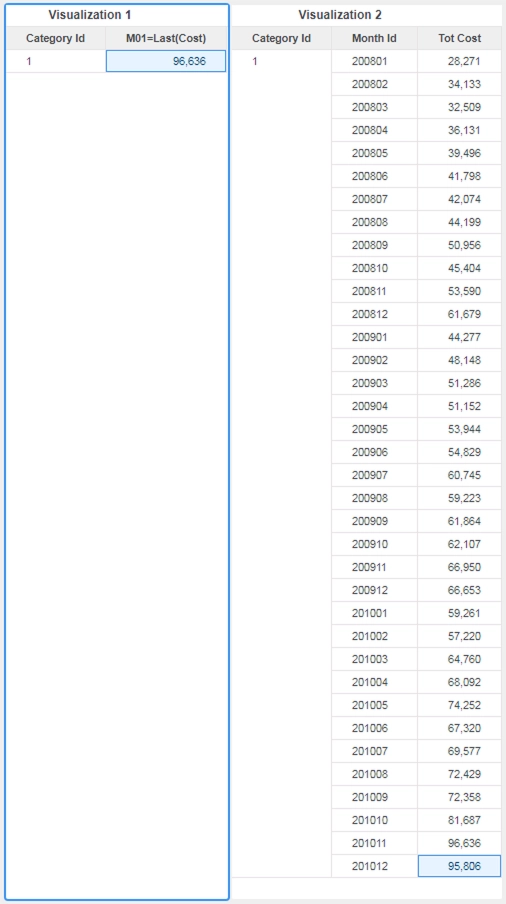
  • You can see the value for M01=Last(Cost) is incorrect by creating a grid with Category Id, Month Id, and Tot Cost. It should be 95,806, but the value of the derived AFB metric in Visualization 1 is 96,636.
ka0PW0000001JXjYAM_0EM2R000000lOlG.jpeg

Cause


In Strategy 10.11 and some earlier versions in Connect Live mode, Data Engine removes the attribute in the Sort By field during SQL execution of the Last() function (above, it is Month Id), and so generates incorrect SQL by evaluating at the wrong level.
The following SQL statement shows how Data Engine evaluates using the TOT_COST order, so it returns the highest value, which is 96,636:
select a11.CATEGORY_ID CATEGORY_ID,
Max(a11.TOT_COST) Keep (dense_rank Last order by a11.TOT_COST asc) WJXBFS1
from T177MQWH.MNTH_CATEGORY_SLS a11
where a11.CATEGORY_ID in (1)
group by a11.CATEGORY_ID
This is not an issue when using a cube made In-Memory.

Solution

  • Upgrade to Strategy 11.0 or above. We recommend the latest version.


In the new fix, the attribute that is in the Sort By field of the metric is NOT removed, and so the correct value will be returned when using the Last function in Connect Live mode. 
The correct SQL for the scenario above is:
select a11.CATEGORY_ID CATEGORY_ID,
Max(a11.TOT_COST) Keep (dense_rank Last order by a11.MONTH_ID asc) WJXBFS1
from T177MQWH.MNTH_CATEGORY_SLS a11
where a11.CATEGORY_ID in (1)
group by a11.CATEGORY_ID
Strategy Internal Reference number for this technical note is KB483216 and DE96587.


Comment

0 comments

Details

Knowledge Article

Published:

May 1, 2019

Last Updated:

March 21, 2024