EducationSoftwareStrategy.com
StrategyCommunity

Knowledge Base

Product

Community

Knowledge Base

TopicsBrowse ArticlesDeveloper Zone

Product

Download SoftwareProduct DocumentationSecurity Hub

Education

Tutorial VideosSolution GalleryEducation courses

Community

GuidelinesGrandmastersEvents
x_social-icon_white.svglinkedin_social-icon_white.svg
Strategy logoCommunity

© Strategy Inc. All Rights Reserved.

LegalTerms of UsePrivacy Policy
  1. Home
  2. Topics

KB483219: Three Attributes in a template do not join on the common table as expected.


Community Admin

• Strategy


In MicroStrategy with the Feature Flag "Defect fixes that may impact Data, SQL, CSI, and MDX" turned on, three attributes in a visualization do not join using a common fact table, resulting in incorrect data.

Starting with the release of Strategy ONE (March 2024), dossiers are also known as dashboards.
Symptoms

  • Feature flag "Defect fixes that may impact Data, SQL, MDX, CSI" is turned on.
    • In Strategy 11.0 and above, this Feature Flag is deprecated and replaced by Data Engine Version.
  • Visualization in Dossier contains 3 attributes where 1 is the parent of the other 2.
    • Dataset does not contain a table that with all 3 attributes in it, but does contains a table which has both child attributes in it.
    • Ex. Quarter Id  is the parent attribute of Month Id  and Month Desc. There is a table that contains Month Id and Month Desc, but not Quarter Id.
  • Incorrect data is returned.

Glossary

  • Feature flag - settings that allow for the distribution of new features and code to interested parties while maintaining the ability to disable and go back to old behavior without having to downgrade; by default, they are off
  • CSI - Strategy internal query language that indicates which attributes and metrics need to be brought back from the Intelligent Cube, along with any filter conditions that need to be applied

Steps to Reproduce

  • Open Strategy Web.
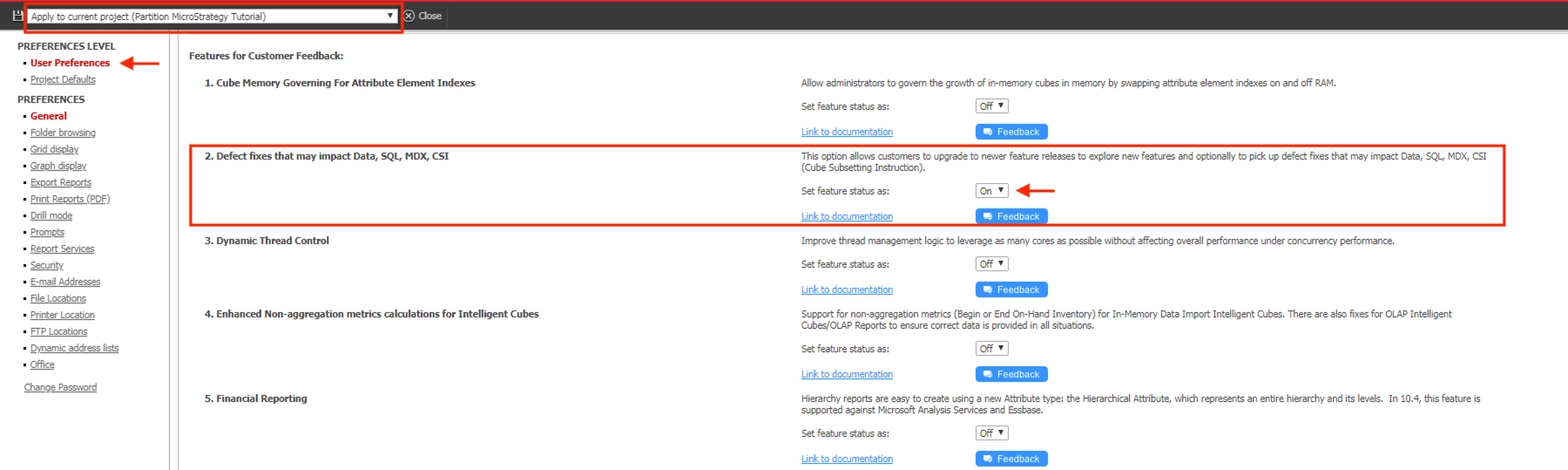
  • Turn on Feature Flag "Defects fix that may impact Data, SQL, MDX, CSI".
ka0PW0000001JXiYAM_0EM2R000000lRIW.jpeg
    • Note: Only users with certain privileges have the ability to change the Feature Flag setting. You can reach this page in Strategy Web after logging into a project and opening Preferences.
  • Create a new Intelligent Cube. We use the Build Query feature, but you can use any tables which have attributes with the relationship explained in the previous sections. Follow these steps:
    • From the project's main page: Add External Data > Databases > Select Tables.
    • Add "LU_MONTH". We will use this table to create our fact table and relationships tables.
    • Click "Prepare Data".
    • Import only the following attributes. This table will contain the child attributes of the relationships we will define later: 
      • Month Id
      • Month Desc
      • Month of Year
    • Now, let's add tables in which the relationship tables will be built from. We will use the same warehouse table and alter it, but any table which contains the parent and child attribute we desire will work. 
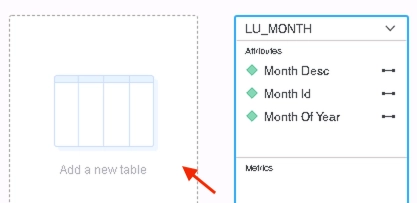
      • Next to the existing table, click "Add a new table". This allows us to add more than one table built from a query into the same cube. 
ka0PW0000001JXiYAM_0EM2R000000lbWT.jpeg
      • Databases > Build a Query.
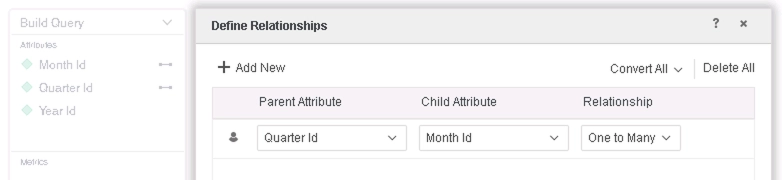
      • Select "LU_MONTH", and select the following columns, then right-click the table you just built, and select "Define Relationships" to add a new relationship: 
ka0PW0000001JXiYAM_0EM2R000000lbVf.jpeg
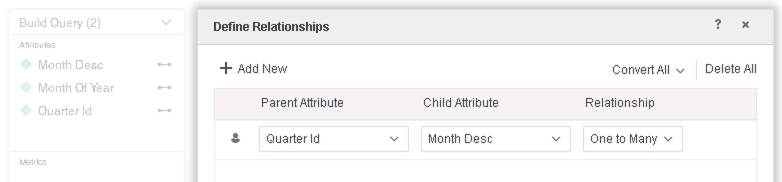
    • Add another table like above, but with the following columns and relationship: 
ka0PW0000001JXiYAM_0EM2R000000lbVp.jpeg
    • Save the cube "In-Memory" mode.
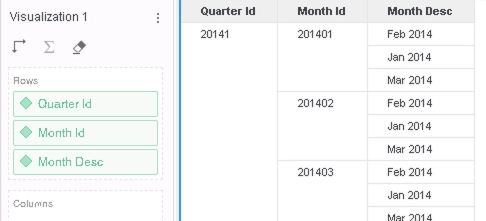
  • Create a new dossier, add Quarter Id, Month Id, and Month Desc to a grid visualization.


Note how the results do not make sense. For example, the row where Month Id="201401" has three values for Month Desc when it should only have one, "Jan 2014":
ka0PW0000001JXiYAM_0EM2R000000lbWi.jpeg

Cause


This is a known issue in Strategy 10.11 with Feature Flag "Defect fixes that may impact Data, SQL, MDX, CSI" on.

  • Data Engine previously added new optimizations to the CSI generation process. However, one of these optimizations removed a necessary join on a fact table.
    • The warehouse contains a fact table that contains all of the attributes on the visualization, but it is not used in the join path when it should be.

Below is the CSI executed for this dossier. Notice that we only joined the 2 relationship table, and lost the relation between Month_ID and Month_DESC, and that caused each Month_ID to be mapped to every Month_DESC.


Table5    [REL_QUARTER_ID_MONTH_ID]:    Quarter Id, Month Id,         RELATIONSHIP_TABLE,    ONE_TO_MANY
Table6    [REL_QUARTER_ID_MONTH_DESC]:    Quarter Id, Month Desc,         RELATIONSHIP_TABLE,    ONE_TO_MANY

select    [Month Id]@[MONTH_ID],    
[Month Desc]@[MONTH_DESC],    
[Quarter Id]@[QUARTER_ID]
from    LU_MONTH T2 T3 (3 tables)
with Table Join Tree:     [REL_QUARTER_ID_MONTH_ID]    
Join [REL_QUARTER_ID_MONTH_DESC] with output level Tuple([Month Id]@[MONTH_ID], [Month Desc]@[MONTH_DESC], [Quarter Id]@[QUARTER_ID])    


Solution

  • Upgrade to Strategy 11.0 or above. We recommend the latest version.
  • Set Data Engine Version setting to 11 or above.
    • The project level setting Data Engine Version can only be enabled through Workstation. For more details on enabling the setting, see Change Data Engine Version.


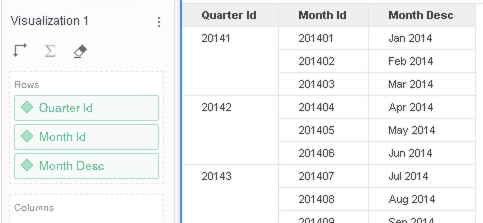
In the new fix, we do not skip the join on the fact table when optimizing CSI. This corrects the wrong CSI that was being executed and ensures that the correct data will always be returned now:
ka0PW0000001JXiYAM_0EM2R000000lbXC.jpeg

Below is the CSI executed after the fix. The black text is the same as before the fix. The red text shows the additional CSI that includes the fact table:


Table5    [REL_QUARTER_ID_MONTH_ID]:    Quarter Id, Month Id,         RELATIONSHIP_TABLE,    ONE_TO_MANY
Table6    [REL_QUARTER_ID_MONTH_DESC]:    Quarter Id, Month Desc,         RELATIONSHIP_TABLE,    ONE_TO_MANY
Table7    [F_LU_MONTHE7F9BA7416C1FFE11D0101073A856436]:    Month Of Year, Month Desc, Month Id,     Row Count - LU_MONTH,     FACT_TABLE    

select    [Month Id]@[MONTH_ID],    
[Month Desc]@[MONTH_DESC],    
[Quarter Id]@[QUARTER_ID]
from    LU_MONTH T2 T3 (3 tables)
with Table Join Tree:     [REL_QUARTER_ID_MONTH_ID]    
Join [REL_QUARTER_ID_MONTH_DESC] with output level Tuple([Month Id]@[MONTH_ID], [Month Desc]@[MONTH_DESC], [Quarter Id]@[QUARTER_ID])    
Join (Set of distinct Tuple([Month Id]@[MONTH_ID], [Month Desc]@[MONTH_DESC]) where Tuple([Month Id]@[MONTH_ID], [Month Desc]@[MONTH_DESC]) 
in [F_LU_MONTHE7F9BA7416C1FFE11D0101073A856436]) with output level Tuple([Month Id]@[MONTH_ID], [Month Desc]@[MONTH_DESC], [Quarter Id]@[QUARTER_ID])


Note: You may need to republish your cube after changing the Data Engine Version to see the correct data.
Strategy Internal Reference number for this technical note is KB483219 and DE88346.


Comment

0 comments

Details

Knowledge Article

Published:

May 1, 2019

Last Updated:

March 21, 2024