EducationSoftwareStrategy.com
StrategyCommunity

Knowledge Base

Product

Community

Knowledge Base

TopicsBrowse ArticlesDeveloper Zone

Product

Download SoftwareProduct DocumentationSecurity Hub

Education

Tutorial VideosSolution GalleryEducation courses

Community

GuidelinesGrandmastersEvents
x_social-icon_white.svglinkedin_social-icon_white.svg
Strategy logoCommunity

© Strategy Inc. All Rights Reserved.

LegalTerms of UsePrivacy Policy
  1. Home
  2. Topics

KB483224: Incorrect extreme values displayed for a bar chart.


Community Admin

• Strategy


Bars on a bar chart are too short for and leave too much white space due to miscalculation of the maximum value for the y-axis.

Starting with the release of Strategy ONE (March 2024), dossiers are also known as dashboards.
Symptoms

  • Too much blank space on Bar Chart visualization
    • Specifically, there is a large difference between the maximum value on the y-axis and the value of the largest bar.
  • Using a previously built Report as a dataset (N/A for Cube datasets)
    • Using certain objects in the Report
      • Hierarchy object, e.g. Time
      • Attribute belonging to mentioned hierarchy in the Report Filter, e.g. Quarter

Glossary

  • Extreme value - the smallest or largest number
  • Hierarchy object - a Strategy object that represents a group of related attributes that belong to the same higher-level concept
    • Ex. Quarter and Year both describe the idea of time, so can be combined under the Time hierarchy. In the Strategy Tutorial project, Time is a user-defined hierarchy.

Steps to Reproduce

  1. Create a new report using the "Blank Report" template. We recommend doing this in Strategy Web.
  2. Add the following objects (from Strategy Tutorial) to the grid:
    1. Time (under Hierarchies)
    2. Category (under Attributes > Products)
    3. Cost (under Metrics > Sales Metrics)
  3. Apply a Report Filter using an attribute from the Time hierarchy.
    1. Add Quarter (under Attributes > Time) to the "Report Filter" section
    2. Select the first four values. You can select any of the values, but you must select at least 2.
  4. Run the report, under "Data" on the toolbar, click "Show Totals".
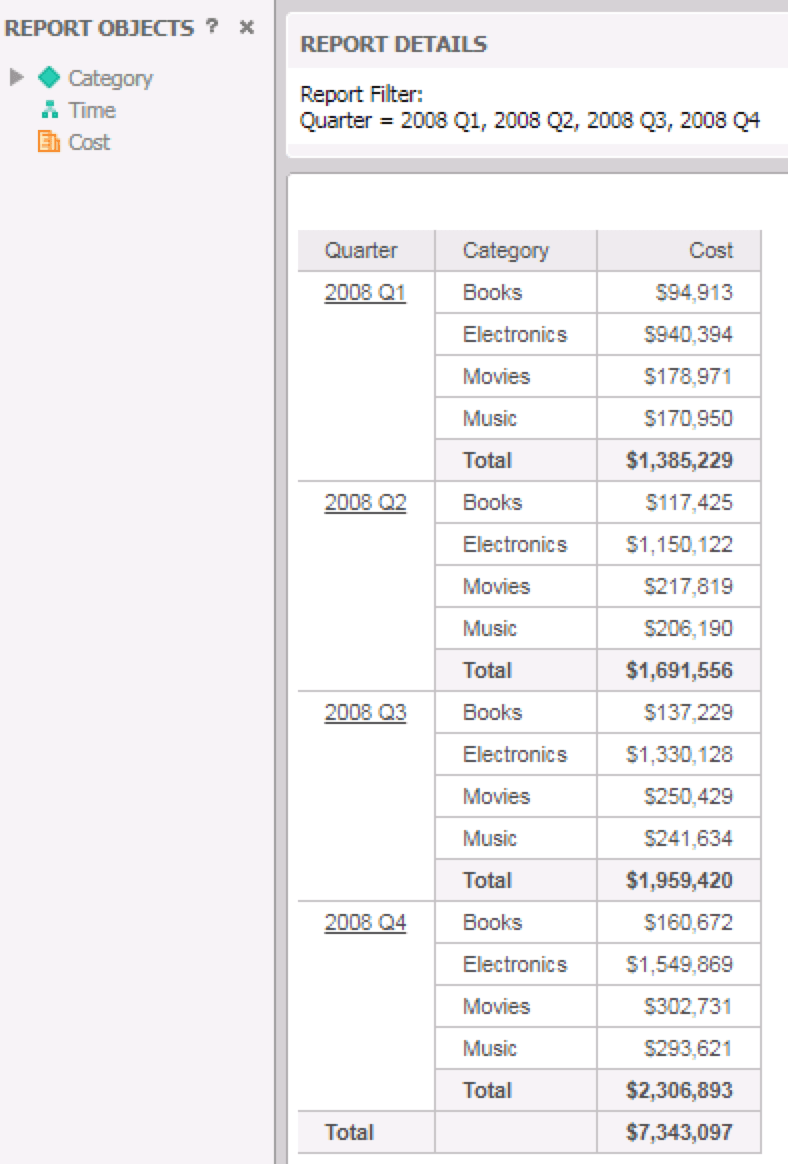
  5. Save the report. At this point, the grid should look like this:
ka0PW0000001JXMYA2_0EM2R000000hL3B.jpeg
  1. Create a new dossier.
  2. Click "Existing Dataset" to import the report you just created.
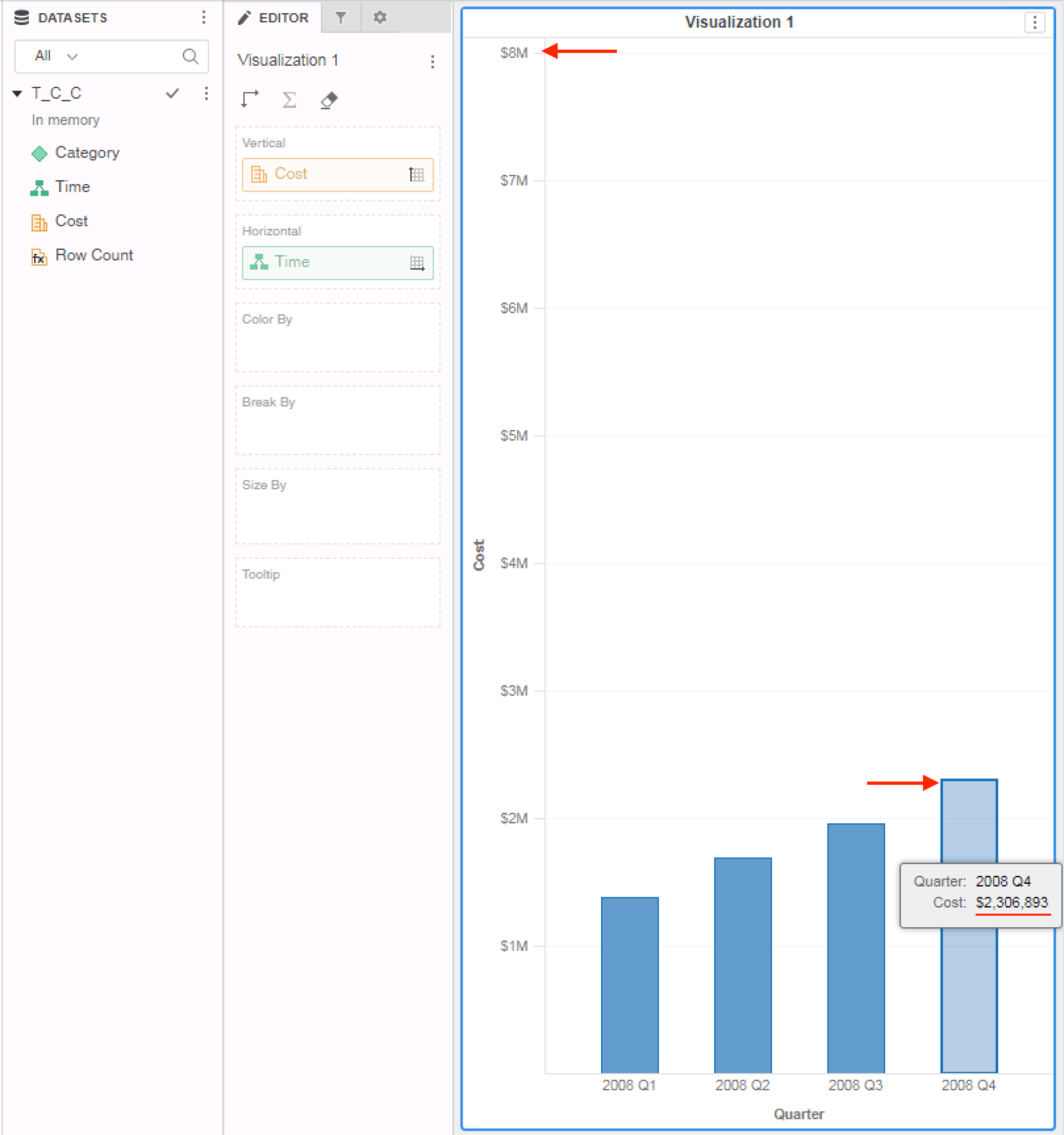
  3. Add a Bar Chart visualization with Category on the "Vertical" and Time on the "Horizontal".


Results:

ka0PW0000001JXMYA2_0EM2R000000hL4d.jpeg

Note: The y-axis has a maximum value of $8M, but the value of the largest bar is much less, around $2.5M. This results in a lot of white space on the chart and small bars.
 

Cause


This is a known defect in Strategy 10.11 and previous versions.

  • Dimensionality of the metric is calculated incorrectly at the hierarchy level.
    • It should be calculated at the relevant attribute's level (in this case, Quarter)
  • Since it's calculated at the hierarchy level, the total is used instead of the largest bar value to as the maximum value of the y-axis (in this case, the total $7,343097 is being used)

Solution

  • Upgrade to Strategy 11.0 or above. We recommend the latest version.
  • Set Data Engine Version setting to 11.
    • The project level setting Data Engine Version can only be enabled through Workstation. For more details on enabling the setting, see Change Data Engine Version.


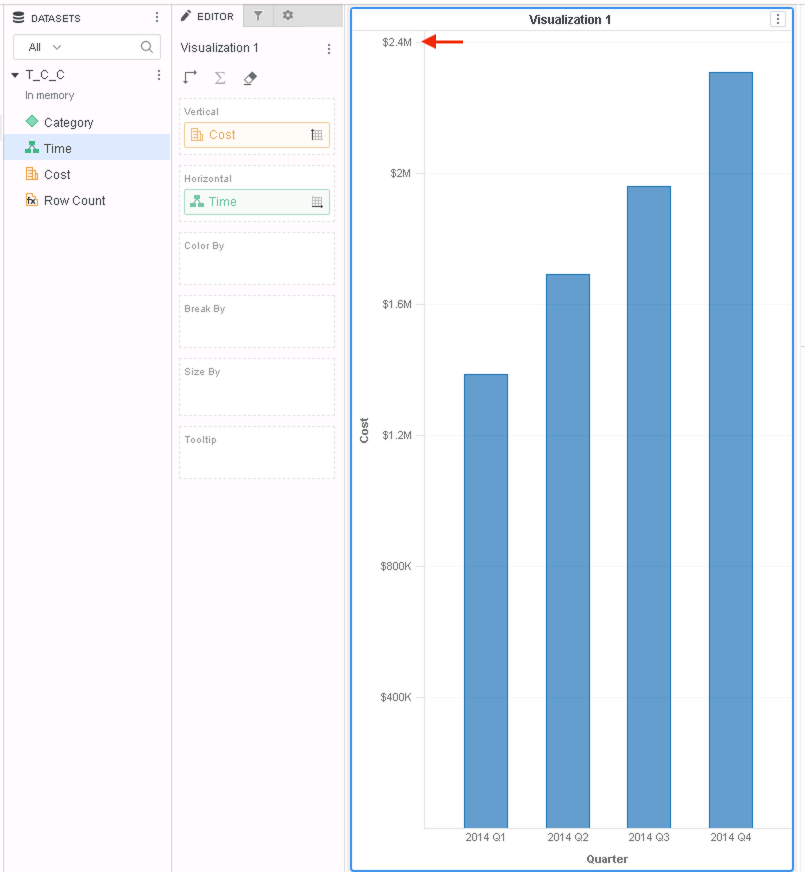
In the new fix, the relevant attribute in the hierarchy is used to calculate the range of values for the y-axis for bar charts. Therefore, there should be less white space on the bar chart and less space between the maximum value of the y-axis and the largest bar.
Results after fix:
ka0PW0000001JXMYA2_0EM2R000000hL4i.jpeg

Note: The after-results were created with Strategy Tutorial objects on a more recent version of Strategy, hence why the year is displayed at 2014. However, the numeric values and data are the same.


Comment

0 comments

Details

Knowledge Article

Published:

May 1, 2019

Last Updated:

March 21, 2024