EducationSoftwareStrategy.com
StrategyCommunity

Knowledge Base

Product

Community

Knowledge Base

TopicsBrowse ArticlesDeveloper Zone

Product

Download SoftwareProduct DocumentationSecurity Hub

Education

Tutorial VideosSolution GalleryEducation courses

Community

GuidelinesGrandmastersEvents
x_social-icon_white.svglinkedin_social-icon_white.svg
Strategy logoCommunity

© Strategy Inc. All Rights Reserved.

LegalTerms of UsePrivacy Policy
  1. Home
  2. Topics

KB483236: Metric defined on RowCount shows incorrect value


Community Admin

• Strategy


On a dossier that uses a Standard Report as a dataset, a Percent to Total metric defined on Row Count returns incorrect values when placed on a visualization with a Derived Attribute.

Starting with the release of Strategy ONE (March 2024), dossiers are also known as dashboards.

Symptoms

  • Using a Standard Report as a dataset in a dossier
  • Visualization contains Derived Attribute and Percent to Total metric defined on Row Count metric
    • Percent to Total metric returns incorrect values

Glossary

  • Derived Attribute

Steps to Reproduce

  • Open Strategy Web. We use Strategy Tutorial objects.
  • Create a new Report R1 with the Subcategory and Item attributes and the Profit metric.
  • Create a new dossier, and add the report made in step 2 as a dataset.
  • Create a new Derived Attribute using Subcategory:
    1.  Any Derived Attribute will yield the same effect. We create Subcategory - Trimmed with the following formula: 

      Yes
      IDZipCode10880228802CSI before fix

      
      select [Call Ctr Id]@[CALL_CTR_ID],
      sum([[F_CITY_CTR_SLS47D2F7934AA01B2579FF23BD2359A940].Tot Cost])@{[Call Ctr Id]} as [Tot Cost]
      from DS2.CITY_CTR_SLS CITY_MNTH_SLS CITY_SUBCATEG_SLS (3 tables)
      with Table Join Tree: [F_CITY_CTR_SLS47D2F7934AA01B2579FF23BD2359A940]
      <[[F_CITY_CTR_SLS47D2F7934AA01B2579FF23BD2359A940].Tot Cost] > 1000000>

      CSI after fix
      
      select [Call Ctr Id]@[CALL_CTR_ID],    
      sum([[F_CITY_CTR_SLS47D2F7934AA01B2579FF23BD2359A940].Tot Cost])@{[Call Ctr Id]} as [Tot Cost]
      from DS2.CITY_CTR_SLS CITY_MNTH_SLS CITY_SUBCATEG_SLS (3 tables)
      with Table Join Tree: [F_CITY_CTR_SLS47D2F7934AA01B2579FF23BD2359A940]
      having [Tot Cost] > 1000000.0

      CategoryCountryProfitRevenueBooksUnited States453652ElectronicsCanada3547ElectronicsUnited States634245MusicCanada73134MusicUnited States654326LTrim([Subcategory@DESC])[Row Count]/Sum([Row Count])


  • Add Subcategory - Trimmed and Row Count to a Grid visualization.
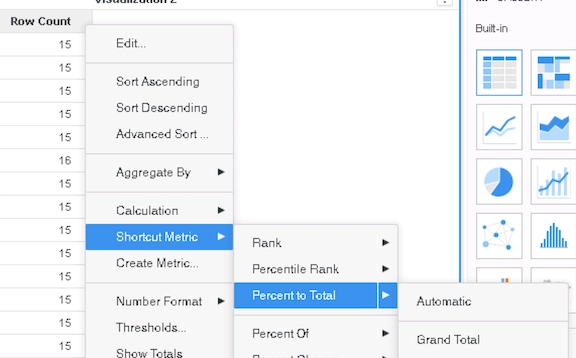
  • Create a Percent to Total metric via the "Shortcut Metric" option using Row Count from R1. Select "Automatic" or "Grand Total": 
ka0PW0000001JY9YAM_0EM2R000000lb2x.jpeg
    • This metric can also be made manually with the formula:

      Yes
      IDZipCode10880228802CSI before fix

      
      select [Call Ctr Id]@[CALL_CTR_ID],
      sum([[F_CITY_CTR_SLS47D2F7934AA01B2579FF23BD2359A940].Tot Cost])@{[Call Ctr Id]} as [Tot Cost]
      from DS2.CITY_CTR_SLS CITY_MNTH_SLS CITY_SUBCATEG_SLS (3 tables)
      with Table Join Tree: [F_CITY_CTR_SLS47D2F7934AA01B2579FF23BD2359A940]
      <[[F_CITY_CTR_SLS47D2F7934AA01B2579FF23BD2359A940].Tot Cost] > 1000000>

      CSI after fix
      
      select [Call Ctr Id]@[CALL_CTR_ID],    
      sum([[F_CITY_CTR_SLS47D2F7934AA01B2579FF23BD2359A940].Tot Cost])@{[Call Ctr Id]} as [Tot Cost]
      from DS2.CITY_CTR_SLS CITY_MNTH_SLS CITY_SUBCATEG_SLS (3 tables)
      with Table Join Tree: [F_CITY_CTR_SLS47D2F7934AA01B2579FF23BD2359A940]
      having [Tot Cost] > 1000000.0

      CategoryCountryProfitRevenueBooksUnited States453652ElectronicsCanada3547ElectronicsUnited States634245MusicCanada73134MusicUnited States654326LTrim([Subcategory@DESC])[Row Count]/Sum([Row Count])


See how the Percent to Total metric returns unexpected values that do not add up to 100%: 
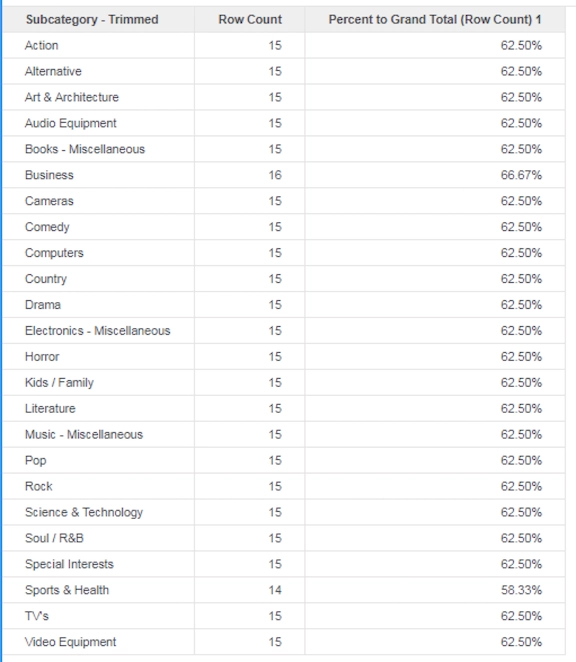
ka0PW0000001JY9YAM_0EM2R000000lb32.jpeg


Cause


This is a known regression issue in Strategy 10.11 and some earlier versions.

  • Data Engine had changed how it calculates derived metrics made with the Row Count metric.
    • When upgrading from previous versions of Strategy, this changed previously correct data to be incorrect.

Solution

  • Upgrade to Strategy 11.0 or above. We recommend the latest version.


In the new fix, Data Blending Engine fixes its calculation of derived metrics on Row Count. The example created with Strategy Tutorial objects will now return:
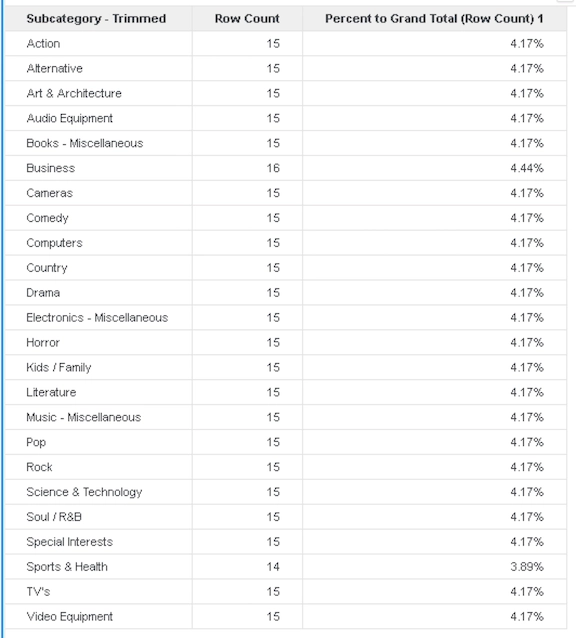
ka0PW0000001JY9YAM_0EM2R000000lb37.jpeg

Strategy Internal Reference number for this technical note is KB483236 and DE94920.


Comment

0 comments

Details

Knowledge Article

Published:

May 1, 2019

Last Updated:

March 21, 2024