Starting with the release of Strategy ONE (March 2024), dossiers are also known as dashboards.
This case is built upon Tutorial project.
1. Create a New Dossier. In DATASETS panel, Click “Existing Objects”. Choose project attribute “Category” and project Metric “Revenue”.
2. Create a new Template with Category and Revenue.
3. For Category, group two Attribute elements. Element Group “Category (Group)” is created.
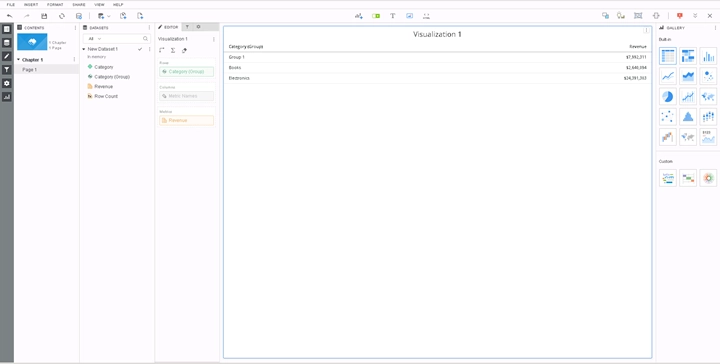
4. Create Derived Metric “RunningSum (Revenue)”. Use OLAP Function “RunningSum” as the Metric Function.
Metric Formula: RunningSum<BreakBy={@auto}, SortBy=(@auto)>(Revenue)
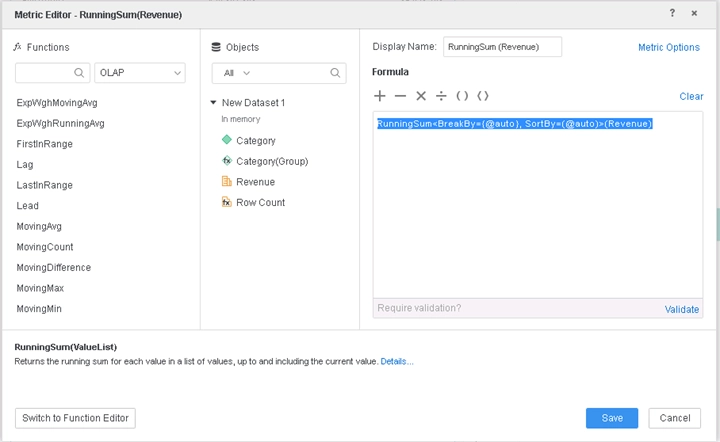
5. Put Category (Group), Revenue, and RunningSum (Revenue) on the Template. For Grid Visualization, RunningSum (Revenue) is calculated correctly, but it calculates incorrectly on the Bar Chart.
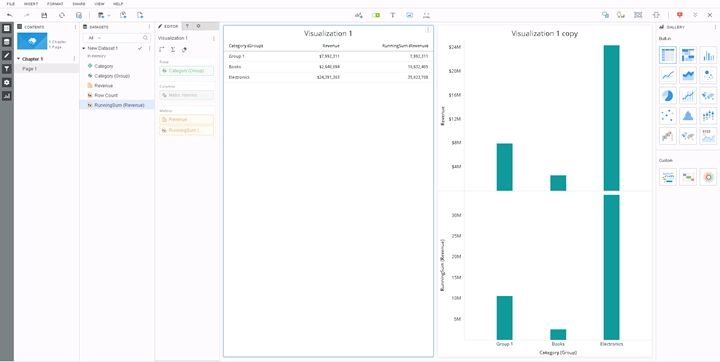
This is a known defect before Strategy 11.0. When the Element Group is on the Template, Derived Metric using Element Group as the OLAP Function Sort By, Derived Metric is calculated incorrectly for all visualizations other than Grid visualizations. This is because Engine did not process Element Group in the Metric Sort by and causes computational problems.
To resolve this defect, upgrade to Strategy 2019 or above. In the new fix, Element Group is handled correctly in the Metric Sort by. As a result, the Metric is now computed correctly.
When upgrading to Strategy 2019 or above, enable the project level setting Data Engine Version to 11. This property can only be enabled through Workstation. For more details on enabling the setting, see Change Data Engine Version .
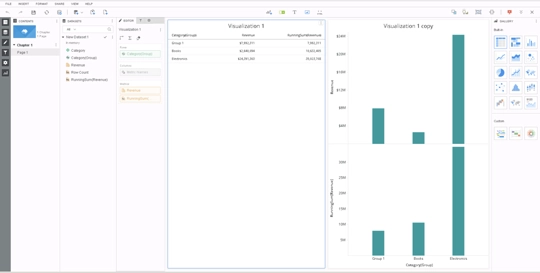
After the fix is apply, bar chart will be calculated correctly as below.
Strategy Internal Reference number for this technical note is KB483239 and DE102071.
